Prevent people from downloading video - Brizy

Hi,
I'll like to know if there's a way to prevent people from downloading my videos from my page. I aim sharing the video from PCloud.
*Please don't make the message public. Thanks!
-

Hi Juan,
You have mentioned that you are sharing your videos from pCloud. You can set a pCloud video to be preview only and prevent it from being downloaded.
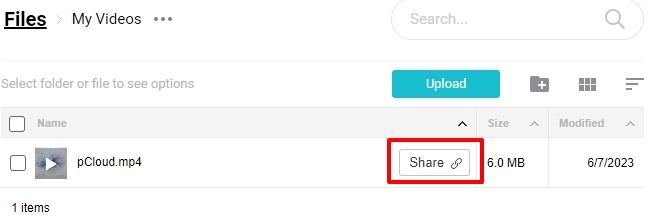
Please sign to your pCloud Dashboard and next to your video, click on the 'Share' option.
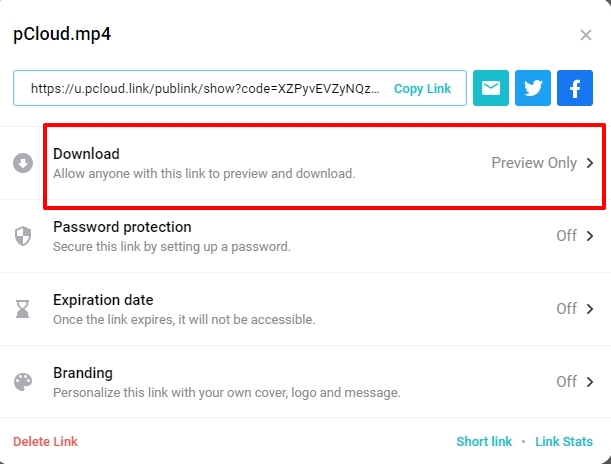
In the screen that opens up, next to 'Download', select the 'Preview Only' option and save your work. For more detailed instructions, please watch this video https://jmp.sh/Z4CS9Pbz
 0
0 -
H George,
Thank you for your fast reply. When I add the video this way it is not playing on my site. The only way it plays is adding the link from the PUBLIC folder. In the Public folders I don't see these sharing options, they just show you the link.
0 -
Hi Juan,
You are right. I could not embed the video from pCloud using Brizy video element either. I tried a popular Video player plugin Presto Player This player also could not play the pCloud video. (I tried it with the Download option enabled)
I tried another Media Asset Management service https://publit.io/ Videos uploaded here can be embedded using both Brizy and the Presto player. Please see this page for instance https://brizytest.online/external-video/ Video download can be disabled in Publit.io as well. Do you think migrating videos from pCloud to another service like https://publit.io/ is an option?
You could also check if other video player plugins support pCloud embed.
0
Please sign in to leave a comment.
Comments
3 comments