Brizy 2.4.20 update

This brizy update has disrupted two of my website currently built with brizy, please how can this be sorted out quickly. I need progress on this ASAP
-

Hi Chima,
Please ensure that you have these Brizy and Brizy Pro versions.
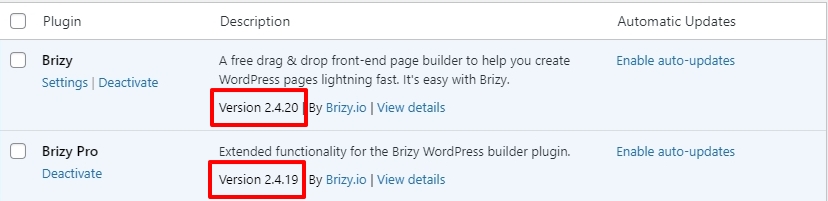
Can you please share the URLs of the projects which are affected by the most recent Brizy updates?
0 -
the URL to the last website was updated and we had to return it back to the previous one
0 -
these URLS both have been updated but yet i keep having these issues, my site is broken.
0 -
I need urgent help. This is affecting our business. I want this matter resolved quickly
0 -
Hi Kc George,
I am still waiting for your feedback. Please help attend to these issue.
0 -
Hi Chima,
The URL https://chamuze.com/ seems to load fine at my end. Please see this screenshot https://jmp.sh/BnDx6PU2
At https://mygracetograce.com/ 4 Brizy CSS files and 2 Brizy JavaScript files are missing and shows 404 File not found error in the browser console. These files are required to render the website correctly. Please have a look at this screenshot https://jmp.sh/RJ9q7TJa
These are the missing files
- https://mygracetograce.com/wp-content/plugins/brizy/public/editor-build/255-wp/editor/css/preview.css?ver=2.4.18
- https://mygracetograce.com/wp-content/plugins/brizy/public/editor-build/255-wp/editor/css/group-2_3.css?ver=2.4.18
- https://mygracetograce.com/wp-content/plugins/brizy/public/editor-build/255-wp/editor/js/group-2_3.js?ver=2.4.18
- https://mygracetograce.com/wp-content/plugins/brizy/public/editor-build/255-wp/editor/js/preview.js?ver=2.4.18
- https://mygracetograce.com/wp-content/plugins/brizy/public/editor-build/255-wp/editor/css/group-2_3.css?ver=2.4.18
- https://mygracetograce.com/wp-content/plugins/brizy/public/editor-build/255-wp/editor/css/preview.css?ver=2.4.18
Can you please check why these files are missing on your webserver?
Please also share with us a screenshot of the Brizy and Brizy Pro version numbers
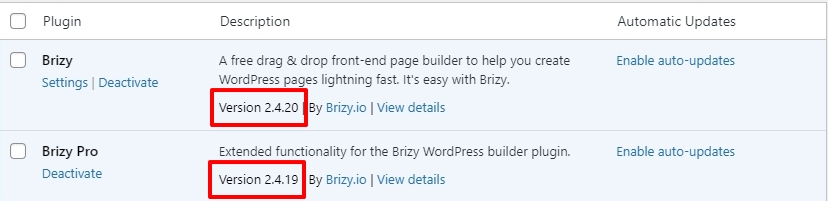 0
0 -
Thank you for your feedback. We really do not know why the above files are missing. Can you advise on what we need to do to restore the missing files because we did not touch them and they were there
0 -

Hi Chima,
Thank you for the update.
To address the issue of the missing files, I kindly suggest uninstalling and then reinstalling both Brizy and Brizy Pro.
Please try this and let me know how it goes.
Best regards,
Ariel H.0 -
Hi, thank you i have tried it and it works.
Thank you.
Futhermore, i have been trying to get the toggle up arrow button that auto scrolls up when you click but i cant get a way for this, can you help?
0 -
Hi Chima,
Are you asking about the 'Scroll To Top' icon which helps in scrolling to the top of a page? Please have a look at this video Brizy scroll to top icon
0 -
Yes
0 -

Hi
Sorry to jump in on this thread but I've installed the updates 2.4.20 and 2.419 pro and have been having problems with my site too.
I haven't been able to get past the spinning icon when trying to edit with Brizy.
I have taken the plugins back to 2.4.18 and 2.4.17 pro and the site works.
Only other plugin is the Page Builder Framework Premium Addon which doesn't seem to make a difference if it's active or not
Ian
0 -
Hi Ian,
Thank you for staying in touch.
Based on our recent experiences, we have come across a similar issue on websites that use Jetpack and GoDaddy CDN. If you are using these services, I recommend trying the steps outlined by my colleague in this support forum thread: https://support.brizy.io/hc/en-us/community/posts/15946039634449
Please follow the instructions provided in the thread and see if they resolve the issue for you.
If you have any further questions or encounter any difficulties, please feel free to reach out to us.
Best regards,
Ariel H.0 -
Hi Ariel Thanks for your reply. I’m using 20i.com and their cdn which is Stackcache. I guess that might be using go daddy at some stage. Is this something that is likely to be fixed in future updates? Thanks again Ian
0 -
Hi Ian,
I have replied to you here https://support.brizy.io/hc/en-us/community/posts/16004542482321
0 -
Hello
we have noticed that the menu of the site displays each time the site (www.chamuze.com) is refreshed from the home page. This is a very unprofessional look and it affects the customer experience. Can you please advise what we need to do stop this from happening.
I have attached a screenshot of the problem for your necessary action.
Thank you.
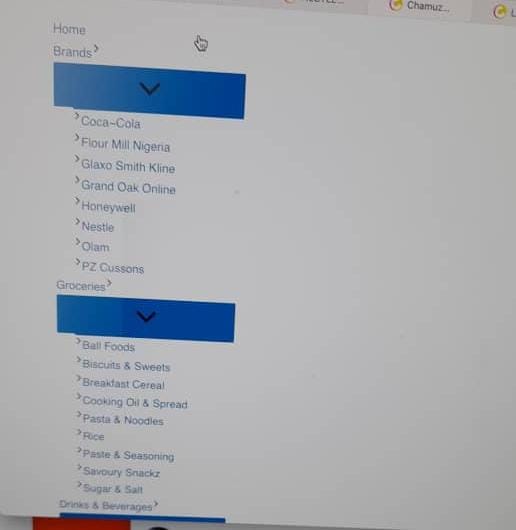 0
0 -
Hi Chima,
Thank you for contacting us.
I checked your site but couldn't reproduce the issue: https://prnt.sc/C42uAc91SRvk
Have you tried clearing your browser cache or using another browser?
Let me know if this helps or if you need more assistance.
Best regards,
Ariel H.0 -
Hi Ariel,
I have done as you have recommended. But the problem still persists. The problem is obvious on desktop and not mobile through. All you have too do is refresh the home page and you will see the spread out of the menu.
Do let me k now if you have found it.
thanks
Chima
0 -
Hi Chima,
Please provide us temporary access to your WP Admin credentials, so we can further check the issue. Add us as a user to your WordPress Dashboard and send the following details to: communitysupport@brizy.io
Community Post link: https://support.brizy.io/hc/en-us/community/posts/15923951281809
WordPress Admin URL:
Username:
Password:Please make a full backup of your website as a precaution.
I am looking forward to your response.
Best regards,
Ariel H.0
Please sign in to leave a comment.
Comments
21 comments