Can't Insert Image

Hey team, I can't insert an image, as every time I pick one from the media gallery and click "Select" nothing gets uploaded.
I shoot a quick video as it's easier to grasp that way:
https://www.loom.com/share/1d2b6dfeb2a14ab090f5f2da2460d8c4
Thank you!
-

Hi Matias,
Thank you for contacting us.
Please try the following steps and see if this will help:
- Please ensure that you are already using the most recent versions of Brizy and Brizy Pro - https://prnt.sc/0wmgAnPx7YKh
- Also, check that your WordPress Address and Site Address match - https://prnt.sc/rmdktYB5_71J
- If the above didn't help, you can isolate the issue by deactivating one plugin at a time and checking if the problem resolves.
- Temporarily switch to another theme and check if the issue goes away.
If all the above didn't help, please provide us temporary access to your WP Admin credentials, so we can further check the issue. Add us as a user to your WordPress Dashboard and send the following details to: communitysupport@brizy.io
Community Post link: https://support.brizy.io/hc/en-us/community/posts/15898511442705
WordPress Admin URL:
Username:
Password:Please make a full backup of your website as a precaution.
I am looking forward to your response.
Best regards,
Ariel H.0 -

I'm having the same problem. It started yesterday afternoon. I have sent an email in to support but in case this helps others:
- I am running the latest versions of Brizy and Brizy Pro
- My WordPress address and site address match
- Deactivating Brizy Pro doesn't help
- I deleted and deactivated the theme Blocksy and activated the Astra theme. This did not fix it.
- Deactivating Brizy basic plugin does help. I can insert an image using Gutenberg.
- I also reached out to the host to verify it wasn't an issue there and they said "the site shows the default page of WordPress and the IP on the page is different than the default one" which didn't make much sense to me.
0 -

Hi Jennifer,
Thanks a lot for reaching out to us.
This is something we would like to check from your dashboard, so I have created a private ticket for this issue, and you will receive a notification shortly.
Please reply to that with site admin login credentials (Username, password, and Login URL) so that we can inspect the issue.
Regards, Basharat
0 -
Hi Matias,
Thank you for your patience.
This is to confirm that we have received your WP Admin login details. I have created a separate private ticket for you to avoid confusion.
You can expect to receive a notification regarding this new ticket shortly.
Best regards,
Ariel H.0 -
Hey Ariel, I deactivated and re-activated every single plugin and found out that Jetpack is the culprit. Too bad because it's a helpful plugin. I'm assuming it might be related to their image optimization features.
0 -

Hi Matias,
In your WordPress Dashboard under Jetpack - Boost, please check if you have enabled the option "Image CDN". https://jmp.sh/FUSoE1ZP If you disable this option, you should be able to use Jetpack along with Brizy.
1 -
Hi Jennifer,
Looks like image uploads are being blocked due to Mixed Content issue on your website. https://jmp.sh/IIV6zOWV
Mixed Content: The page at 'https://cbt.ef9.myftpupload.com/wp-admin/post.php?action=in-front-editor&post=741' was loaded over HTTPS, but requested an insecure favicon 'http://cbt.ef9.myftpupload.com/wp-content/uploads/2023/05/cropped-Reveal-Icon-192x192.png'. This request has been blocked; the content must be served over HTTPS.
This means when initial HTML is loaded over a secure HTTPS connection, other resources (such as images, videos, stylesheets, scripts) are loaded over an insecure HTTP connection. Images are being blocked on your website due to mixed content.
Please have a look at this article for ideas on fixing this error. How to Quickly Fix Mixed Content Warnings You can also take the help of your hosting company to fix this issue. Once you fix this issue, please check if you are able to upload images.
After fixing the mixed content issue, if you are unable to upload images, please get back to us; we will take another look at your project.
0 -
Hey Kc George. That did the trick. Thank you!
0 -
It’s still not working for me. What should I do?
Jennifer Herring0 -
Hi Jennifer,
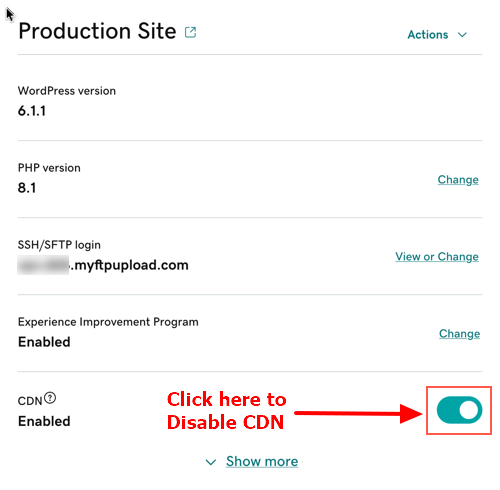
The most recent Brizy versions have an incompatibility issue with the GoDaddy CDN. Can you please disable the CDN option from your GoDaddy account? Please follow instructions in this article. Enable or disable my CDN
 0
0 -
Thank you so much. That worked.
0

Please sign in to leave a comment.
Comments
11 comments