Woocommerce: How to disable Brizy woocom sidebar?

When using Woocommerce with Brizy WP plugin and Cart element is pasted elsewhere (to header for example), than clicking this Cart icon opens a sidebar with cart content. The position of a sidebar can be set to left, right, centre, but that is all. I do not think it is possible to change colors (black buttons). Yet the most important thing is: how to disable it, so visitor is redirected to the Cart page?
I wrote an action, but it is not working properly. Do you have any hint please? Maybe I missed some secret button/setting to disable this brz-woocart__sidebar?
Thank you,
Mark
-

Hi Marek,
You are right; the buttons in the side cart cannot be customized.
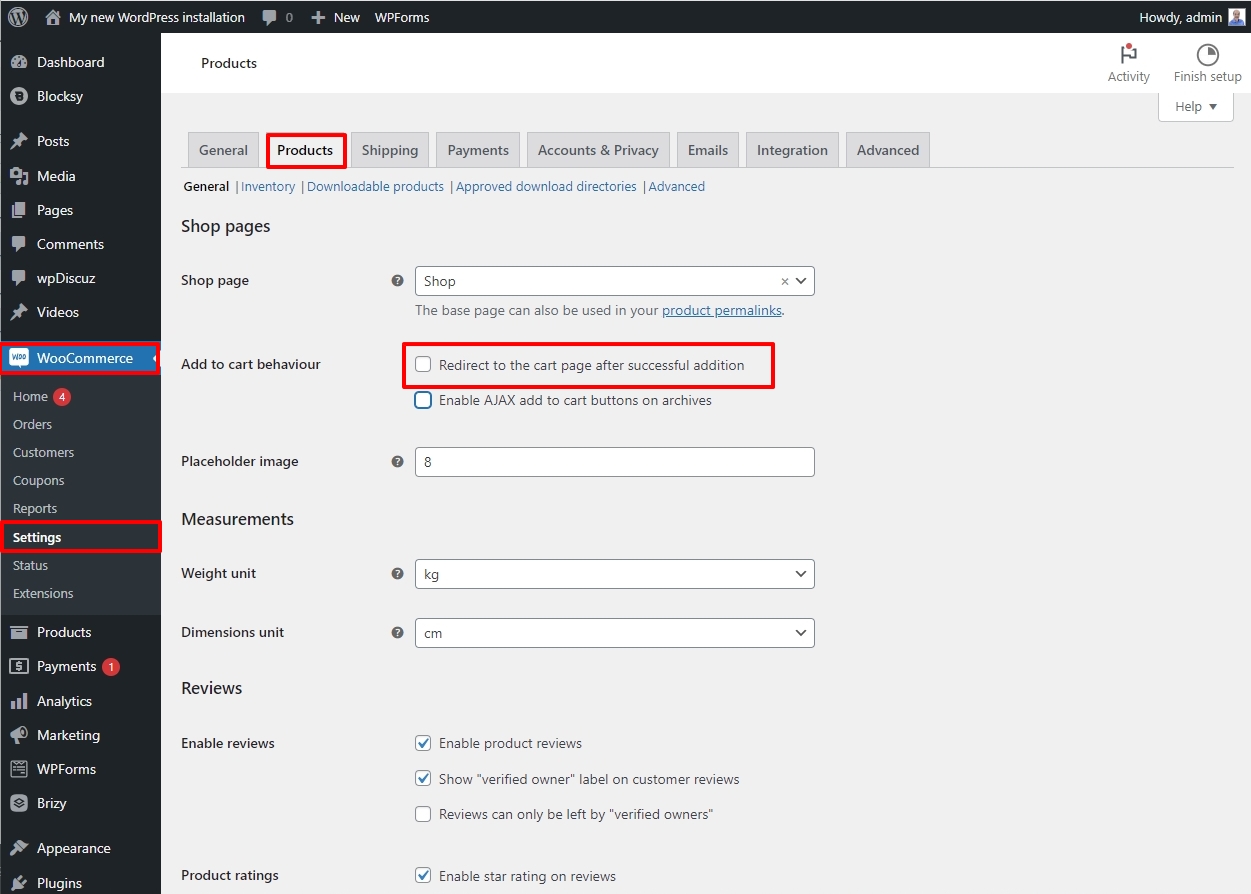
To redirect users to the Cart page when adding a product to the Cart, in your WordPress Dashboard under WooCommerce - Settings - Products tab please enable the option" Redirect to the cart page after successful addition" option. https://jmp.sh/sHUwr5mH
 0
0 -
George, thank you for your reply, however, you are addressing different question, than I asked.
I asked HOW CAN I GET RID OFF the sidebar completly? I want to disabble it. I do not want it to exist, to be displayed. AND – after I click on the little Cart icon /which is Brizy element), I do not want this sidecart to be opened and instead I want visitor to be redirected to the cart page... So this has nothing to do with redirtecting after item is added to a cart, no. this is about clicking the little Cart icon, when products are already in cart...
I hope I made it clear now. Thank you for hints.
PS – this is probably only possible with PHP snippet, what I was asking for, as I did not find any setting to disable this Brizy woocom sidebar /which is really very innoying and unfortunate).
PPS – it is also a problem with language – how/where to translate those Brizy Woocom sidebar buttons. Probably with Loco translate it could be done /I can do poedit and so on...), yet I find this very bad and user/developer unfriendly, that it is not possible /probably) to turn it off completly in a simple way.
0 -
PPS: here is a script, that does almost what I want, BUT – the sidebar opens for a while, half of a second and only after that visitor is redirected... There must be a better way to disable/remove it completly... Can you give me advice with that please? Thank you for your time and support.
function redirect_to_cart_page() {
?>
<script type="text/javascript">
(function($) {
$(document).on("click", ".brz-woocart", function(e) {
e.stopPropagation();
e.preventDefault();
window.location.href = "https://eshop.ondrejsuchan.cz/nakupni-kosik/";
});
})(jQuery);
</script>
<?php
}
add_action('wp_footer', 'redirect_to_cart_page');0 -

Hi Marek,
Please try using this custom CSS to hide it.
.brz-woocart__sidebar{
    display:none;
}
To add this CSS, you can go to "Appearance" in the WordPress admin dashboard, then select "Customize", and navigate to the "Additional CSS" section. Paste the code into the editor provided.
Please try this and let me know how it goes.
Best regards,
Ariel H.0 -
Hi Ariel,
OMG :D You always hit me with something so obviously simple :))) Thank you very much.
For reference and anyone who will be interested:
CSS hides the Brizy Woocom sidebar. AND with addiction of my script (pasted to PHP – I use code snippets plugin for that instead of Child theme) the sidebar gets hidden and visitor is redirected to Cart page. Here is my php script (I think there may be possibility to replace the url of the Cart page of some attribute like “wc_get_cart_url()“ but I am not sure about that:
function redirect_to_cart_page() {
?>
<script type="text/javascript">
(function($) {
$(document).on("click", ".brz-woocart", function(e) {
e.preventDefault();
window.location.href = "https://herepasteyourcartaddress/";
});
})(jQuery);
</script>
<?php
}
add_action('wp_footer', 'redirect_to_cart_page');0
Please sign in to leave a comment.
Comments
5 comments