Blog Archive

Hello support,
I am making a website and i am really struggling to create a blog archive.
What have i done:
* i made a brizy template here are the settings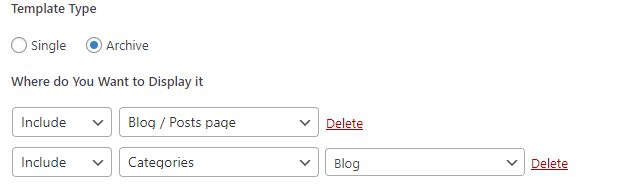
* Under settings ---> reading i have set the post page to my blog page
* I have added the blog page under pages
* I have added it under my menu
So i dont understand why when i click on blog in my menu i see a blank page.
Any help is appreciated
-

Hi Mohamed,
Once you have added the above Display Condition and published the blog template, did you click on 'Edit with Brizy' and design your Brizy blog page? If you haven't, please click on the button 'Edit with Brizy' and design your blog page following this process.
- Add the global header
- Add a blank block
- Add the global footer
In the blank block, drag and drop the Archive element from the Elements panel and stylize it. Please watch this video for more details. https://jmp.sh/OQvVwizd
Please let us know if you had already done this. If you have, please also share your website URL so that we can check.
0 -
Thanks for your reply sir,
I had already done those steps.I think i can explain the problem better with this video.
As you can see the page is there and build. However if i want to preview it, it gives me a blank page.
0 -
Hi Mohamed,
The blog page should ideally work fine if you have done everything you have mentioned above. We would like to take a look at your project to troubleshoot this issue for you. If you need help with this, please add me as a user to your WordPress Dashboard and send the following details to our email: communitysupport@brizy.io
- Community Post link: https://support.brizy.io/hc/en-us/community/posts/15750404936209
- WordPress Admin URL:
- Username
- Password
Please let us know here when you send us the email.
0 -
Hi Mohamed,
For the Brizy Blog Template to work, the page https://tuinzwembadplezier.nl/blog/ should be a Gutenberg page (and not a Brizy page). On your project, however, this page was edited using Brizy and had a blank design.
I deleted the above page, recreated it and set it as your blog page. Now your Brizy Blog design is visible in the frontend.
0 -
Thank you!
0
Please sign in to leave a comment.
Comments
5 comments