Switch from custom to subdomain not working, nor is logging out of account

Hi, I'm trying to change which of my projects gets to use my 1 custom domain included with my account, but its not switching. Also logging out doesn't work at all. Please see 2 min. video here
https://www.berrycast.com/conversations/0bd3827d-8740-5c33-b312-70f10b3d6b90
-

Hi Justin,
To remove the custom domain from your Growth Mason project,
- Select the 'Publish' option from the project thumbnail
- Choose the 'Custom Domain' option
- Select 'Delete Domain' in the screen that opens up
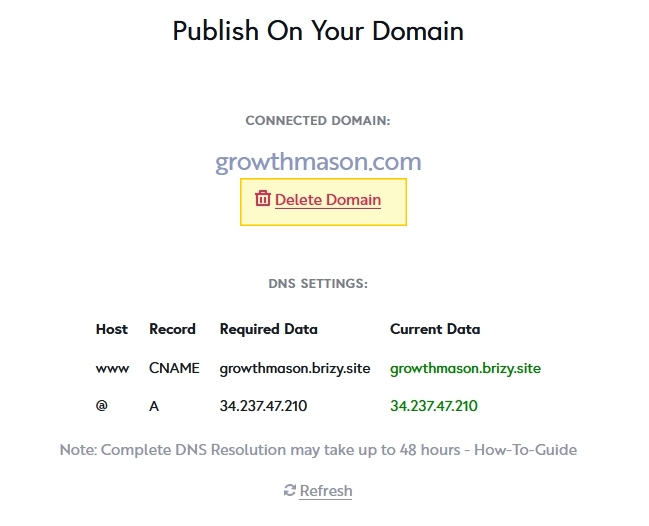
Please try clearing the cached files and images in your browser and check if that helps in logging out from brizy.io account. You may also want to try logging in and out using a different browser
0 -
Hi KC,
Thanks for the reply.
1. Custom domain: That seems to have worked and I've now connected the custom domain to my other project. It does however show me this now when I try to visit the site:
Do I just need to wait longer for it to work?
2. Logging in/out in another browser really isn't an appropriate solution here, nor should I need to clear cache and cookies for that to work. This has been an ongoing problem for a long time. Logging in/out should work as it does with any other website, without users being required to clear the cache or use another browser. That's a tech issue your team needs to look into.
0 -
Hi,
So I think the issue is that the DNS settings point to our old course platform where our website was hosted instead of pointing now towards Brizy.
But how do I edit these settings? I see my only option is to 'delete' the domain, and when I add it back in, Brizy automatically adds these settings again.
Justin
0 -
Hi Justin,
When you say "I've now connected the custom domain to my other project" do you mean the English Buzz project? I see a different custom domain english.buzz.
In this project, while the CNAME record is correctly added, the A Record is not. Please add the A Record with these details @ A 34.237.47.210
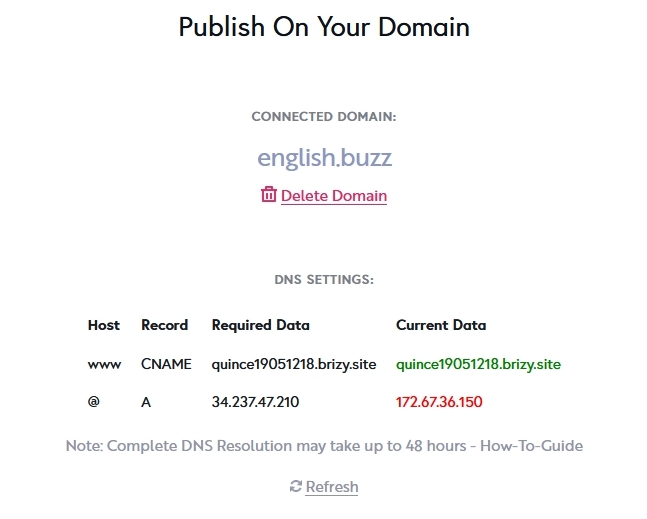
If you have added your domain records in Cloudflare, please disable the Proxy for the A and CNAME records.

Once you make these changes, please get back to us. We will install the SSL certificate for you
0
Please sign in to leave a comment.
Comments
4 comments