Blog featured image

Hello! I have a problem with my featured image, i recently changed the featured image and this change is shown in my WP and Brizy editor, however, once I refresh the live version of my site, the old blog banner (blog featured image) is still showing. Do you know how to fix this? Thanks in advance!
-

Hi Eliza,
Is your blog post published? Can you please share the URL of your blog post where we can see this issue? Can you also share the new featured image you have added so that we can compare the two?
0 -
Hello,
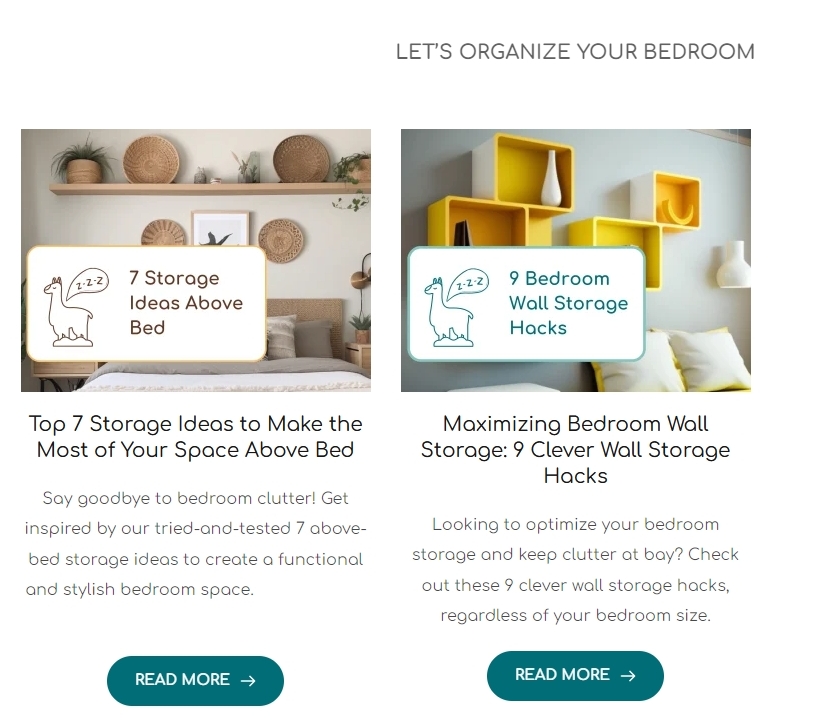
Here is the blog featured image URL: https://alpacayourstuff.com/bedroom-storage-organization/. The wrong version of the banner is 7 storage ideas above the bed, however, it should be 7 storage ideas above bed. Please, let me know what banner version you see from your end. Thank you!
0 -
Hi Eliza,
This is the what I see when visiting the URL https://alpacayourstuff.com/bedroom-storage-organization/
It says "7 storage ideas above bed" and not " 7 storage ideas above the bed". According to what you have mentioned above, this looks like the latest featured image.
If you feel the changes you make to your page are not reflecting in the frontend, please purge all server cache. Here is the procedure to clear all server cache. https://world.siteground.com/kb/clear-site-cache/ If required, please take the help of the SiteGround Support to clear all server cache.
0
Please sign in to leave a comment.
Comments
3 comments