SEO settings in Brizy Cloud

Hi,
can you please explain how exactly settings in Brizy Cloud works? I did not find that anywhere.
What I am asking is Search Engine Visibility switch ON/OFF. There is one in Projects settings. And than every page and post or Custom Asset has it's own switch accessible from the top menu (content, translate, seo, social, code). And what I do not get, is:
- if project Search Engine Visibility is turned off and particular page/post/asset is turned ON, will this be indexable /visible to search engines) or not? In other words – will this overide the project's settings?
- vice versa – if project is turned ON and particular page/post/asset turned OFF, will this be abandoned from search engines? In other words – particular pages can be hidden, although the others will be indexable...?
- When particular page is set as a Home page – where to put relevant SEO title and Description FOR THE HOMEPAGE? In Project SEO settings, or in the page /that is chosen as home page/ settings?
- Should be the (home)page Search Engine visibility settings be turned ON, when Project settings is turned ON or it does not have to, as Search engines will get the necessary info from the Site Title and Description defined under Project settings? Because if (home)page SEO Search Engine Visibility is turned ON, and Project Settings is turned ON as well – AND the SEO titles of Paoject and (home)page SEO settings are different – which one will be picked by Search engines?
Thank you.
PS - I appreciate your support and am not complaining about it. At the same time, the documentation is very vague, leaving unresolved issues. Ones that make absolutely no sense to you and to which the answer (to you) is perfectly obvious. At the same time, for a person who hasn't created the system, starting to work with it is hell. You can't rely on the fact that "it's intuitive", because "intuitive" often means many variations, but they can work in different ways. This is a classic example on your part of the phenomenon called "The course of knowledge". You should find out what it is and how important it is for your business to deal with it.
We /users/ often have to ask questions about things that should be documented in the user manual. Not just in /very nice/ videos and a few links, but in clear and COMPLETE documentation. This is something that would move Brizy from a semi-amateur (semi-proffesional) platform closer to a professional one (please note I am naming it from a customer perspective. From your customer, who is a proffessional/business owner etc. in field of web design and development and uses the platform for his work. This is NOT a statement about your proffesionalism. It is statement about the fact wether the platform meets the requirements for professional and efficient work. For example, proper documentation and fixing bugs that were promised to be fixed very long time ago is much more important, than adding new features like AI)
PPS - it's possible that such documentation exists and I haven't found it.
Wish you the best, M.
-

Hi Marek,
Thank you for reaching out to us.
Here are my answers to your questions:
1. if project Search Engine Visibility is turned off and particular page/post/asset is turned ON, will this be indexable /visible to search engines) or not? In other words – will this overide the project's settings?
If you turn off search engine visibility in the Project Settings, your whole website will not be indexed.
2. vice versa – if project is turned ON and particular page/post/asset turned OFF, will this be abandoned from search engines? In other words – particular pages can be hidden, although the others will be indexable...?
If you disable search engine visibility for specific page(s), they will be excluded from search results.
3. When particular page is set as a Home page – where to put relevant SEO title and Description FOR THE HOMEPAGE? In Project SEO settings, or in the page /that is chosen as home page/ settings?
If a specific page does not have any SEO details, the SEO details from the Project Settings will be displayed. In other words, the SEO settings in the pages take precedence over the SEO settings in the Project Settings.
4. Should be the (home)page Search Engine visibility settings be turned ON, when Project settings is turned ON or it does not have to, as Search engines will get the necessary info from the Site Title and Description defined under Project settings? Because if (home)page SEO Search Engine Visibility is turned ON, and Project Settings is turned ON as well – AND the SEO titles of Paoject and (home)page SEO settings are different – which one will be picked by Search engines?
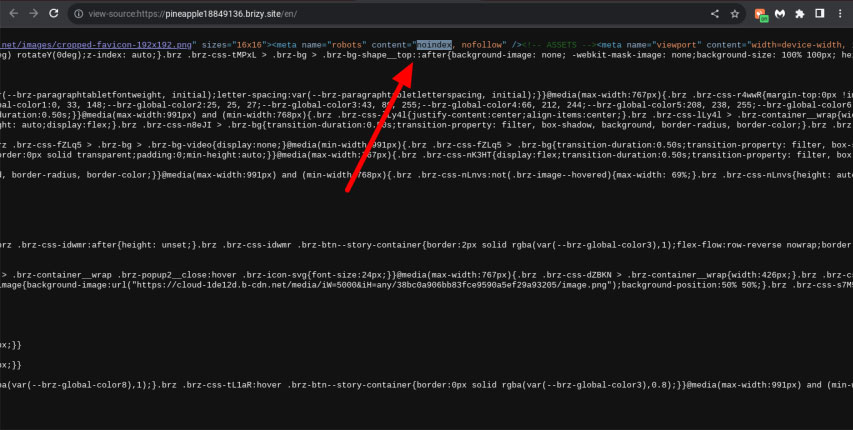
By default, the search visibility in all pages should be enabled, except for pages that you do not want to appear in search results. If you disable search engine visibility on a specific page or pages, Brizy will automatically add a "noindex" meta tag to those pages. This means that any page with this meta tag will not be visible in search engine results. If you disable search visibility in the Project settings, a "no index" meta tag will be added to all pages.
We acknowledge your concerns regarding the clarity and completeness of our documentation. We recognize the significance of having comprehensive and user-friendly documentation, particularly for professionals in web design and development. Additionally, we understand the importance of addressing bugs promptly and prioritizing them over new feature additions. Please be assured that we are actively working on improving these areas. We are gradually expanding our content on our YouTube channel and blog pages, as well as collecting bug reports to ensure that our developers address them accordingly based on urgency.If you have any additional questions, please feel free to reach out to us.
Best regards,
Ariel H.0 -
Hi Ariel, I want to express a big thanks for your clarification and also for your time and support.
M
0
Please sign in to leave a comment.
Comments
2 comments