Open submenu on name click, not icon

Hello,
We have an hamburguer menu with two levels. To access the submenu it is only showed when you click on the right arrow icon next to the name, if you click the name it doesnt open.
The father is a custom url with #, there is no page.
How can we make this?
Website: https://www.avantiafenix.com/
-
I figured out with this:
<script>
document.addEventListener('DOMContentLoaded', function() {
// Añadir .brz-mm-listitem_opened a todos los elementos .brz-mm-menu__item-dropdown
var dropdownItems = document.querySelectorAll('.brz-mm-menu__item-dropdown');
dropdownItems.forEach(function(item) {
item.classList.add('brz-mm-listitem_opened');
});// Eliminar .brz-mm-hidden de todos los elementos .brz-mm-panel que también tengan .brz-mm-hidden
var hiddenPanels = document.querySelectorAll('.brz-mm-panel.brz-mm-hidden');
hiddenPanels.forEach(function(panel) {
panel.classList.remove('brz-mm-hidden');
});
});
</script>.brz-mm-listitem_vertical>.brz-mm-panel {display: block!important;}#mm-3, #mm-9 {height: auto;overflow: hidden;}0 -

Hi
Please add this CSS code under Additional CSS to make the sub menu open when clicking on the name
.brz-mm-menu__item a.brz-mm-btn {
width: 100%;
position: absolute;
padding-left: 80% !important;
}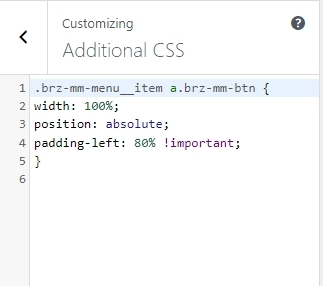 0
0
Please sign in to leave a comment.
Comments
2 comments