Image quality problems

As reported by users over and over again, the image quality is absolutely awful. All I'm doing is updating the images already used from the template and uploading them to the same exact place with the same exact dimensions, and they NEVER look as good as the original. Even when published. I just uploaded updated colors for the top background image and it's horribly blury. The lines should be as crisp and clear as the original version.
I'm unhappy about this because I'm not changing anything but the colors.
When I upload my own images, it's even worse (previous news and events).
If this is going to be an issue that can't be resolved quickly and easily, I'm absolutely going to cancel and request a refund because this is too critical of a feature for people to continue to have issues with dating back years.
-

Hi Charlie,
Images on your homepage has the default custom option turned on. When this option is selected, images are resized and optimized for faster page loading. Please use the 'Original' size option for your images and then upload a new high quality image using the Brizy Image element if you want to keep the same image quality as the uploaded file on your website. Images will not be resized or optimized for better page performance with this option enabled.
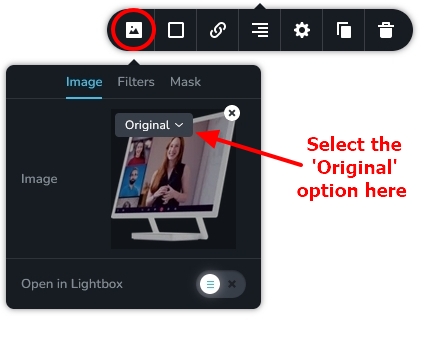 0
0 -

I noticed that I did not need to re-upload the images. Once I changed the option on existing image, it reloaded it to higher quality automatically.
0 -

That option is not possible for product images and it messes up image sizes in galleries.
0 -
Hello Armand,
For galleries, you can select the "Justified" layout option to have uniform height for your images. At https://brizy.online/gallery/ you can see this layout.
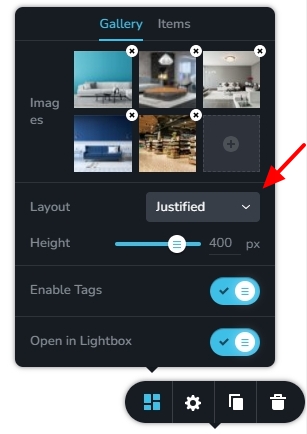 0
0
Please sign in to leave a comment.
Comments
4 comments