Can't scroll Typography or the Font list to format text

In the most recent update of Brizy 2.4.34 & Brizy Pro 2.4.31, I can't scroll the available options for Typography past Heading 1, nor can I scroll the fonts.
(On another set of sites we have running Brizy 2.4.31 & Brizy Pro 2.4.28 this problem does not exist.)
Revert to a prior version until a fix is available?
-

Hi Don,
With the most recent Brizy versions, I am able to scroll through the typography and font lists. Please see my test here https://jmp.sh/KQ97MGmM
Please right click on the Brizy Editor and select the 'Inspect' option to open the DevTools.
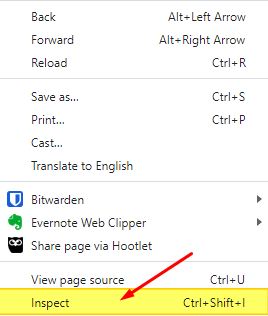
Open the Console tab and check if any Brizy JS or CSS file is being blocked on your page. Have a look at this screen recording for the procedure. https://jmp.sh/F2AJEVR0
0 -
When I use the inspect tool while using the Brizy editor on the site I see the following, the 404 shows up when I right-click in a text box:
- GET https://'website'.com/staging/wp-content/plugins/brizy/public/editor-build/dist/fonts/Nunito-SemiBold.woff2 net::ERR_ABORTED 404 (Not Found)
- GET https://'website'.com/staging/wp-content/plugins/brizy/public/editor-build/dist/fonts/Nunito-SemiBold.woff net::ERR_ABORTED 404 (Not Found)
- GET https://'website'.com/staging/wp-content/plugins/brizy/public/editor-build/dist/fonts/Nunito-SemiBold.ttf net::ERR_ABORTED 404 (Not Found)
0 -
For kicks, we
- deleted, downloaded Brizy & Pro from the Brizy website, and reinstalled them on the existing site. Same error persists.
- just updated Brizy to 2.4.31 and Brizy Pro to 2.431 on another site that we previously built that had no typography scroll problems in the Brizy editor, and it now demonstrates the same problem (inability to scroll the typography). There were no 404 errors before the update when inspected. The same ones show now on this build.
0 -

Hi Don,
Thank you for the update.
Could you kindly let us know which operating system you're using to edit your pages, as well as the specific browser and its version?
In the meantime, please try editing your pages in incognito mode. This can help rule out any browser extensions or cache-related issues. Additionally, you can also try using a different browser altogether and see if that makes any difference.I am looking forward to your response.
Best regards,
Ariel H.0 -
Okay, so we took some time to troubleshoot our existing build by reviewing each of the blocks on problem pages (we already cleared cache & cookies, turned off all other plugins, ran in incognito mode, and tried working in another browser), and it appears that the culprit exists in Brizy's two most recent sets of updates:
- Brizy 2.4.34
- Brizy 2.4.35 (released sometime today)
We found that when a background image on a page is set to Animated, scrolling the font list and typography is not possible in any blocks on that page. If the background image is set to None or Fixed the ability to scroll the fonts and typography returns.
Hope this helps and gets into an upcoming update soon.
0 -
Hi Don,
We appreciate you debugging the problem and getting back to us with your findings. I will report this bug and we will work on a fix.
In my tests, when the animated parallax option is enabled for a background image, scrolling through the typographic options with the mouse pointer works while using the mouse wheel to scroll is not possible. You can see my test at https://jmp.sh/fCisl47h
0
Please sign in to leave a comment.
Comments
6 comments