Hamburger Menu not working with Astra

I am using Brizy Pro (2.4.17) with the latest Astra (4.1.5) on Wordpress (6.2.2). In tablet and mobile mode, the hamburger menu doesn't work. It works when I'm in editing mode on tablet and mobile, but outside of editing mode, it does not work. Please help!
-

Hi Lawrence,
Can you please share the URL of your website where we can see this issue?
0 -
Hi George,
The URL is hendersonvillechorale.org, but it isn't live yet. Should I deactivate the "Site Coming" plugin?
0 -
Hi Lawrence,
Yes; it would be good to deactivate the plugin. After deactivating the plugin, you could also design a new page with the message "Our new website is launching soon! Thanks for checking in! While we are getting ready, make sure to follow us on Social to know when we launch!" and set this page as the homepage temporarily.
Then please share with us the URL of the page where we can see this issue.
0 -
Hi,
I just had the WORST experience I have ever had using a page builder. I tried to create a coming soon page within Brizy using blocks/templates/elements and make it a temporary home page. When I tried to make the background color of the page black (which Brizy seriously needs to add as a styling option instead of having to rely on the theme settings, especially since Brizy bypasses the theme styling to a large degree, and as I found out, messing with the theme settings AND using Brizy is a recipe for disaster), it messed up all of my styling. Plus, it RECREATED my coming soon page and started using Astra's footer settings. What a nightmare!!!!! I spent an entire hour trying to get my coming soon page to look correct, and finally had to RESTORE the last backup of the site to get it back to where I started. So, I will NOT turn off the Coming Soon page as it is now because I will NOT go through what I just had to deal with again. I will provide you with a login that you can use to go into the admin. Please let me know a secure way to send you the login. Brizy, you can do BETTER than this, I hope. Because if this is the general experience I will have making sites with Brizy, then I'll go back to Divi.
0 -
Hi Lawrence,
I'm sorry to hear about your unpleasant experience with Brizy. A Coming Soon page like this should ideally take no more than 5 minutes to create.
Please add a user to your WordPress Dashboard and send the following details to our email: communitysupport@brizy.io
- Community Post link: https://support.brizy.io/hc/en-us/community/posts/15486705338385
- WordPress Admin URL:
- Username
- Password
Please let us know here when you send us the email.
0 -
Hi Lawrence,
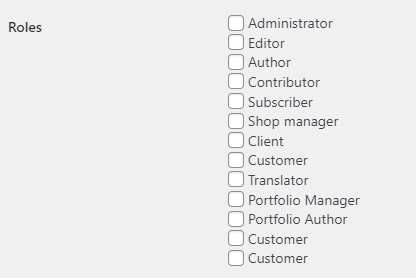
Thanks for sending us the access credentials. I could login successfully; however the WordPress Dashboard is not accessible.
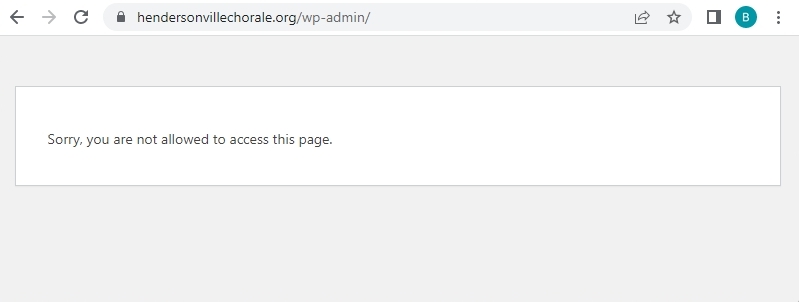
Can you please check if you have assigned an appropriate role to the user Brizy Community Support?
 0
0 -
I've just sent the email with your login information.
0 -
Please try now. Sorry about that!
0 -
Hi Lawrence,
The mobile and tablet menu did not work in the frontend due to an incompatibility between Brizy's most recent versions with a specific setting in the SG Optimizer plugin. In your WordPress Dashboard, under SG Optimizer - Frontend - JavaScript tab, I have disabled the option "Minify JavaScript Files" Please see this screenshot https://jmp.sh/zCgTD3jw
Now your mobile and tablet menus display well in the frontend. Please check
0 -
Hi KC,
Thank you for fixing this issue. I apologize for my curt response previously, but I was at my wit's end and the site was quite dysfunctional.
0
Please sign in to leave a comment.
Comments
10 comments