License expired, can't put in newly generated license code

I got to Brizy through the transition from Themefuse and have continued after that with a lifetime account. Two of my sites that I have build under the temporary Themefuse license have expired and now I want to put them under the lifetime license as well.
I have 2 questions:
1. How do I implement the new lifetime license after generating one, as I am not allowed to install Brizy Pro due to an expired license?
2. Will it destroy the work I previously made in Brizy?
I hope there is a simple fix.
-

Hi Natascha,
Let me restate what I have understood. You had built two websites using Themefuse and the license for these two websites have expired. Now you want to migrate these websites to the Brizy.
Coming to your questions.
- I guess you will have to rebuild your website using Brizy and Brizy Pro and then add a Brizy Pro license
- I did not quite understand your second question.
0 -
Hi George,
Sorry if I wasn't clear earlier. I used to use Themefuse and when they transitioned to Brizy, I was offered a Brizy subscription of two years I think it was. In that time I used Brizy to build two websites. When that subscription was about to end I purchased the lifetime subscription, thinking the existing websites would automatically be under the lifetime subscription too.You can see in the printscreen I sent earlier, that there are two websites under an expired license.
My question is how to get those two sites under the lifetime subscription or how do I replace the old license with a newly generated license.I can't use Brizy anymore to do maintenance on these websites.
0 -
Hi Natascha,
Thanks for the clarification; I now understand the issue better. Since there are only two projects, the easiest solution would be to deactivate the previous licenses and add new licences from your https://www.brizy.io/ account.
In your WordPress Dashboard under Brizy- Settings, under the 'License' tab, click on the 'Deactivate' button to deactivate the current license.
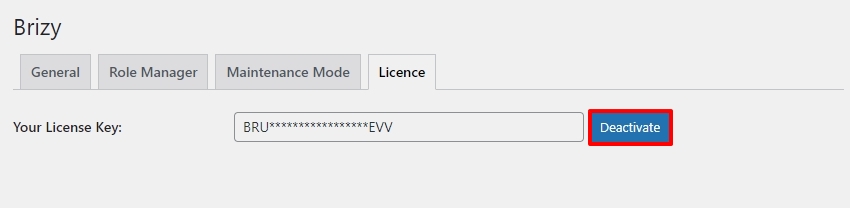
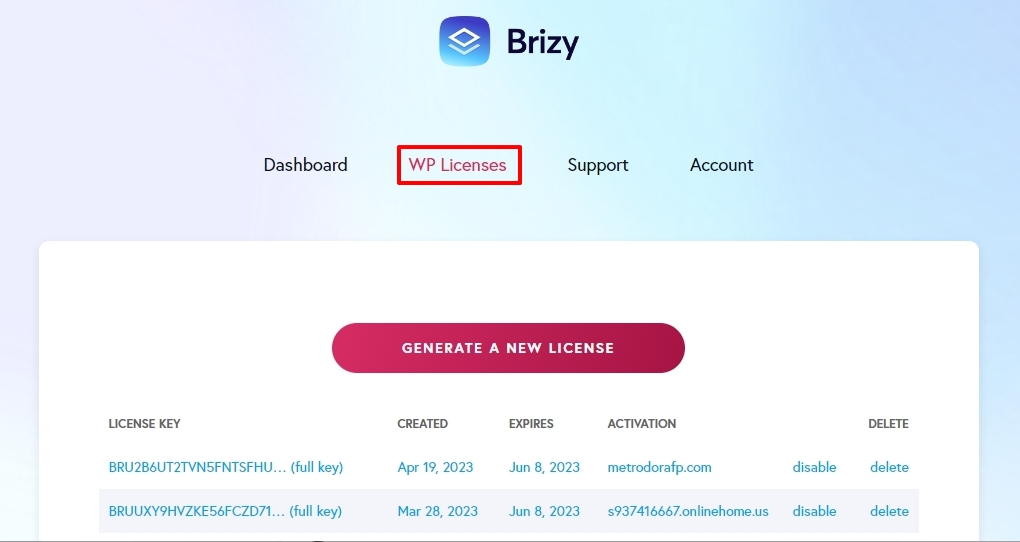
Then you can add a new license by signing into your https://www.brizy.io/ account, copying a new license key under the 'WP Licenses' tab and pasting it in the above screen.
 0
0
Please sign in to leave a comment.
Comments
3 comments