Feature Timeline columns and line elements are not working as expected

Hi,
Timeline columns no longer function when I want to create new ones. If I try to add more than two, they are not visual. And the line element is not in sync. What to do now?
(Brizy Pro, Wordpress)
Regards
J Carlsson
-

Hi Johnny,
Thank you for contacting us.
Could you please confirm if you're able to replicate the issue when all other plugins, except for Brizy and Brizy Pro, are disabled? There's a chance that this issue is occurring due to a conflict with another plugin. Additionally, it would be helpful if you could try switching to a different theme and see if that resolves the issue.
If the problem persists, please provide us with a brief screencast demonstrating the issue. This will allow us to reproduce it on our end.I am looking forward to your response.
Best regards,
Ariel H.0 -
Hi Ariel.H, I have configured a test environment for you. The URL is ___________ it, you can carry out tests you find necessary. The configuration contains the theme GeneratePress, which you can change. NinjaForm's licences and the page builder Brizy are active. I´ve also attached a screen dump. SUMMARY FACTS: ------------------------ Theme: Generatepress Page-builder: Brizy, Brizy Pro ---------------------------------------
0 -
Hi Johny,
Thank you for the update. I have inspected the page, however, it seems to me that this is the expected functionality, even in previous versions of Brizy. To achieve what you're aiming for, you'll have to first establish the columns and then manually insert the tab elements, as shown in this screencast - https://youtu.be/wSVXB0gsgAY
If you have any further questions, please let us know.
Best regards,
Ariel H.0 -
Hi Ariel.H,
Thanks for your quick answer and the instructions.
But one question remains.
How do I adjust the horizontal line that incorrectly cuts straight through and past the icons in the example image in your video tutorial?
Best Regards
Johnny C0 -
Hi Johnny,
Thank you for the update.
Regarding the issue with the horizontal line cutting through and extending past the icons in the video, the lines should automatically connect to the next icon in a straight line. If this is not happening on your end, please provide us with a short screencast demonstrating the issue. This will allow us to better understand your concern and provide more specific guidance.
Best regards,
Ariel H.0 -
Hi Ariel.H,
You asked for a short screencast demonstrating the issue with the horizontal line. I have already permitted you to look at a test site with the link and log in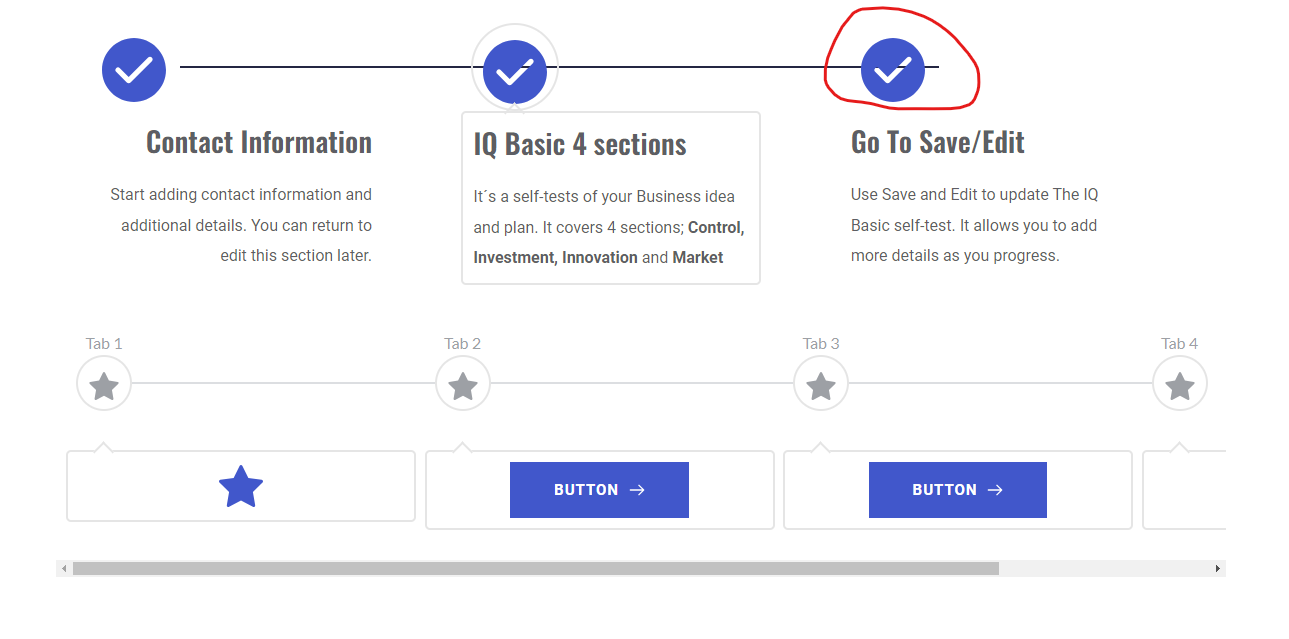 to 112.innovastart.se/test-timeline/. You already reviewed it and sent me a video of how to proceed with columns. That video also shows the weird horizontal line. How can I adjust the line?
Can't you review the same video yourself or use the permission to re-enter the test site? Otherwise, I can, of course, return the video I got from you. I can also resend access information to the test site.But another question has also emerged. Why is the timeline animated? I can't find where I configured it.
Regards
J Carlsson0 -
Hey Johnny,
Apologies for the confusion. I'm not sure about the exact source of the overlapping line.
I've imported this block to replicate it on my local testing site and investigate the source of the overlapping line. But if I were to create it myself, this is how I would approach it - https://www.youtube.com/watch?v=kbjarbfDecURegarding the animation effect, it seems like the rubber band animation is activated. This is how you can turn it off - https://www.youtube.com/watch?v=tL3aDn71NSI
If you have any further questions, please let us know.
Best regards,
Ariel H.0
Please sign in to leave a comment.
Comments
7 comments