Tabs on Mobile- Tab-Title background full width

In the mobile version, the background of the tabs isnt completely 100% width. I have tried a lot and can't get it 100% wide, can anyone help me?
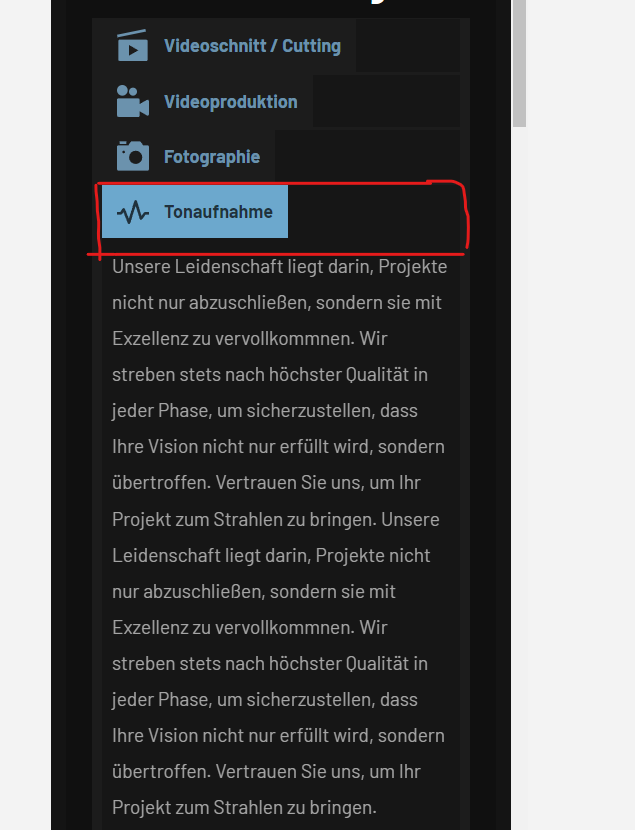
-

Hi Can,
Thank you for reaching out to us.
The issue you've encountered arises when you set a background for a column within the tab content area. Unfortunately, there is no option in mobile view to adjust the tab width. The only way to fix this is to use custom CSS to ensure that the tab width is 100% in mobile view similar to this example - https://imgur.com/3DllGGJ
You can add the following custom CSS to address this issue.
@media (max-width: 991px) and (min-width: 768px)
{
.brz .brz-css-jzwkz > .brz-tabs__content .brz-tabs__nav--button {
    width:100%
}
}
Please try this and in case this doesn't work, please provide the URL of your site, so we can inspect it.
Best regards,
Ariel H.0 -
Thank you very much, it works :)
0
Please sign in to leave a comment.
Comments
2 comments