WC Product Content element not displaying correctly

When I add the Content element to my Brizy Template single product page it displays all the elements correctly except for the Content element. I'm expecting to see the product description but when I add it I get this display:
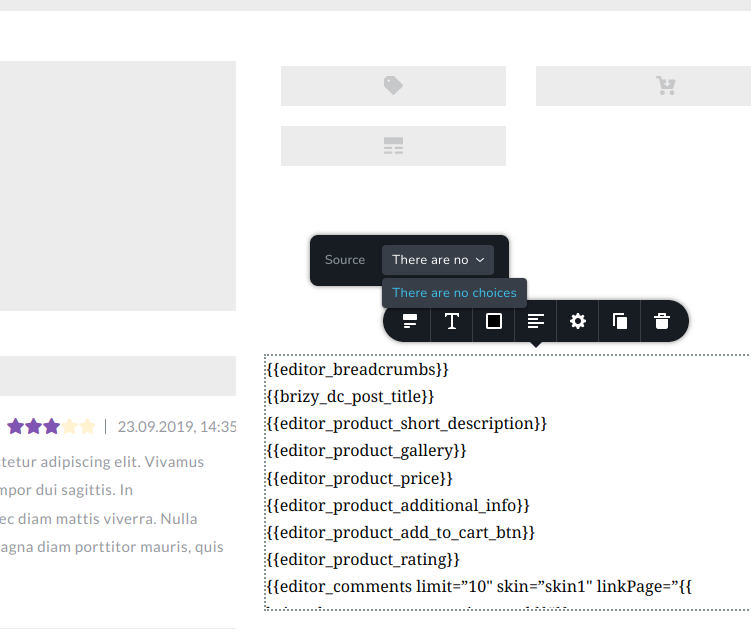
I have cleared the site and object cache, and removed and readded the column and element a number of times but always get this result. I'm only new to Brizy so I'm hoping it's something simple I'm doing incorrectly that can be fixed easily.
-

Hi Rob,
The Brizy Content element appears working fine in my test website. https://brizytest.online/product/coffee-table/
If you are using a theme not listed here, can you try using Blocksy or another theme from this list? https://www.brizy.io/theme-partners
Can you please also share the URL of one of your product pages?
0 -
Thanks for the quick response KC.
I've been playing around with it since I posted and after multiple delete/add new attempts it appears to be working ok in real time now. I didn't do anything different but something must have fixed the underlying issue. The code still displays in the Brizy editor mode but when viewed live it now displays correctly. I'm using the Woocommerce theme Storefront that comes with it by default I believe, but I might try one of those you listed to see if it behaves correctly in edit mode as well. It's not a problem now that it works, but it's disconcerting when it appears as a weird list of code!
0
Please sign in to leave a comment.
Comments
2 comments