Website super slow

I created a new website for my client, but no matter what i do, it's super slow. Have optimized pictures and tried everything, but it does not help. felderudlejning.dk
Could it be something with the Brizy plugins, using Pro.
-

Hi Thomas,
A performance test at GT Metrix shows that the initial server response time of your website is 5 seconds. This means that once a user types the website URL into a browser and presses Enter, the server responds with the first byte of data after 5 seconds. Please have a look at the 'waterfall' tab of this report https://gtmetrix.com/reports/felderudlejning.dk/gr4tRVwv/
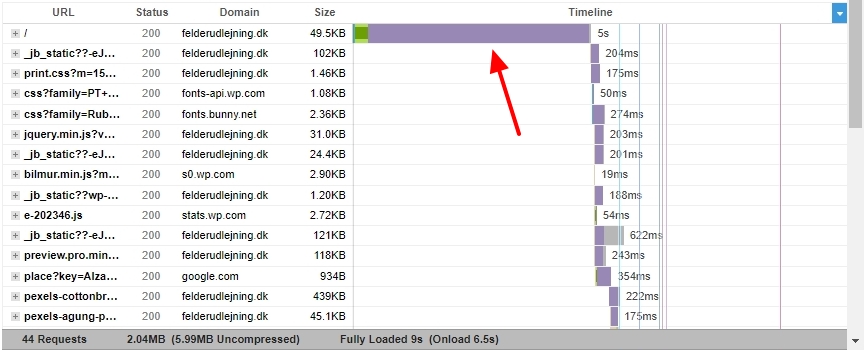
Time to the first byte (TTFB) of 5.0 seconds is considered quite high. TTFB of 200-500 MS is considered good. A few factors which contribute to high TTFB are
- Insufficient Server Resources: One of the primary causes of a slow Time To First Byte (TTFB) is when the origin server takes an extended period to handle the HTML request and provide a response to the browser. Upgrading to your service or moving your site to a different provider are possible solutions
- Lack of Caching: Caching helps offset many of the resources needed to serve dynamic pages by storing each generated page as a static file in cache One of the easiest ways to decrease your TTFB is to use caching on your site. It helps reduce the server processing time.
- High Latency: The user’s distance from the server and the quality of the connection impacts the time to first byte. You can reduce the load on your servers by using CDNs (content delivery networks)
You can learn more on this topic from this article How to Reduce TTFB to Improve Page Load Times
If you are not using a caching plugin, please consider using one. Looks like you are hosting with WordPress.com. Please try changing your theme from Varia to Blocksy and see if that makes a difference.
0
Please sign in to leave a comment.
Comments
1 comment