upload media and image folders not visible

Hello , Im new on wp and brizy . I have a lot of image in my site so I would like organize them into folder. I tried to use the Media Library Folder plugin.Unfortunatelywhen I try to put an image in the block , the upload media popup of brizy show me only the standard view of wp media so the image organized by month (and since I'm building the site from scratch all the images are in the same months. I don't see any folder I created in the filter and also I can't show the list of image with rows and details.
I can't believe that's the way wp manage files and folders.
Are there any plugin to show folders of media in brizy upload media , best if the plugin works with real folder in order to upload files with ftp ?
thanks in advance for any suggestions
-

Hi Gianmarco,
Thank you for contacting us.
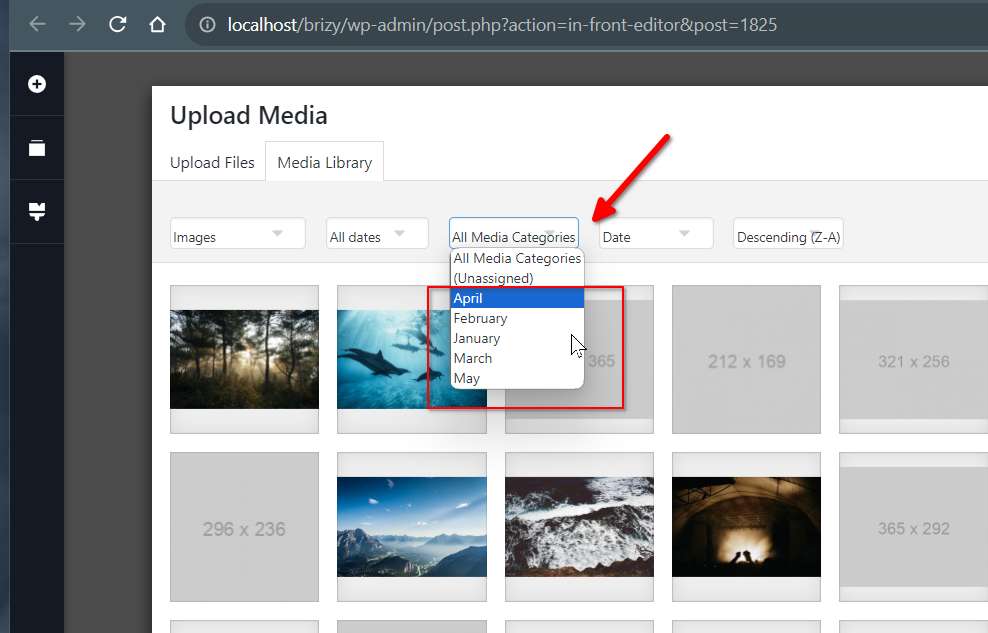
To organize your images, I suggest using the Media Library Organizer by Optimole. This plugin allows you to categorize your images, and when you access the media library in Brizy, it adds a dropdown menu for filtering your photos. While it doesn't support adding a date directly, you can set the category name to the month, which will help group the images on a monthly basis.
If you have any further questions, please let us know.
Best regards,
Ariel H.0
Please sign in to leave a comment.
Comments
1 comment