contact form not working

hello,
for following email wp option wont work,
thomas@restorationtreecare.com. go daddy with outlook set up.
Is there any other work around if the client doesn't want give access for smtp? thank you
-

Hi Edgar,
PHP Mail, WordPress' built-in email sending feature, has certain drawbacks. As a result, emails sent out with this option have low deliverability.
- PHP mail() doesn't support SMTP authentication. This means it doesn't provide any block-listing or spam protection features, so your email messages could easily end up in your recipients’ junk folders.
- PHP doesn’t do a great job of setting email headers correctly. This can result in errors that will cause emails to be flagged as spam
- Emails sent by PHP mail () may be blocked. Some Internet Service Providers (ISPs) do not allow emails sent by PHP mail() as a form of spam protection
SMTP option offers better deliverability compared to the PHP mail() function. By sending out Form email notifications through a reputed SMTP server, you can avoid common deliverability issues associated with PHP mail.
It is not necessary to request access to your client SMTP server to send out email notifications from his website. Email notifications can be sent out via any SMTP server anywhere. One option is to send out email notifications via Gmail SMTP server. You will need a Gmail address (not necessarily a Gmail address of the client). Please create a new Gmail address if you do not have one. Here is the procedure Email notification via Gmail
It is important to fill out the first 4 fields in the email notifications screen. You could consider these settings for your form.
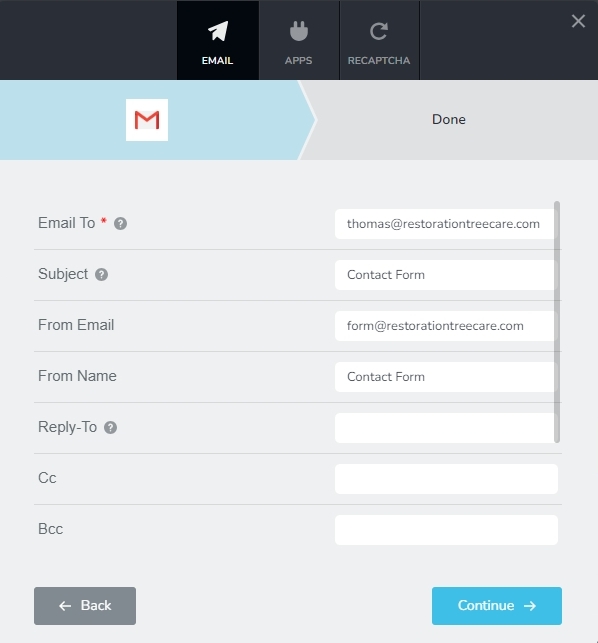
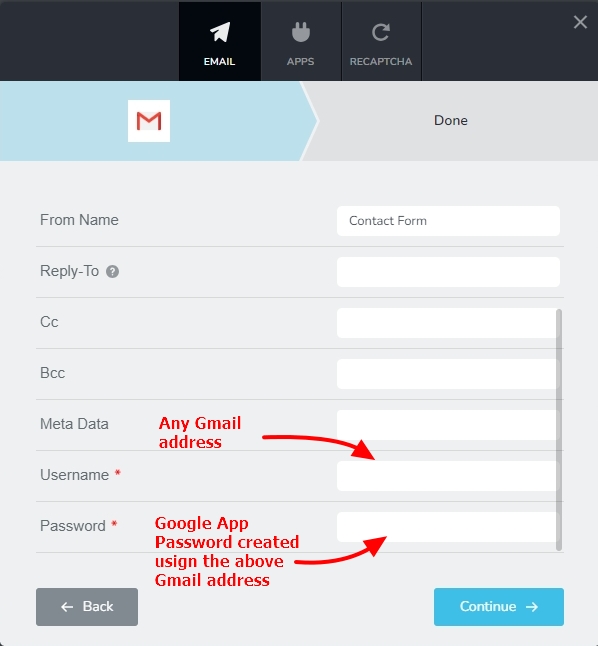 0
0 -
hello thank you or this info
so just to clarify I can create a new gmail account and create app password that account to sent the emails that are @domain. with no issues!! if so this is great news. also can I use the real @domain for the reply to? thx
0 -

Hi Edgar,
Thank you for the update.
You can send emails to @domain, and you also have the option to set the reply email address as @domain. You are using Gmail solely for authentication and sending emails from your website. For best results, you may also include a Gmail email address as CC.
If you have any further questions, please let us know.
Best regards,
Ariel H.0 -
sounds good I will test this out. thanks again for the insight.
0 -
ok I tested it out and it sends the email but it goes to junk folder. is there a fix for that to go inbox
0 -
Hi Edgar,
Thank you for the update.
It appears that your server is currently blacklisted, which affects your site's reputation.
You can confirm this by using Blacklists checker on this link - https://mxtoolbox.com/blacklists.aspx
Please enter your domain name and hit the Blacklist Check button.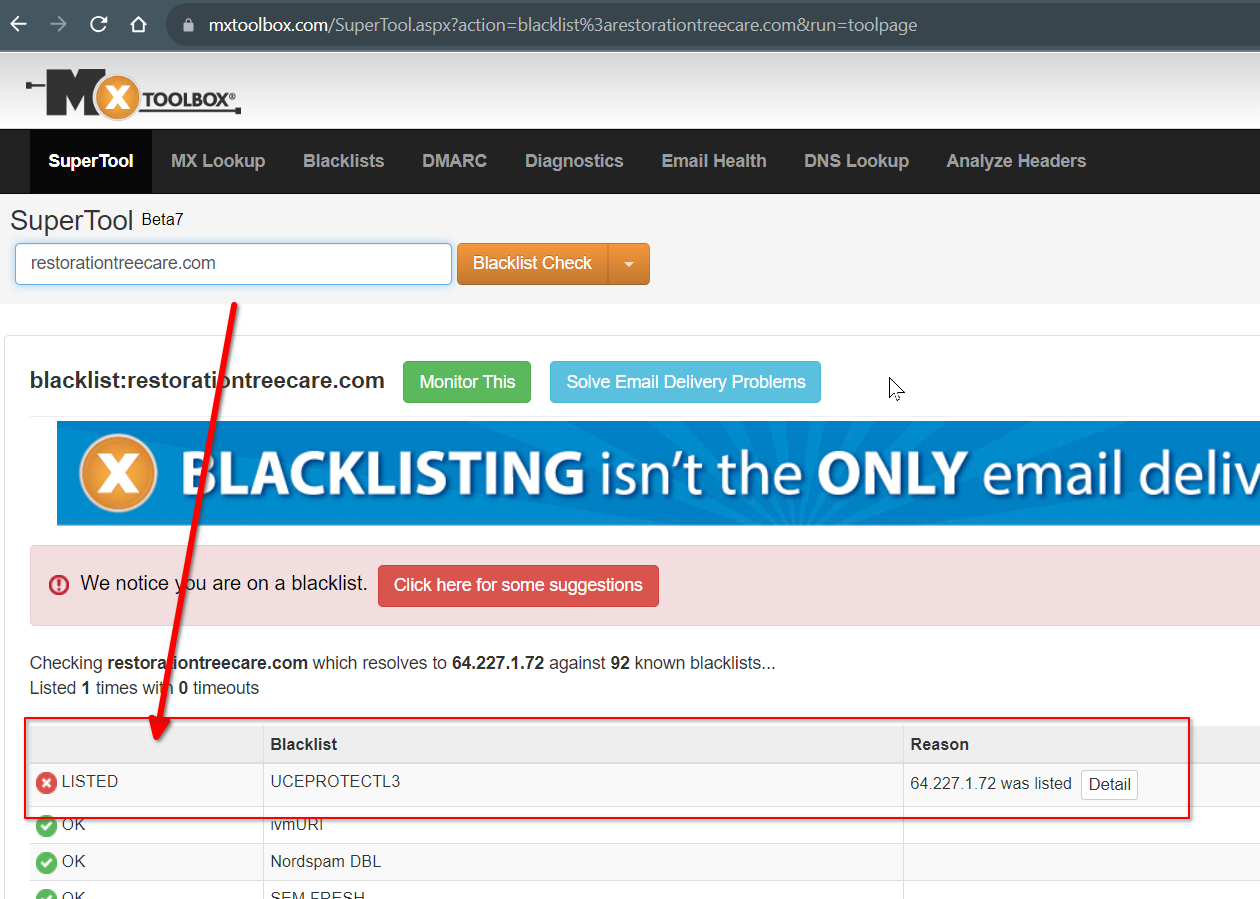
If your domain is hosted on a server with a poor reputation or shares an IP address with a blacklisted domain, it can affect your domain's reputation and cause your emails to be marked as spam or blocked altogether.
To resolve this issue, I suggest that you reach out to your hosting provider, so they can request the removal of your server from the blacklist.If you have any further questions, please let us know.
Best regards,
Ariel H.0
Please sign in to leave a comment.
Comments
6 comments