Images missing on mobile

Hi I have a client site were the images are on the PC and Tab sites but not the mobile they will just not show. Any ideas? Thanks Dan
its the ones that start with the people with lines, the one with the hand shake and the one with the man in glasses.
-

Hi,
Thank you for contacting us.
Please try the following and see if this will help.
- Try to temporarily switch to another theme and see if this will resolve the issue.
- If switching themes, didn't help, also try to disable all other plugins besides Brizy and Brizy Pro, and see if this makes any difference.
If all the above fails, please provide us temporary access to your WP Admin credentials, so we can further check the issue. Add us as a user to your WordPress Dashboard and send the following details to: communitysupport@brizy.io
Community Post link: https://support.brizy.io/hc/en-us/community/posts/14971171336849
WordPress Admin URL:
Username:
Password:URL of the affected page:
Please make a full backup of your website as a precaution.
I am looking forward to your response.
Best regards,
Ariel H.0 -
Hi Ariel
So I have tried all you have said and more, ive looked at the CSS with yellow pencil and the images there are not showing either. I have no idea why they would show in the main site but not the mobile. Could you have a look please.
Thanks Dan
0 -

Hi Dan,
In your design, the two missing images are placed in the background of columns and the columns do not have any content. When you have a blank column with just a background image, in desktop and tablet, the blank column will take on the height of its adjacent column. The images were not visible on mobile because its column had no height.
There are few ways you can fix this problem
- Add a Spacer element to the blank column with the background image and adjust its height.
- Set a custom height for the column with the background image in the mobile design view (see the image below)
- Add your images using the image element instead of adding it as a background.
I have followed the first approach and have fixed the image problem on the mobile on your homepage. Please check.
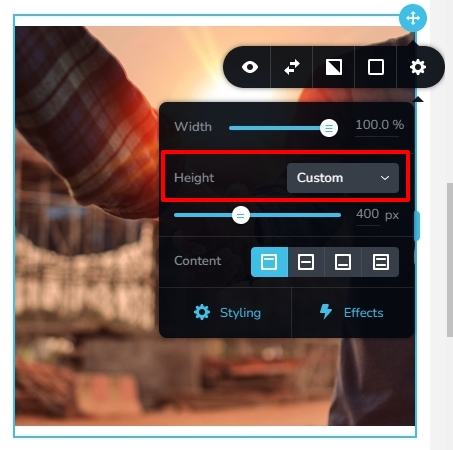 0
0
Please sign in to leave a comment.
Comments
3 comments