Brizy Cloud - Content only shown with one language - not the main language

Dear Brizy Support Team,
I build this page for a client in several languages. One page does not show the content (only in the English language). The main language of the page is German.
You can find the page here: https://www.engineering-passion.com/de/mechatronische-komponenten-und-systeme
The content is shown in the English language only.
I cannot think of any way to fix this on my side, so this is why I am asking you here.
Thanks and have a good day,
Robin
-
When I put the page on English, then it shows the German content. Translation does not seem to work on this page (like it works on all others) and the page seems to confuse the main language with English instead of German.
Have a look at the English version: https://www.engineering-passion.com/en/mechatronische-komponenten-und-systeme
0 -

Hi Robin,
My apologies for the inconvenience.
We've recently received a similar complaint, and we have already reported this issue to our senior support team, I will get back to you as soon as I have an update.
If you have any further questions, please let us know.
Best regards,
Ariel H.0 -
Hi Robin,
Thank you for patiently waiting.
We have now resolved the issue, please try it at your end and let us know how it goes.
Best regards,
Ariel H.0 -
Hi Ariel.H,
Sorry but on my end it is not working. Still the same issue.
Have a look over here :)
https://www.engineering-passion.com/de/mechatronische-komponenten-und-systeme
If this works, you can check it yourself on this page.
The issue seems only to be on this certain sub-page...Maybe you can have another look, why it is not working for me...
All the best,
Robin
0 -

Hi Robin,
You are right; the issue on the Components & Systems page is not resolved. (Ariel was referring to the translation feature of Brizy Cloud, which wasn't working for a while and now started working again)
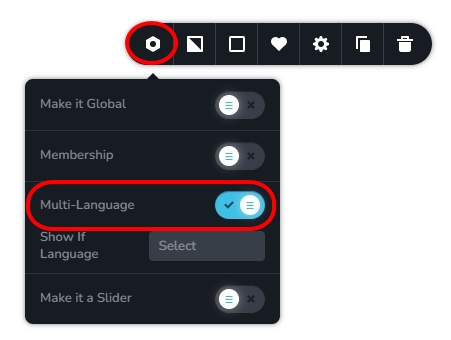
Please open the page https://www.engineering-passion.com/en/mechatronische-komponenten-und-systeme in the Brizy Cloud editor, check if the 'Multi-Language' option is enabled under the block settings of the content block of this page. Please disable this option and check if the issue with this page gets resolved.
 0
0 -
Hi George,
Thanks a lot. This helped and solved the problem. But I do not remember turning it on...
Anyway, now it works.Thanks for your help.
Robin
0
Please sign in to leave a comment.
Comments
6 comments