Background Image or Video do not show when first set a background color

FYI: This problem is about Brizy Cloud.
I noticed that when a background color for a block is set, and then afterward you want to change in a background image, the image (or video) does not show.
If I add a new block (on the same page), then I can add a background image or video normally.
I've tried everything, but nothing seems to work. The only thing I can think of is recreating my website from scratch. I hope I am wrong and you have a solution or a workaround.
-
I already found the solution myself ...
In the background color window, I can select 'None' for the background color. Then, the background image shows up ....
I expected the background color to be behind the background image in case the background image does not have the right aspect ratio to (re)size. That's my thinking mistake.0 -

Hi Hans,
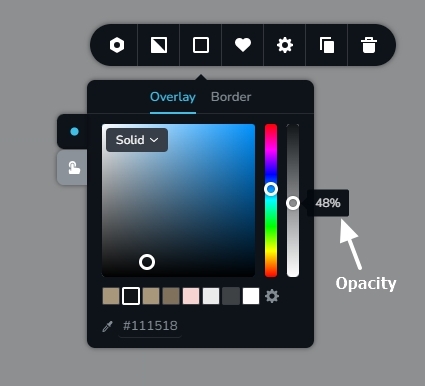
A color is applied as an overlay when added along with a background image. If the text contract is poor when overlaying text over a background image, you can improve legibility of the text by adding overlay color.
You have the option to decrease the opacity of an overlay color apart from setting it as none.
 0
0
Please sign in to leave a comment.
Comments
2 comments