The translations don't respect the space at the beginning.

I have a text that has been automatically divided for translation, so some of the sentences start with a blank space. The problem is that the translation does not respect the space and displays the result without any space, joining the words together.
Original text:
Finalidad de la recogida
Translation results:
Finalitéde la collecte
Purposeof the collection
-

Hi Jose,
Thank you for contacting us.
To fix it, please try to manually translate it by selecting the page, hit the Translate tab, find the original text and enter the correct translation.
This is demonstrated on this screencast - https://youtu.be/9TdUGJPaqW8Please try this and let me know how it goes.
Best regards,
Ariel H.0 -
I already tried the manual translation. The problem is not the space between characters on the same line of translation. It is the space at the beginning of the paragraph that does not allow leaving a blank space. The system divides the paragraph to be translated into two lines and the second line begins with a space. I can't end or start with a space, that's why the words are put together.
0 -
Hi Jose,
I appreciate your patience with this, could you please provide us a screenshot showing the issue so that we can reproduce it on our end?
Best regards,
Ariel H.0 -
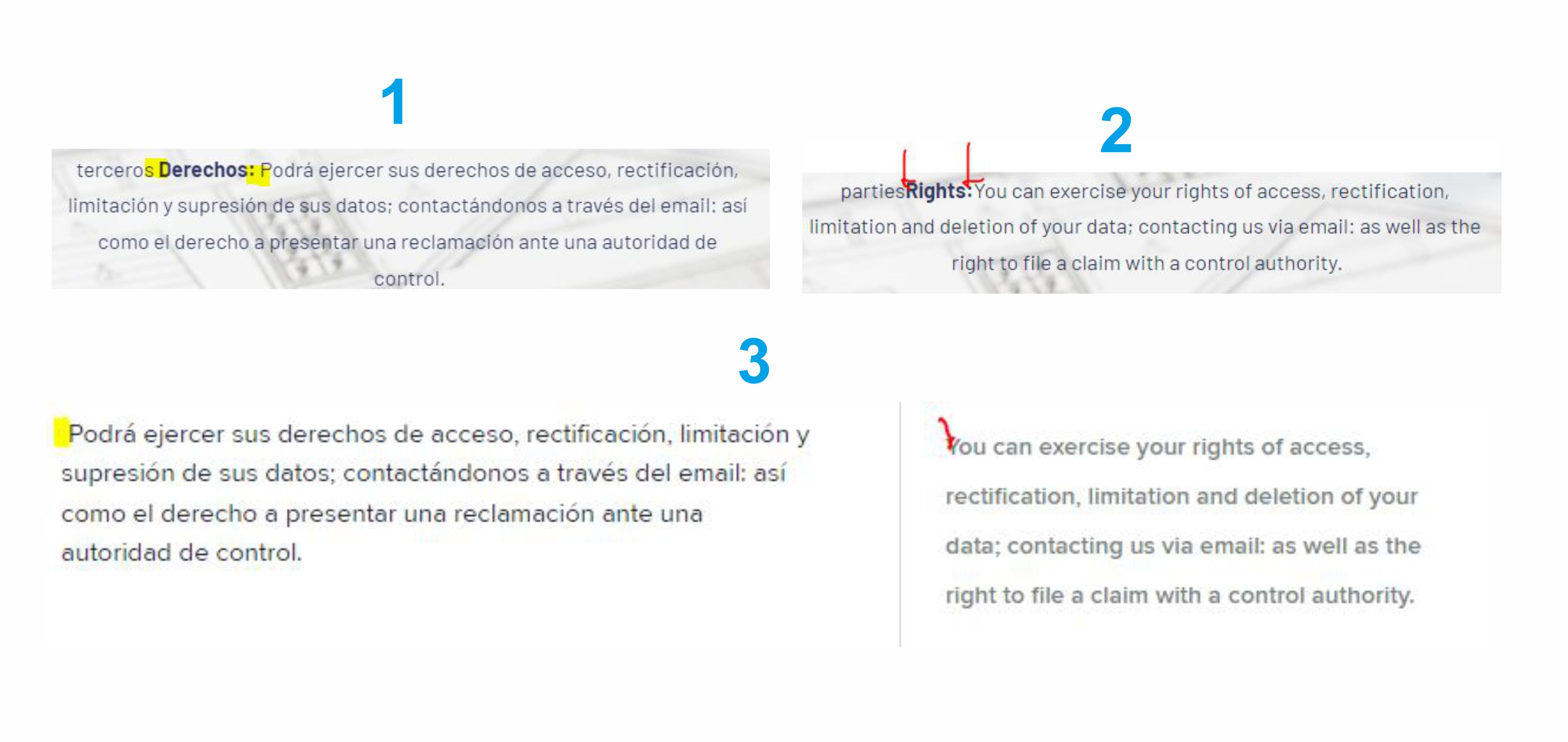
I upload a numbered image.
1 Spanish text on the web, with the blank space between words highlighted in yellow.
2 English text seen on the web, with the lack of space between words highlighted in red.
3 The translation in the Brizy Cloud panel. On the left, the Spanish text starts with a space (highlighted in yellow). On the right, the English text does not allow for space. Even if the space is manually added, it is automatically removed.
 0
0 -
Hi Jose,
Thank you for the update.
Our developers are already aware of this issue. I will get back to you as soon as I have an update.
Sorry for the inconvenience.
Best regards,
Ariel H.0
Please sign in to leave a comment.
Comments
5 comments