Blog posts not working correctly

I am attempting to add posts and for some reason they just link to a newsletter link I have in one of the older blog posts. It is not displaying what I actually added into the content.'
So when you click on Spring Newsletter on this page, it just links to Autumn Newsletter, no matter what I do.
-

Hi Jennifer,
To fix this issue, please delete the URL you have added to the 'Featured Image' and the 'Read More' button and link to the 'Post URL' after clicking on the 'Database' icon.
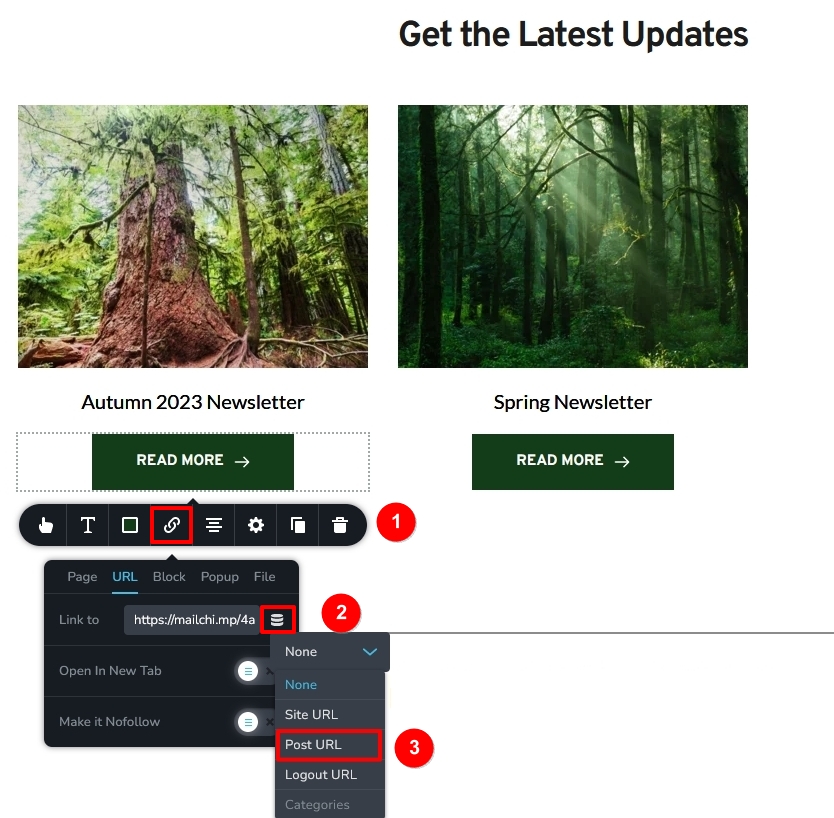 0
0 -
Hi KC, I followded the instructions, but now when you click on the link, it takes you to a completely blank page. Please advise.
Thank you
0 -
Hi Jennifer,
Earlier, all blogposts were linking to https://mailchi.mp/4a2b649e0112/forest-bridges-autumn-2023-newsletter. After removing the above hyperlink, maybe you have not added any content to your blog posts? Please add content to your blog posts by clicking on the Edit button here
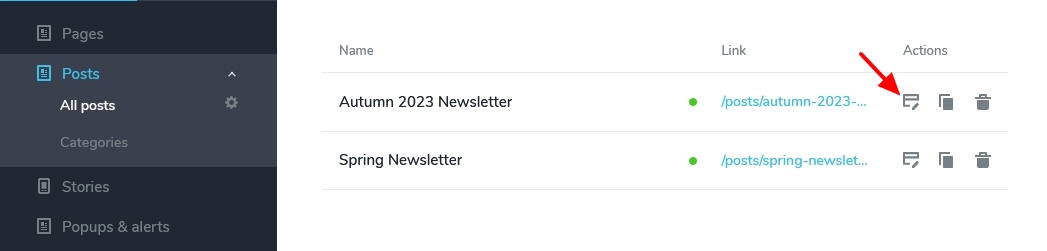
These tutorials can help you add blog post content
- How to Create Post Pages Like a PRO!
- Learn How to Create Custom Fields in Brizy Cloud PRO, in Just 5 Minutes!
Are you planning to link each blog post to external articles? Please elaborate your plan in more detail so that we can guide you appropriately.
0
Please sign in to leave a comment.
Comments
3 comments