post templates

Hi, I use Brizy pro and created a template for posts. I would like to write some posts with brizy builder and not with Gutenberg. But unfortunatelly the layout has changed in the brizy version.
To easy understanding here is two sample post with the same template:
With brizy builder: https://penzugyeinkrol.hu/nyugdijbiztositas-nagyon-nagyon-jo-koltseggel/
With Gutenberg: https://penzugyeinkrol.hu/megjelent-a-rendelet-az-elelmiszer-arstop-rol-oruljunk/
The second one what I would like to see. How can I reach it?
Thanks in advance,
Krisztian
-

Hi Krisztian,
Can you please try this? In your WordPress Dashboard under Appearance - Customize - Blog - Single Post select this layout and see if that makes a difference
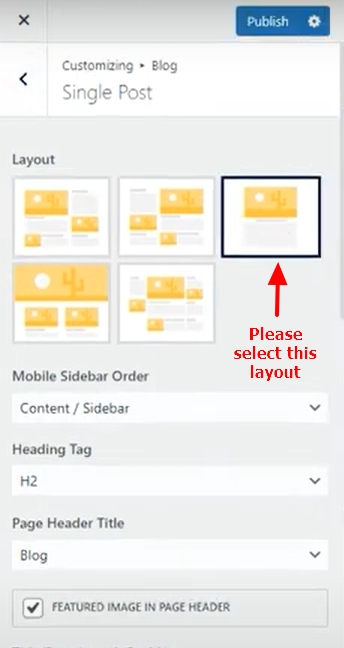
If this brings your blog post content to the middle of the page, you can add the sidebar to your Brizy blog post template. I will make a video for you on how to do this. Please let me know if this solution would work for you.
1 -
Hi George,
Thanks for the advice, but my ask is about not just the sidebar but also the header, footer and other elements. Is it possible to use my article template on the page built by Gutenberg and Brizy?
Another question: can I create two layout for articles and choose which I want to use for each article?
0 -
Hi Krisztian,
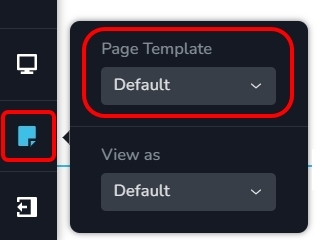
Yes; if you would like to use the OceanWP header and footer for your blog posts, on the left sidebar select the Page Icon and then select the Default Page Template in your Brizy Blog post template.
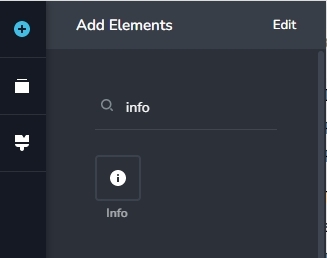
To add the blog post author, date etc to your blog post hero block, please use the Brizy Info element
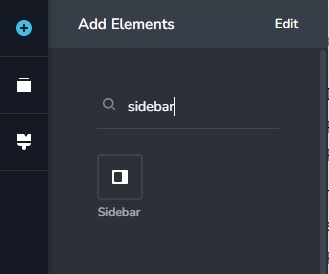
To replicate the sidebar, create two columns in the content area of your blog post template and add the Gutenberg content on the left column. Add the form to one of the widgets under Appearance - Widgets and display it on the right side bar using the Brizy sidebar element.
You can create blog post templates for different categories/ tags/ authors etc. If you need two different designs for two different sets of blog posts, please think of segregating your blog posts under either two different
- Categories
- Tags
- Authors
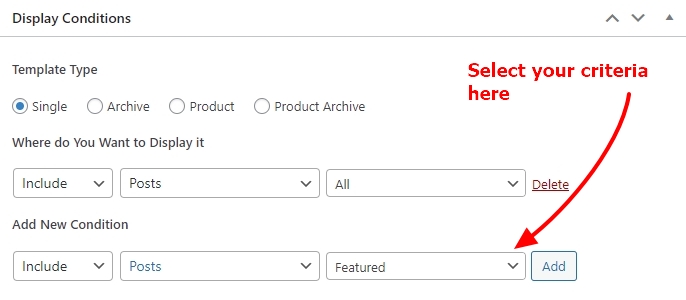
Once you do this, create two different blog post templates for each set of blog posts by making appropriate selection here
 1
1 -
Hi George,
Thanks a lot for the informations.
Just to clearance: if I use Brizy templates for my posts built by Brizy, the theme's settings overwrite Brizy template, so the header, footer and other setting will be what I set up in the wordpress customizer. But after I switch the same article to a wp edited article, it will be seen as I set up in the Brizy template.
So if I want to the articles be seen with the same layout in both of the two versions (edited in Brizy and Gutenberg), I need to create a layout for posts built by Brizy what can be similar to Brizy template. Am I understand correctly?
0 -
Hi Krisztián,
Please have a look at this video where I am discussing your question. https://jmp.sh/hPOrcIND
If you have more questions, please let me know.
1 -
Thanks, great and informative video. Just a last question (I'm sorry if it's a little bit foolish): how can I set up the "Brizy template"? When I choose that one it's a clear page. How can I setup the layout of that?
0 -
Hi Krisztián,
If you are asking about designing a blog post template, please have a look at this video. https://jmp.sh/qQ0DtByV
1
Please sign in to leave a comment.
Comments
7 comments