I can't update a post

on my site https://gasfireplaceguysli.com/
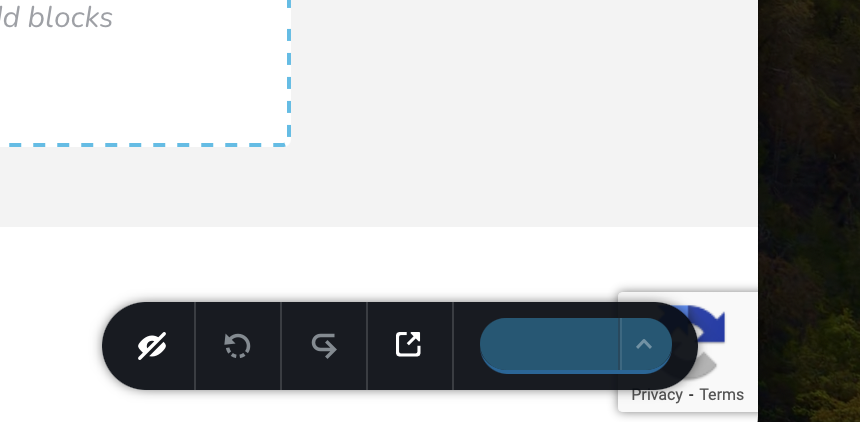
i cannot save/update with the button at the lower right. it is not showing anything. and when I am clicking it it is not saving.
-

Hi Tatsiana,
Can you please disable these plugins and check if you are able to save your pages.
- Smush – Optimize, Compress and Lazy Load Images
- Wp Smush
If this does not help, we will need access to your WordPress Dashboard to offer further help.
0 -
I have deactivated Smush plugin and it still doing the same thing. I dont have WP Smush plugin
Tatsiana Greenberg
Web Developer0 -
Hi Tatsiana,
To troubleshoot this issue for you, we will need access to your WordPress Dashboard. Please add a new user to your WordPress Dashboard and send the following details to our email: communitysupport@brizy.io
- Community Post link: https://support.brizy.io/hc/en-us/community/posts/14565048660114
- WordPress Admin URL:
- Username
- Password
Please let us know here when you send us the email.
0 -
* Community Post link: https://support.brizy.io/hc/en-us/community/posts/14565048660114
* WordPress Admin URL:
* Username:
* Password:
Tatsiana Greenberg0 -
Hi Tatsiana,
Thanks for the access to your WordPress Dashboard. I could not reproduce the issue you are facing. Please have a look at my test here https://jmp.sh/wjRevSfm
Did this problem also occur with https://hemlockroofingco.com? Please provide more information about the issue so that we can investigate it.
0 -
On no, so sorry, this is a different site.
Here are credentials for the right one
* Community Post link: https://support.brizy.io/hc/en-us/community/posts/14565048660114
0 -
Hi Tatsiana,
I have signed into https://gasfireplaceguysli.com/ WordPress Dashboard. I could save the changes I made to your blog post. Please have a look at this screen recording https://jmp.sh/gdaSwDqZ How do I reproduce the issue you are facing at my end?
Please access your WordPress Dashboard from a private (incognito) window of your browser and see if that makes a difference.
0 -
I see that. But I am having this issue again. I was able to add one post, but when I started on my second one, It is doing the same thing again. The weeks UPDATE is now showing up.
And I was trying to work on it last week and it wasn’t working at all either.I removed Brizy and then added it again. I am not sure what to do about it. I really need this to be working.
0 -
Hi Tatsiana,
Please try these
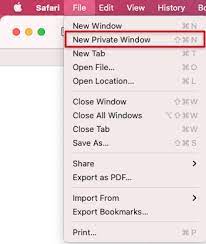
- Please sing into your WordPress Dashboard from a private (incognito) window of your browser and check if the issue persists
- Try a different browser and check if the issue resolves
 0
0 -
I have tried google chrome and also chrome incognito and both is giving me the same issue
0 -
Hi Tatsiana,
Are you using any ad blocker or malware browser extensions? These can interfere with the working of websites. If you are, please disable all extensions or try another browser with no extensions and check if the issue persists.
0 -

Hi Tatsiana,
Thank you for the update.
Have you had a chance to test this out on a different browser, like Firefox, as KC recommended? I'm curious to see if the same issue pops up there.
If the problem doesn't persist on another browser, it might be related to local storage. In that case, could you try clearing your local storage to see if that fixes the problem? Instructions are found here: https://support.conquer.io/hc/en-us/articles/5821475923988-How-to-clear-local-storage-in-Chrome
Please try this and let me know how it goes.
Best regards,
Ariel H.0 -
I don’t have any extensions at all. It has never happened before and I have added many posts to many other sites that have pretty much exactly the same stuff.
0 -
Hi Tatsiana,
Thank you for the update.
We have recently received a similar report, and we have escalated this issue to our developers for further investigation. Rest assured that our team is actively working on resolving this matter. I will reach out to you as soon as I have any new updates.
Sorry for the inconvenience.
Best regards,
Ariel H.0 -
so I think I figured out what exactly was causing this issue. Iif I am publishing the post right away, everything works well. however if I want to schedule a post - that's when this issue happens.
0 -
Hi Tatsiana,
This is due to a bug with the most recent Brizy versions. We have reported this bug and are working on a fix.
Until we are able to roll out a fix, please follow this work around. Publish the post temporarily, make the necessary updates to the post and then schedule it again.
0
Please sign in to leave a comment.
Comments
16 comments