Is Brizy compatible with WP Travel engine?

Hi!
Let's start with saying I am super happy that I can create websites with Brizy! I will look for a way around each challenge that tells me to not use it :D
These last days I have been trying to understand if Brizy and WP Travel Engine are compatible by trying out things. SO far I have not yet figured out completely how to do it, but I feel I am close.
Before diving more into the details of my challenge the simple question is, are Brizy and WP Travel engine compatible.
I found this earlier post on the forum on the subject:
Could someone verify whether I can use these together?
Kind regards
Jarko
-

Hi Jarko,
Based on the tests I have carried out, it looks like you can't display WP Travel Engine Trip pages using Brizy. However if you develop your pages using the 'Default' 'Page Template' you can design your header and footer using your theme and you can use the WP Travel engine Trip pages as it is without adding a Brizy header and footer.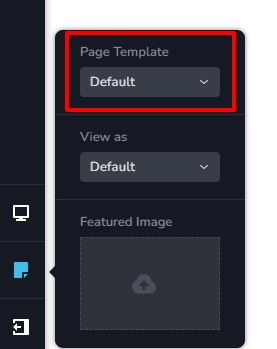 Please have a look at this website for an example of a websites developed using Default Page Template (the header and footer design come from the theme (Blocksy) and the page design from Brizy) https://echophotoph.com/If you using Astra or Blocksy theme, you can setup your header and footer following this procedure.0
 -
Hi!
I am still struggling with getting this to work :)
I am using Blocksy, and have designed header and footer with it. What I haven't done is develop the pages using the 'default' page template.
This is maybe a bit of a noob question, but how do I do this? Does this mean designing the page in the WP style block editor?
The problem I currently experiencing is connected to what you imply. I have an 'Experience' page which has the 'Trip listing Page' theme from WP Travel Engine. Whenever I update anything on the site, the page template of that page is somehow reset back to default, leaving me with only the header and footer of the page, but not showing the trips.
I have made a Loom of this: https://www.loom.com/share/c8368ace32454325883813126ceaf962?sid=2d0143e8-2988-497c-b636-057cc2ee175d
Could you explain me how I could develop the page in 'default', solving this problem?
Kind regards,
Jarko
0 -
Hi Jarko,
Please have a look at this video for the procedure to apply Default Page Template for Brizy pages. https://jmp.sh/1v4OBgfn
0 -
Hi George!
I hope you had a nice weekend. Thank you for your response and showing me the steps. Your help is always good.
As far as I can see this is what I've done. I built the header and footer with Blocksy, and my main pages are all on default (see screen shot).
The problem is the page showing the trip listings. This page has the 'trip listing' template, which is WP Travel engines. I can turn it on, and it functions on the front end. But every update on the site, it switches back leaving me with a blank page (I am showing this in the Loom). This is the core of the problem, this template turning off every time.
Is there any way you can help me further? I am also talking with support of the Plugin, but I haven't found a solution with them either. Is there anything else I can do to have them more involved?
I gladly give you access again to my dashboard :)
Looking forward hearing from you!
Kind regards
Jarko

 0
0 -
Hi Jarko,
Please take a full backup of your website and try this out.
Please change to one of these themes recommended by WP Travel Engine. https://wptravelengine.com/wordpress-travel-themes/category/free/. Your header and footer will be get disturbed during this test. Please check if the 'Trip Listing Template' changes automatically to the 'Default' Template with the new theme. If one of the listed themes offer better stability to your Homepage and the Experiences page, please consider recreating the header and footer using the selected theme.
Even though we don't have experience working with the WP Travel engine plugin, if the plugin support is unable to offer a meaningful solution, we don't mind taking a look at your dashboard to see if we can be of help.
0 -
Hi George,
Thank you for this suggestion. I will try this!
I do want point out that I tried troubleshooting the issue by deactivating all the plugins. Deactivating Blocksy did not solve the problem, the page kept going back to default template after an update.
When I deactivatet Brizy however, the page template did no longer change after updating. The whole page looked horrible off course :)
That's why I thought it was some clash between Brizy and the WP Travel plugin that is causing the problem.
Kind regards,
Jarko
0 -
Hi Jarko,
Because your Homepage and the 'Experiences' page are built with the theme and the WP Travel Engine plugin, and Brizy has no involvement, the possibilities of Brizy causing the page to shift its template are slim. If the above experiment does not help, please give us access to your WordPress Dashboard. We'll give it our best go at resolving this problem.
You can add me as a user to your WordPress Dashboard and send the following details to our email: communitysupport@brizy.io
- Community Post link: https://support.brizy.io/hc/en-us/community/posts/14563146300305
- WordPress Admin URL:
- Username
- Password
Please let us know here when you send us the email.
0 -
Hi Georg!
Thank you for your reply! I am working on your sugggestion with changing the theme. As always, unforseen challenges appear, so I don't have a functioning subdomain to test it yet. I will get this done this week.
Therefore, in the meantime, I gladly accept your offer for you to have another look at my dashboard. I created a temporary user for you using the 'temporary user' plugin. It is connected to the email @support.
Please have a look. I still have a feeling I might not have understood you corrrectly on how to build the pages.
Let me know if there is anything else you need from me.
Kind regards
Jarko
0 -
Hi Jarko,
What are the steps to sign in to your WordPress Dashboard? Does the Temporary User plugin give you a link I can click to sign in?
0 -
Hi!
Okay, I didn't do it correctly. I have a link. I will send it by mail. to the support.mail.
kind regards
Jarko
0 -
Hi Jarko,
In your WordPress Dashboard under Brizy - Settings, you had enabled the Maintenance Mode. This feature can interfere with the proper functioning of other plugins. I have disabled it now. If you need to show a Coming Soon page, please consider using a plugin for it.
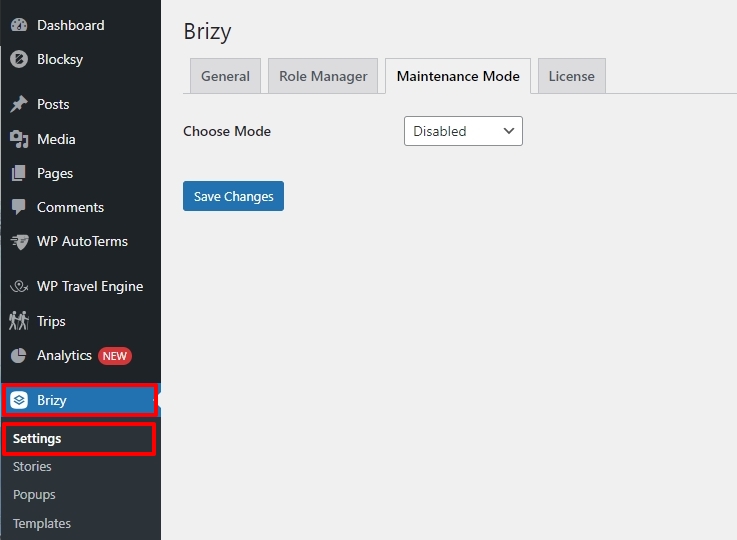
Please let us know if this helps to prevent the automatic switching from the Trip Listing Template to the Default Template.
0 -
Hi!
This is the second time I was sure I posted a reply, and it is not showing. Not sure what I've done wrong.
So nothing of the above helps. Maintenance mode is not causing the problem. I have also copied the site and tested with a different theme. Nothing keeps the template page from resetting to default.
The only thing that makes a difference is when I deactivate Brizy plugin. Then the trip listing page shows, and even after updating it is still showing. This is of course no solution, because the rest of the site looks horrible when I do this.
So please, can we try and find a real solution? It seems pretty clear that there is something between the two plugins that causes this.
How can we go forward? Should I give you access to the cloned site, so you can just do whatever is necessary? :)
If Brizy support doesn't have resources or wants to dive into this problem, I can understand. However, please let me know. Then I can find a completely different solution. I am telling my client for many weeks now that I am looking into the problem, and I feel I've made 0 progress.
Kind regards,Jarko
0 -
Hi Jarko,
When you add a comment, initially it will show as 'Pending Approval' in your account. When we approve the comment it gets published.
I have noticed that you have edited the 'Experiences' page with Brizy. Since the page is auto generated by the WP Travel Engine plugin, editing it with Brizy makes no sense. I created a Gutenberg page at https://cultura.projectjd.no/experience/ and set it to the 'Trip Listing' Template. Please let me know if this page switches to the 'Default' Template automatically.
0 -
Hi George!
Okay, this solved the problem! This makes me feel pretty foolish, but I am very happy it works. It just shows I should stay humble, and keep listening.
So all you did was create a new page with Gutenberg? And not change it by clicking 'edit with Brizy'? I need to create similar pages (the plugin has more templates), so I need to do it correct the next time.
Earlier you told me to have the sites on default. I did not understand the difference between how the page is produced look like this:
Or this: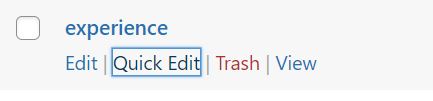
Event though both have 'default page' under quick view.
Thank you for helping!
Kind regards
Jarko
0 -
Hi Jarko,
You are right. I created a page in Gutenberg and did not click on 'Edit with Brizy'. I also added the Featured Image in the Gutenberg Editor.
When you set a Brizy page to 'Default' template, the page refreshes with the theme header and the theme footer. I suggested this earlier so that the Travel pages like Experience and other Brizy pages can have a consistent look with the same header and the footer.
The difference between the two pages highlighted above is that one is a Gutenberg page and other is a Brizy page. Both are using the 'Default' Template (theme header and footer)
0
Please sign in to leave a comment.
Comments
15 comments