header and footer not showing up on only one page

on my site https://hemlockroofingco.com/ , the header and footer are showing up on every page except for one. i have it set as global blocks and have them set to be on every page in the global settings. this is the page it is not showing up on https://hemlockroofingco.com/financing/
also on the https://hemlockroofingco.com/financing/ page, I have a code with a link to a financing application for my customers. but it is not working anymore for some reason. and I have the same code on home page as well in the "Financing your project section".
I have the same code on another site and it is not working either anymore and it used to be fine. here is that site https://hemlockcontractingco.com/. it is in the banner.
Thank you
-

Hi Tatsiana,
Thank you for reaching out to us.
It seems that the issue you are experiencing is likely related to JetPack. To troubleshoot the problem, I kindly request you to disable the Site Accelerator feature and observe if this resolves the issue.
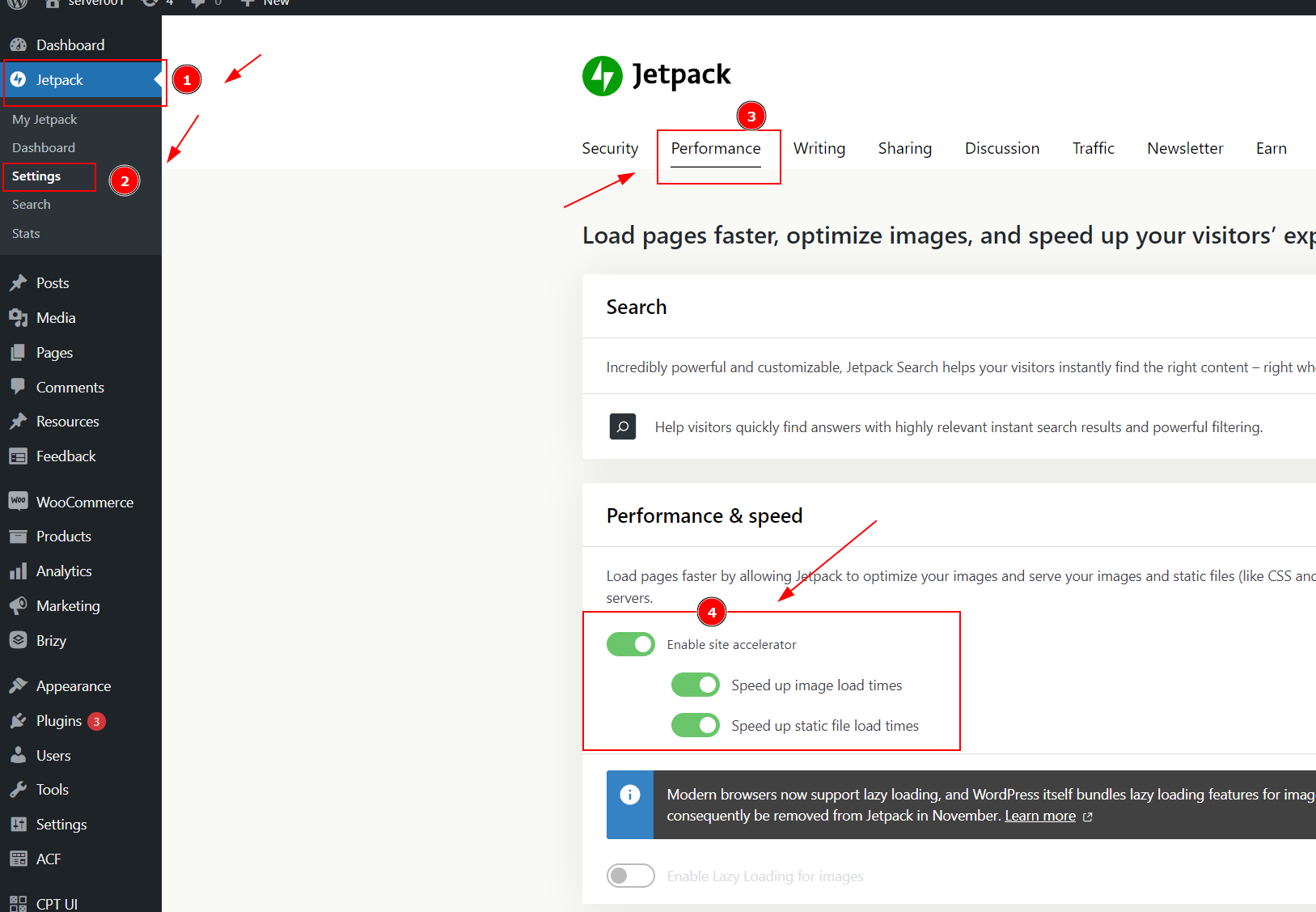
Please try this and let me know how it goes.
Best regards,
Ariel H.0 -
It is not on. Jetpack site accelerator settings are all off. and have been.
Tatsiana Greenberg
0 -

Hi Tatsiana,
Please remove the embed code you have added to these pages, add a Brizy button and add the following hyperlink to the button and check if that resolves the issue.
https://app.gethearth.com/financing/36207/60811/prequalify/
If this does not help, we will need access to you WordPress Dashboard to offer further help. Please add a new user to your WordPress Dashboard and send the following details to our email: communitysupport@brizy.io
- Community Post link: https://support.brizy.io/hc/en-us/community/posts/14556224238226
- WordPress Admin URL:
- Username
- Password
Please let us know here when you send us the email.
0 -
I certainly can do that and I am sure it will work, but the whole point is to be able to have that picture that comes with the code. And it used to work till very recent.
And the header and footer for this page.Tatsiana Greenberg
0 -
Hi Tatsiana,
The banner you are trying to display is returning a 404 File Not Found error. The image is not visible on your website.
If you can see the banner image, right click on it, save it to your computer and upload it your Brizy page. You can then add the hyperlink to the image. https://app.gethearth.com/financing/36207/60811/prequalify/
To help you with displaying the header and footer at https://hemlockroofingco.com/financing/ we will need access to your WordPress Dashboard.
0 -
I am going look into it more, this code is a specific to the client, so I can’t do just a link.
What about the header and footer on the page?0 -
Hi Tatsiana,
Your global header and footer were not set to display on the page https://hemlockroofingco.com/financing/ I have added a condition to display the header and footer on all pages. Now the header and footer shows on this page.
I have also added the banner image on this page with all the URL parameters included in the Embed code. You can delete the Embed element from this page.
0
Please sign in to leave a comment.
Comments
7 comments