I can't access the Media Library when editing my page

I've been reading this happens to other users over the years.
My problem is that I can load my images directly into the library but when I'm editing a page on my site I can't access them, it keeps trying to load without success.
The main problem here is that a person (friend)in an other end, using the seam platform (Chrome) can access them just fine
Any ideas what is going on? I really need to launch this site ASAP
*I have the latest version of Briny Pro
-

Hi Eva,
Recent Brizy versions have incompatibilities with Jetpack Image optimizations and GoDaddy CDN. If you have enabled any of the following options, please disable it to upload images using Brizy.
- In your WordPress Dashboard under Jetpack - Dashboard scroll down to the heading "Performance and Growth" and disable the option 'Image Accelerator' https://jmp.sh/SU32wfE9
- Under Jetpack - Settings, under the Performance tab, disable the option 'Speed up image load times' https://jmp.sh/neap53iR
- If you have installed Jetpack Boost, under Jetpack - Boost disable the option 'Image CDN' https://jmp.sh/FUSoE1ZP
- If you are hosting with GoDaddy and using their CDN, please disable the CDN option from your GoDaddy account. You can follow instructions in this article. Enable or disable my CDN
If none of the above helps, please get back to us with your website URL. We will take a look.
Is your friend working on the same project or another project? If he is accessing the same project, then the issue could be local to your browser. Please sign into your WordPress Dashboard using a different browser and check if that makes a difference.
0 -
Thank you for your answer.
My friend did access my site using the latest version of Chrome, as I did.
We disable jetpack, as you have said this before in other threads, but I still can't replace or place an image when building a new page or editing an existing one.
To upload them the only solution that works for me is upload them directly to the media library in the main panel of WordPress (which it is OK by me) but I struggle to upload images in the pages that I already have or want to build.
Please help mehttps://evagascon.com/fotografia-de-familia-al-natural/sesiones-de-navidad-magicas-entre-libros/
(This is the latest page I was trying to upload images to.
my url is https://evagascon.com
Hope you can do something0 -
By the way...I tried Chrome, Safari, Explorer.....
Same computer and different ones0 -
Hi Eva,
If you are hosting your website with Strato, please sign into your hosting account and ensure that 'Write Protection' option under Security - SiteGuard is disabled. Please check if this makes a difference to uploading images using the Brizy Editor.
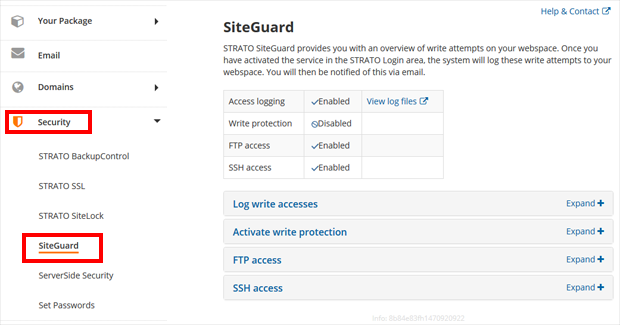
If this does not help, please add a new user to your WordPress Dashboard and send the following details to our email: communitysupport@brizy.io
- Community Post link: https://support.brizy.io/hc/en-us/community/posts/14542828151826
- WordPress Admin URL:
- Username
- Password
Please let us know here when you send us the email.
0
Please sign in to leave a comment.
Comments
4 comments