Brizy saved layout / blocks not importing (zip)

Hello,
I'm trying to transfer a Brizy layout from one site to another with export/import functionality.
Export works good. Import fails. Same for Blocks.
Fidelio-bonn.de -> fidelio.friendmade.com
Any ideas?
Best, Stijn
-

Hi Stijn,
Thank you for reaching out to us.
Is the same problem persisting when you temporarily switch to a different browser?
Best regards,
Ariel H.0 -
Hello Ariel,
Unfortunately yes. Tried both Safari and Chrome.0 -
Hi Stijn,
Thank you for the update.
Based on my understanding, you are trying to import the layout from Brizy WP to Brizy Cloud. Would you mind sharing the exported Zip file with us? This will enable us to recreate the issue on our end.
I am looking forward to your response.
Best regards,
Ariel H.0 -
Hi Ariel,
No, I am using Brizy WP on both installations.
Can I provide the ZIP in a private channel?0 -
Hi Stijn,
Please send it to communitysupport@brizy.io.
In the subject line, please add this reference number: 14528361671954Best regards,
Ariel H.0 -
Thanks. Mail sent
0 -
Hi Stijn,
Thank you for your cooperation.
I tried to replicate the issue; however, I had no trouble importing the Zip file as demonstrated on this screencast: https://youtu.be/3Egp-2AM3vs
To resolve this, could you please verify the PHP version on your server and ensure that the PHP memory limit is sufficient? You can follow the steps provided in this screenshot to check your server configuration - https://i.imgur.com/aMj4jSx.png
If you are using an older version of PHP, I recommend updating it to PHP v8.0 or a higher version. Additionally, if the PHP memory limit is set below 512M, please increase it to 512M for best results.
Please also review the other items highlighted by the red arrows in the screenshot.Please give this a try and let me know about the outcome.
Best regards,
Ariel H.0 -
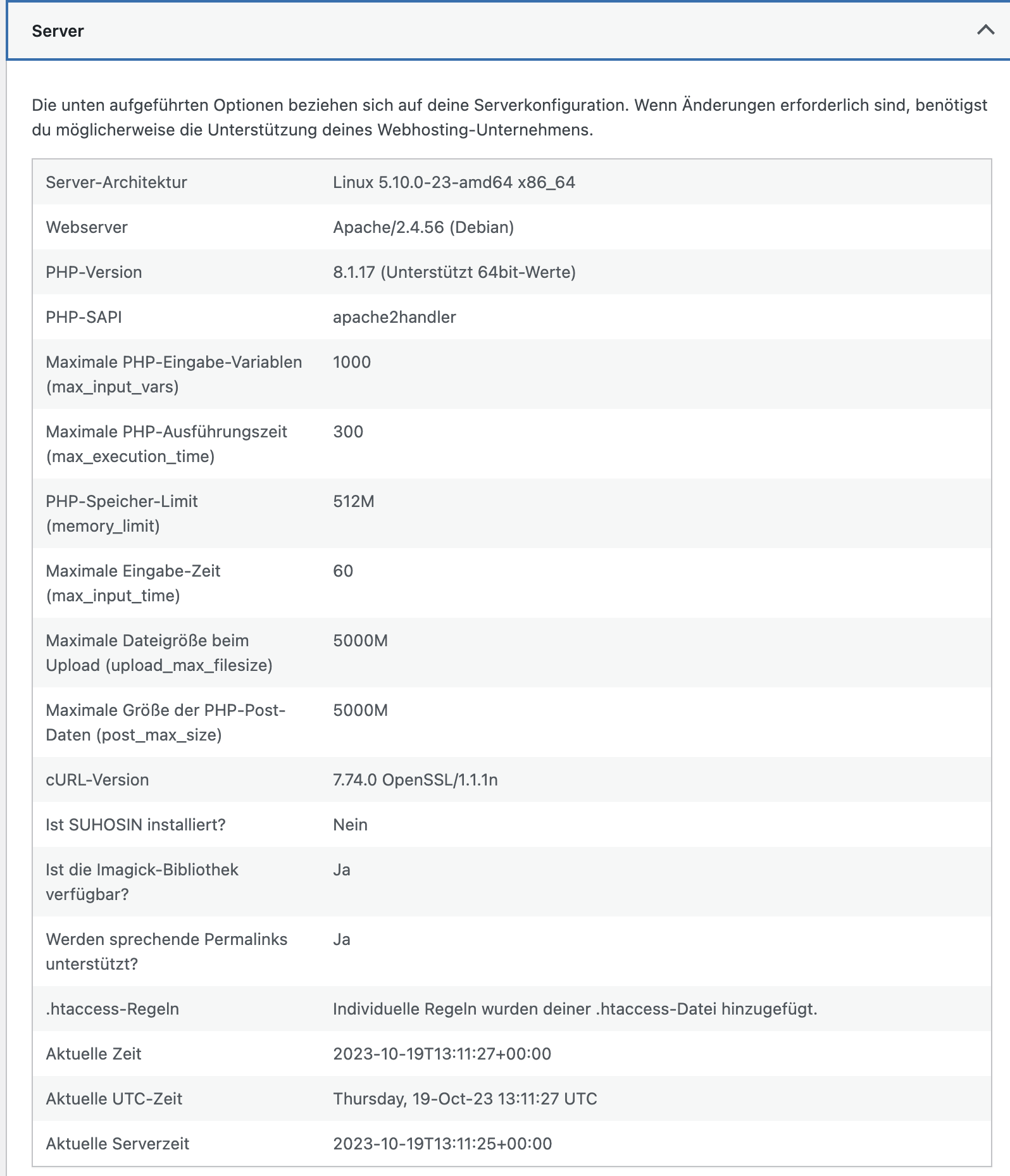 0
0 -
All looks normal I think?
0 -
Hi Stijn,
Everything appears to be normal. To further troubleshoot this issue, I recommend trying the following these steps:
- Deactivate one plugin at a time and check if the issue is resolved after each deactivation. This will help identify if the problem is caused by a specific plugin.
- Temporarily switch to a different theme and observe if the issue persists. This will help determine if the theme is causing the problem.
If the above steps do not resolve the issue, we kindly request temporary access to your WordPress Admin credentials. Please add us as a user to your WordPress Dashboard and send the following details to communitysupport@brizy.io:
Community Post link: https://support.brizy.io/hc/en-us/community/posts/14528361671954-
WordPress Admin URL:
Username:
Password:Please ensure that you have a full backup of your website before granting access, as a precautionary measure.
Best regards,
Ariel H.0 -
Hm. OK. I'll try thanks. Another problem just popped up: Accordions not opening.
Any chance cookies are used by brizy?
0 -
Hi Stijn,
Thank you for the update.
Could you please confirm whether disabling all plugins except Brizy and Brizy Pro resolves the problem with the accordion? If the issue persists, it would be helpful if you could grant us temporary access to your WP Admin credentials so that we can investigate the issue. To send your WP Admin credentials, kindly follow the instructions provided in my previous email.
Regarding the use of cookies, this is discussed in detail on this article:
https://www.brizy.io/cookie-policyBest regards,
Ariel H.0

Please sign in to leave a comment.
Comments
12 comments