WooCommerce: Missing elements

Good morning,
I would like to create an e-commerce site with Brizy Pro.
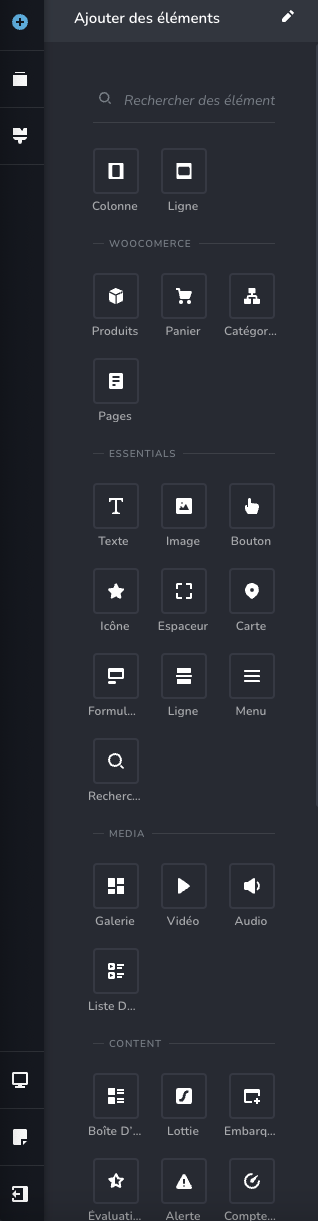
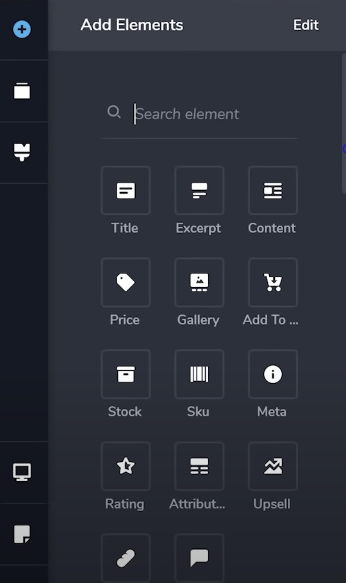
However, on my side the Brizy editor for WooCommerce is almost empty. I'm missing a lot of elements in the dragged/dropped elements (add to cart, price, gallery, stock, etc.).
In the Brizy settings, I activated all the fields for WooCommerce. Did I forget something?
Sincerely
This is what I see :
Here is what is on your YouTube channel for example:
-

Hi Maxime,
Thank you for reaching out to us.
These options can be found when you create a single product template or a product archive template.
To create a template for the Single Product page, follow these steps:
1. Ensure you've added your products to WooCommerce.
2. In Brizy, navigate to "Templates." Create a new template or select an existing one that you've prepared for Single Products.
3. Give it a meaningful name (if you've created a new template), and set the following Display Condition:
3.1. Template type: Product;
3.2. Display condition: Include - Products - All.
Be sure to click "Add" to apply the display condition and then publish or update the template. Refer to this link: https://jmp.sh/FeciVKq
4. Inside the template, carefully select the WooCommerce elements you wish to display on the Single Product Page, such as WooCommerce Title, Content, Price, Add to Cart, Reviews, and other desired elements. Don't forget to update the template to save your page modifications. You can view the steps here: https://jmp.sh/qYtmnxmIn addition, please note that if you are working on an archive template, the corresponding elements should appear in the left toolbar if the template has been correctly created.
If you have any further questions, please let us know.
Best regards,
Ariel H.1 -
Good morning,
Thank you for your quick response !
Problem solved, I did not click on the "add" button in the model display conditions.Thank you so much,
Good day
0
Please sign in to leave a comment.
Comments
2 comments