Unable to select image in media library

Hello, I am unable to select an image in the media library. When I try to add an image to the image element, the media library pops up, and I can click on an image but the "select" button in the bottom right corner doesn't work. It only happens when I'm building a page with the Brizy builder, it works on pages built without Brizy.
the site is https://ignitercreative.com
-

Hi Sean,
Thank you for reaching out to us.
This is something we would like to investigate from your dashboard. Could you please provide us with the WordPress credentials, so we can look into this issue further?
Please add us as a user to your WordPress Dashboard and send the following details to: communitysupport@brizy.io
Community Post link: https://support.brizy.io/hc/en-us/community/posts/14466444692625
WordPress Admin URL:
Username
Password
Also, include the URL of the affected page/sPlease make a full backup of your website as a precaution.
Meanwhile, If by any chance, you used embedded code on this page, please try to temporarily remove it and see if this makes any difference.
Please try this and let me know how it goes.
Best regards,
Ariel H.0 -
The page in question is https://ignitercreative.com/.
It only happens on the pages where I'm using the Brizy BuilderHere's a screen recording: https://share.getcloudapp.com/Kou9nWvJ
ignitercreative.com/wp-admin
UN: -------------
PW: -----------Sean Deminski
0 -

Hi Sean,
I have signed into your WordPress Dashboard. However I could not reproduce the image upload issue at my end. Please see this video for my test https://jmp.sh/O1kZU3Vd
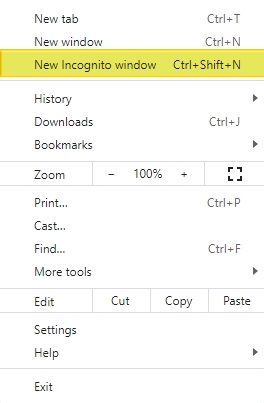
Please try signing into your WordPress Dashboard from a private (incognito) window of your browser and see you face the same issue.
 0
0 -
Ok thank you.
I tried a couple browsers, cleared my browser cache and my WP cache, I thought I tried Incognito mode, made sure I had adblockers and VPN off.... but I must've missed something. I'll go through this weekend and try those items again as well as another computer.
It helps a ton knowing it worked on your end. Hopefully its just a browser glitch, but I'll let you know if it happens again.
Thank you,
Sean0
Please sign in to leave a comment.
Comments
4 comments