URGENT -> Severe Issues Caused by Brizy Plugin

Hello Brizy Team,
My hosting provider informed me that the Brizy plugin is causing issues and they restricted access to the server. I can share the whole email but it has to be on a private thread.
"With this notification we would like to inform you that your account consumes a very high percentage of the server resources (processor time and memory) and thus affects the performance of the whole shared server. In order to keep the server at normal load, we had to limit the shared server resources your account can use.
We have conducted a thorough investigation which showed that one of your scripts loops and spawns too many processes. The script that loops (i.e. references itself) is: brizy plugin"
Could you please look into this as soon as possible?
Thank you,
Calin
P.S. Vorbesc romaneste si putem comunica in romana.
-

Hi Calin,
Thank you for reaching out to us.
This issue could occur for a variety of reasons.
Could you please provide us with further details, such as issues you encountered before this happened?
Can you change or edit your pages? If not, are there any error messages?Meanwhile, please ensure that you are already using the most recent version of Brizy and Brizy Pro.https://prnt.sc/UaHCvJnBCA5h
If you would like to share the whole email from your host, please forward it to communitysupport@brizy.io
I am looking forward to your response.Best regards,
Ariel H.0 -
Thank you for your reply Ariel! I do have the most recent versions of Brizy adn Brizy Pro and I will email forward the info.
Have a wonderful day,
Calin
0 -

Hi Calin,
Thanks for forwarding the email from the SiteGround team. Ideally Brizy should not cause a looping script. We would like to check why this is happening on your website and what we can do to stop this behavior.
We would need access to your WordPress Dashboard to investigate this. Please add us as a user to your WordPress Dashboard and send the following details to our email: communitysupport@brizy.io
- Community Post link: https://support.brizy.io/hc/en-us/community/posts/14425187519889
- WordPress Admin URL:
- Username
- Password
Please also add us as a collaborator to your website in your SiteGround account. Please follow the procedure in this article. Manage Users
Please let us know here once you have sent us these invitations.
0 -
Thank you for your reply George! I have emailed the information to the address you provided. Please note the invite will come from BigScoots.
Have a great day,
Calin
0 -
Hi Calin,
Thanks for the invitation to your WordPress and BigScoots Dashboards. I have added a support ticket in the BigScoots Dashboard asking them how to reproduce the issue they are facing with the HEAD requests. We will continue to work with them to resolve this issue.
0 -
Hi Calin,
I spent some time investigating this issue during the weekend. Like BigScoots support had mentioned, Brizy appears causing the unusual number of HEAD requests on your project. I am escalating this issue to our developers to investigate this further and to work towards a solution.
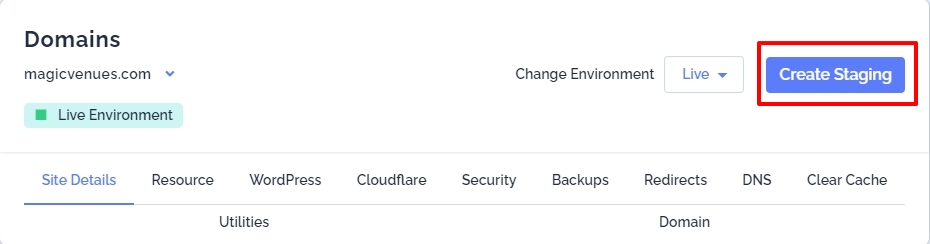
BigScoots allow you to create a staging site. Our developers can carry out investigation on the staging and you can continue to work on your live site. Do we have your permission to create staging?
 0
0 -
Good morning George,
Thank you for your reply! Absolutely, please go ahead and create the staging website if I can still work on my live site.
Have a great day,
Calin
0 -
Hello,
I am wondering if you managed to find anything that would help me fix this issue.
Thank you,
Calin
0 -
Hi Calin,
Yes; we have an update. One of our developers looked into this issue yesterday. He felt that Brizy is responsible for the issue on your website. We will work on fixing it; however we will need sometime before we can release a fix for this.
I rolled back to the previous versions of Brizy on your WordPress Dashboard, made a minor edit in one of your pages and checked the access.log file. This time, there were no HEAD requests recorded in the log file.
Prasul from BigScoots Support also confirmed that they are not finding any issue with your website at the moment. Hopefully we have a temporary solution in place. If there are any further update from BigScoots, please let us know.
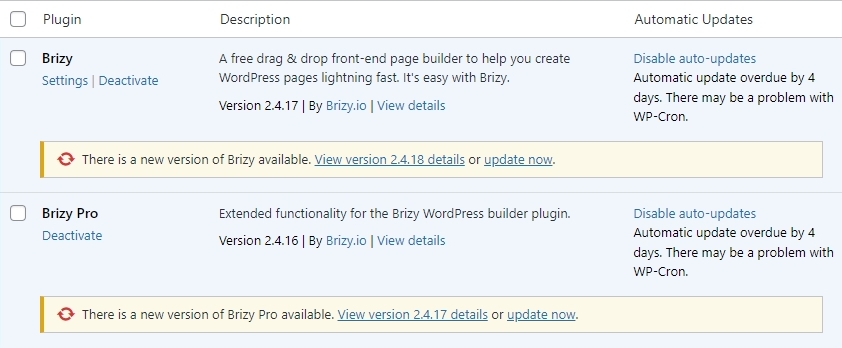
In you WordPress Dashboard you will see two update prompts for Brizy and Brizy Pro. Please do not update Brizy and Brizy Pro and retain its current versions.
 0
0 -
Good morning George,
Thank you for the update! OH! Sadly, I saw your message only AFTER I updated Brizy and Birzy pro. Would it be possible to roll back the update?
Thank you!
Calin
0 -
Hello Again George!
I used the Bigscoots backup form last night (prior to me updating Brizy) to restore the live website to its previous Brizy versions. Should I do that for the staging website as well?
Thank you,
Calin
0 -
Hi Calin,
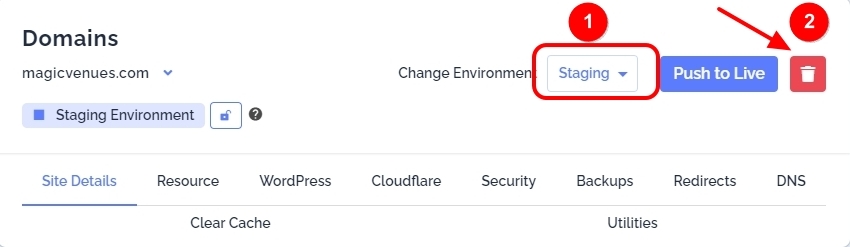
We created staging to carry out some tests. We don't need it any more. You can delete staging.
- Select staging site
- Click on the red/white delete icon
 0
0 -
Thank you George! Could you tell me when would I be able to upgrade Brizy and Brizy pro plugins?
Thank you!
0 -
Hi Calin,
Its difficult to say when you can update. Please keep it indefinite for now. When we make some progress, we will let you know.
0 -
Hi Calin,
I did say that we do not need the staging site anymore. However our development informed us that they would like ongoing access to your staging site to work towards a solution. If you don't mind, can we setup staging again and keep it for sometime?
0 -
Thank you George! I will not update Brizy for now. Sure, please go ahead and create the staging again.
1) Do you need my help? I cannot remember if I revoked the access...
2) Please note that I changed my website password. Do you need it?
Thank you,
Calin
0 -
Hi Calin
Thanks. I have created a staging site and have been in communication with BigScoots Support. As per their request, I have updated Brizy and Brizy Pro to its latest versions on your live site. They have agreed to get back to us if the past issue repeats.
We want to see if Brizy causes any server overload during your edits. Feel free to make some edits on the live site.
Let us give BigScoots team few days to a week to get back to us with their findings.
0
Please sign in to leave a comment.
Comments
17 comments