Font Issue - Slowing Site

Hello and thanks for looking over my question. I'm working on speeding up my site and have a list of items - fonts being an important item on the list. I only use Red Hat and Oswald on my site....
1- I'd like to know how to strip my site of all fonts I don't need.
2- Keep Brizy from reaching out to Bunny Fonts and Google fonts. I've seen code for other page builders but not for Brizy that I'm aware of.
3- Load the exact fonts into my site that I want used in the media library, and only have the user's browser use a different font if it can't use mine.
I'd like to get as close to accomplishing these things as possible, and any help would be greatly appreciated.
-

Hi Carl,
Let me go over your questions one by one.
1. How to delete unused fonts: Click on any text in the Brizy editor, select the Typography icon and click on "Add New Font"
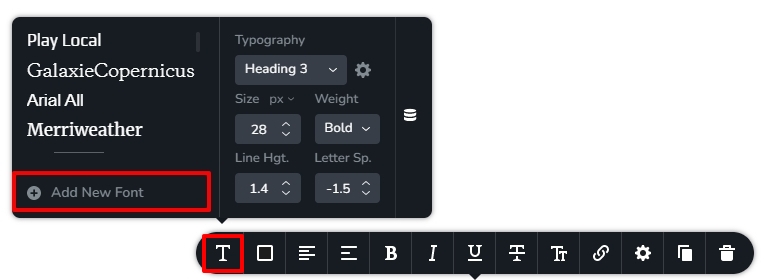 In the font library that opens up, select the Fonts tab and hover your mouse over any unused font and click on the delete icon that pops up to delete an unused font. Repeat the procedure for all other unused fonts.
Note: Unused fonts do not get downloaded in the website frontend. Hence removing unused fonts is not necessary. However if you find that a specific font is being downloaded in the website frontend and you can't locate which specific text uses the font, you may want to delete the font to prevent the font download.
2. How to host fonts locally? Please watch this video which was originally recorded to answer a similar question in this community forum. https://jmp.sh/ilw8LCU
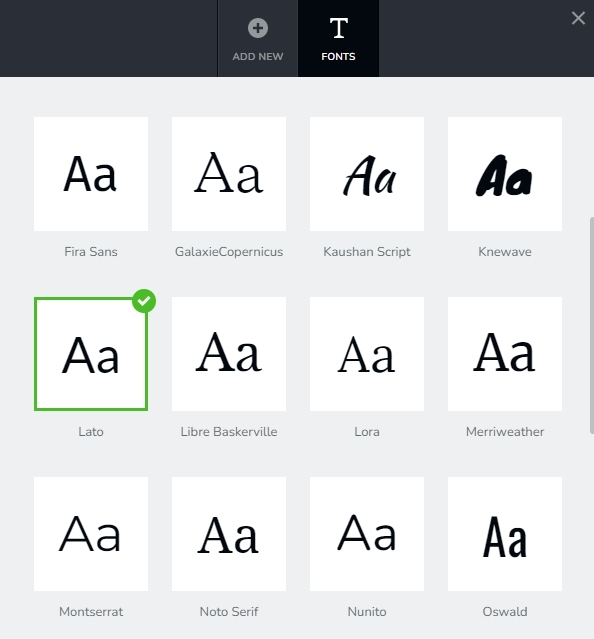
3. Set fallback font. I am not sure if I understand what you are asking here. Normally if you specify a font on your page and the specific font file is not included, a fall back font get used in its place. You can set a font as the fallback font in the Brizy font library by clicking on the font. The fallback font is highlighted using green border and a green tick mark.
 0
0 -
Thanks KC George. This helps a lot. I appreciate your assistance!
0
Please sign in to leave a comment.
Comments
2 comments