my plugin don't save my work

i can't save my job is important for me can i help me?
-

Hi Francesca,
Thank you for reaching out to us.
Could you kindly try using an alternative web browser to see if this resolves the issue? Additionally, please ensure that you have installed the most recent versions of both Brizy and Brizy Pro.
If the issue persists, you can try to identify the problem by following these steps:
- Disable all plugins except Brizy and Brizy Pro to check if you can save your pages. If this resolves the issue, it's likely that there is a conflict with another plugin.
- To pinpoint the conflicting plugin, re-enable the other plugins one by one while testing or saving your pages until the issue reoccurs. This process will help you identify the conflicting plugin.
- If disabling plugins does not resolve the issue, consider temporarily switching to another theme to isolate any theme-related conflicts.
Please try this and let me know how it goes.
Best regards,
Ariel H.0 -
He doesn’t work… I try anything… 😅
0 -
I send email I’m waiting for solution, please is more important
0 -
Hi Francesca,
Thank you for the update.
Regrettably, I have been unable to pinpoint the root of this issue. To conduct a more thorough investigation, could you kindly grant us temporary access to your FTP? Please share the FTP credentials with us through our community support email.
If you do not have access to your FTP details, we recommend reaching out to your hosting provider for further assistance.
I am looking forward to your response.
Best regards,
Ariel H.0 -
I send all to communitysupport@brizy.io
0 -
Hi Francesca,
Thank you for keeping in touch.
The FTP credentials are different from your WP Admin credentials, which we already have.
I kindly request that you reach out to your hosting provider and ask for the FTP details.Best regards,
Ariel H.0 -
I send FTP
0 -
Hi Francesca,
Thank you for your cooperation.
Upon checking, it appears that Brizy is denied in saving changes to your pages, as indicated by the entries found in your server's error log:
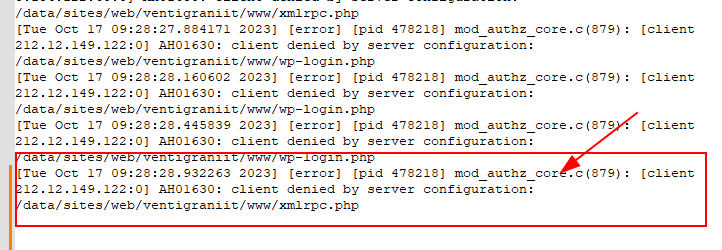
Changes are denied due to server configuration rules.
To resolve this issue, you may need to ask your hosting provider to review and adjust the server's configuration to allow access to the file for the specified client or address the underlying access control rules.
Please try this and let me know how it goes.
Best regards,
Ariel H.0
Please sign in to leave a comment.
Comments
8 comments