Pages won't update

Hi Folks
Site has been working well, however the other day the brizzy plugin was out of date (not the pro version but the standard plugin) It removed my headers and pro content until I updated.
So I have updated the plugin and everything appears as normal again but when I try and publish, the update hangs. I have removed the current license and added a new one in case that was the issue but it is still happening.
Any thoughts on this one?
-

Hi Matt,
Thank you for reaching out to us.
Please try the following steps and see if this will help:
- Disable one plugin at a time and assess whether the problem is resolved.
- Temporarily change to a different theme and assess whether the issue disappears.
If all the above didn't help, please provide us temporary access to your WP Admin credentials, so we can further check the issue. Add us as a user to your WordPress Dashboard and send the following details to: communitysupport@brizy.io
Community Post link: https://support.brizy.io/hc/en-us/community/posts/14390602448530
WordPress Admin URL:
Username:
Password:Please make a full backup of your website as a precaution.
I am looking forward to your response.
Best regards,
Ariel H.0 -
Hey Ariel
I'm having the same issue on the sister site to the one I posted prior.
I have disabled the 3 plugin that were added in the last month, however even 5 days ago I was able to save via the update button. The option to update isn't available.
I have ensured the brizy plugins are both latest versions. Any other thoughts ? 0
0 -

Hi Matt,
If you schedule a WordPress page to be published on a future date, the Brizy update button can misbehave. We are working on fixing this bug.
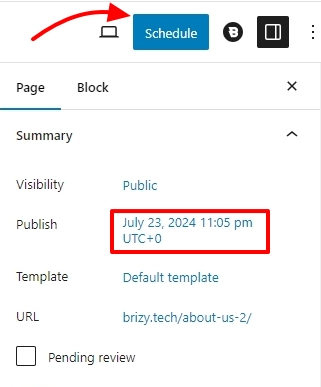
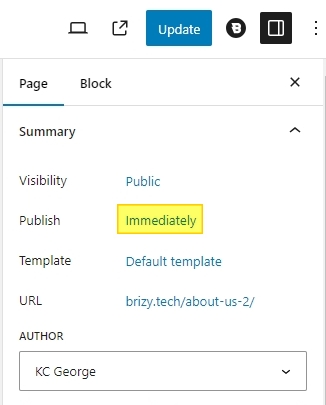
In the interim, kindly follow this work around. You should be able to update the Brizy page if you publish the page right away. Once you have updated the page, you can schedule the page to be published again at a later date and time.
 0
0
Please sign in to leave a comment.
Comments
3 comments