Custom Open Type Font Stylistic set on Cloud and Wordpress?

Hello,
how can I use a particular style set of Open Type Font in Cloud project please? Should I put a code to Custom CSS? Like this one?
@font-feature-values Custom-Font-Name;
{
ss01 off;
ss02 off;
ss03 on;
}
And the same question is about picking up particular stylistic set in opent type font /or woff etc. in Wordpress. If I upload a custom font and than insert appropriate CSS in child theme, or customizer, will that work? Thank you
-

Hi Marek,
Thank you for reaching out to us.
Unfortunately, the feature you mentioned is not supported, you can only upload custom fonts to use on your website - https://support.brizy.io/hc/en-us/articles/360042085192-How-to-upload-your-custom-fonts
If you have any further questions, please let us know.
Best regards,
Ariel H.0 -
Hi and thank you for quick reply,
So let me please clarify: it is not possible to use stylistics sets for either Open Type fonts or woff tec. either in Wordpress with Brizy builder Pro, neither Brizy Ćloud?
No chance? Not even if I put the code to child theme in WordPress for example?Thank you,
with kind regards
Marek
0 -

Hi Marek,
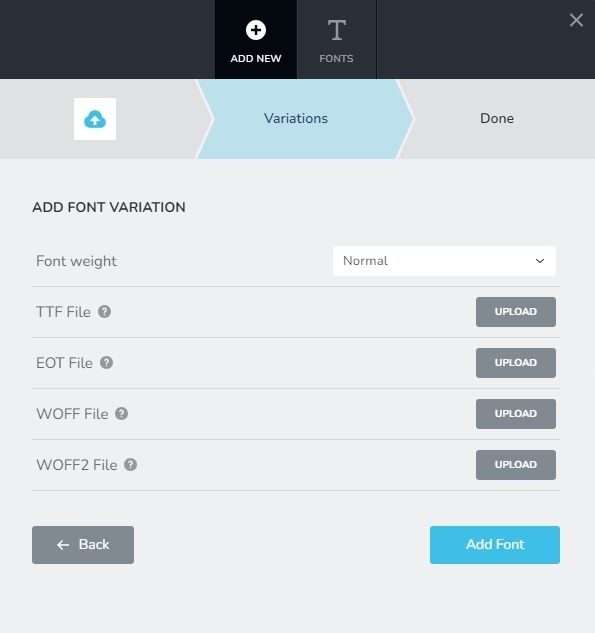
If you can find stylistics fonts in TTF, WOFF, WOFF2 or EOT file formats, you can upload them to Brizy Cloud or Brizy WordPress.
If you would like to use a specific Open True Type font on your website, please convert it to TTF/EOT/WOFF/WOFF2 using a service like these and upload it to Brizy.
 0
0 -
Hi George and thanks for response. I am aware how to do such things you mentioned, I was asking about using a Stylistic Set which some Open Type fonts have. For example a slightly diferent “l“ or “a“, sometimes so called old style figures etc. If you use f.e. InDesign, or whatever even simle Apple Pages, KEynote etc. than there are under Typography an option for Stylistic Set (may be called differently, depending on app). Please take a look here: https://www.myfonts.com/products/bold-ladislav-412650 I am attaching a screenshot, you will find it under “ff“ button. And there is usually possible to use some CSS to tell Wordpress /or other sstem/ which Stylistic Set to show. And What I wanted to know, if this is possible 1. in case fonts are loaded to Wordpress through Brizy Upload Custom font 2. in Brizy Cloud And if you were answering this question of mine, than I still do not know how to do it, as you wrote: If you can find stylistics fonts in TTF, WOFF, WOFF2 or EOT file formats, you can upload them to Brizy Cloud or to Brizy WordPress. I do not see how to choose the stylistic set, only a Font weight. So the only way would be to use CSS somehow? Thank you Mark
0 -
Hi Marek,
I have added the font Quarantype Sackrace from https://www.myfonts.com/ into my Brizy Cloud project https://restaurant1.brizy.site/ You can see the font in the hero section of the homepage.
In the following screen recording, I demonstrate to you how you can add a font downloaded from https://www.myfonts.com/ in your Brizy Cloud project. Please watch it here https://jmp.sh/O6l2mD3n
 0
0 -
Hi KC George,
and thank you for your effort and tutorial. I really appreciate it, although I know exactly how to do all things you mentioned and showed to me (those things are clear to me and I am used to them). So my apology – I must did a not really clear explanation of my problem, although I think Ariel.H did get that.
So what I was asking about, when I know the process you explained?
Some fonts do have so called „Stylistic sets“ (or similar) inside them, they contain more style variations. And by that I do not mean their weigh or italic, bold, etc. Those stylistic sets are nuances, like different “a“ or “g“ or many other nuances. Some contain so called “Old style figures“ as well. I do not know how you can determine on Windows what I am talking about. You can find it in Adobe apps like Illustrator, InDesign etc. Maybe in Infinity Designer and similar apps. I am on Mac and in OS X probably ever app has the option to see stylistic sets and you are able to choose them, if the font contains them..
Usually, if you use font with stylistic sets/variations on web, you can use CSS to „call“ the specific set – so it is displayed on a front end... This is possible in Wordpress /well meybe some themes could interfere with that, maybe. And MAYBE this is possible to do in Brizy Cloud, if a proper CSS code is added somewhere in Brizy Cloud (and I am not that experienced with the Cloud platform yet, so I do not know).
Anyway, I asked the font vendor, Mr. Tomas Brousil from Suitcase Type Foundry and he was so kind to crreate a special font file, that contained my desired Stylistic set as default and that solved the problem (I highly recommend his fonts to everyone :)
Here is example of 2 variations in stylistic set in one font Ladislav, named after Czech designer Ladislav Sutnar, who lived in USA since approx 1939 and is considered as inventor of web design years before internet:
https://en.wikipedia.org/wiki/Ladislav_Sutnar
https://www.typotheque.com/articles/ladislav-sutnar-web-design-before-the-internet (I hope you wouldn't mind this little propaganda of his genius :)
PS – on myfonts.com web you can find those Stylistic sets/variations under Individual Styles TAB:
https://www.myfonts.com/collections/ladislav-font-suitcase-type-foundry?tab=individualStyles
0 -
Hi Marek
I apologize for not understanding your request because I was not familiar with the concept of stylistic sets. I appreciate the details you have shared. I've learned something new today.
0
Please sign in to leave a comment.
Comments
7 comments