black beam pops up when hovering over main menu

Hi,
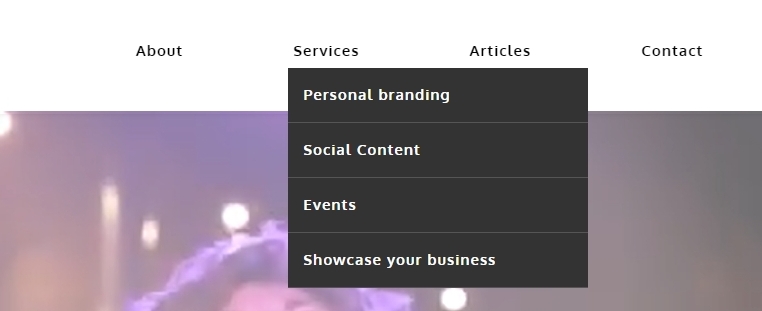
I noticed that whenever i hover over the main menu on 2 websites. a black beam pops up under it. Look a bit weird.
You can check it on www.nouksvisuals.nl
-

Hi Anouk,
When you say "a black beam pops up under it" are you referring to the drop down menu? How would you like to redesign your drop down menu? Would you like to customize its background color and its menu text colors?
 0
0 -
Hi George,
No sorry thats not what I mean. As the black bar or beam shows over the full width of the horizontal main menu in the top.
0 -
Hi Anouk,
On the page https://nouksvisuals.nl/about/ when hovering over the 'Articles' menu, I see a black rectangle which appears below the menu. On other pages, this does not happen.

On the About page, if you have enabled the Mega Menu option for the "Articles" menu, please disable it.
 0
0 -
Hi,
Thanks for your reply.
Mega menu wasn’rt enabled.
0 -
Hi Anouk,
Let me suggest two possible solutions here
- You can import the header you are using on any other page and delete the header on this page since the aforementioned issue only affects the header at https://nouksvisuals.nl/about/. Save the header on another page, then select the saved header from the Saved Blocks library to import the header to your About page.
- We need access to your project to correct the header problem on https://nouksvisuals.nl/about/. Send us the user credentials to communitysupport@brizy.io after adding a user for us in your WordPress Dashboard. We will fix it on your Dashboard.
0
Please sign in to leave a comment.
Comments
5 comments