Strange ID in menu

We are working in this site https://envera.infofuturo.es/ and we need to pass a triple AAA accesibility test, the thing is that in the button in the right top corner called "Ir a delegaciones" we have a strange piece of code:
<a class="brz-a brz-btn brz-css-wcxaq brz-css-qlsko" href="https://envera.infofuturo.es/delegaciones/" data-brz-link-type="external" id="" data-custom-id="retzhrqmqvkopjbbiezktupxjwvqckukyxbk" role="link"><svg version="1.1" xmlns="http://www.w3.org/2000/svg" xmlns:xlink="http://www.w3.org/1999/xlink" x="0px" y="0px" viewBox="0 0 24 24" xml:space="preserve" class="brz-icon-svg align-[initial] brz-css-iqama" data-type="glyph" data-name="stre-right"><g class="nc-icon-wrapper" fill="currentColor"><path fill="currentColor" d="M8.809,23.588l-1.617-1.176L14.764,12L7.191,1.588l1.617-1.176l8,11c0.255,0.351,0.255,0.825,0,1.176 L8.809,23.588z"></path></g></svg><span class="brz-span brz-text__editor">Ir a delegaciones</span></a>
There is a empty id befores de data-custom-id attribute.
Could you say us the reason for this to happen?
It is also happening in the items menu.
Thank you in advance
-

Hi,
Thank you for reaching out to us.
To help us better understand the issue, could you please provide us where on your website we can find this, so we can further check the issue?
I am looking forward to your response.
Best regards,
Ariel H.0 -
Please read the question again, all the details and the url are in the question!
0 -

Hi
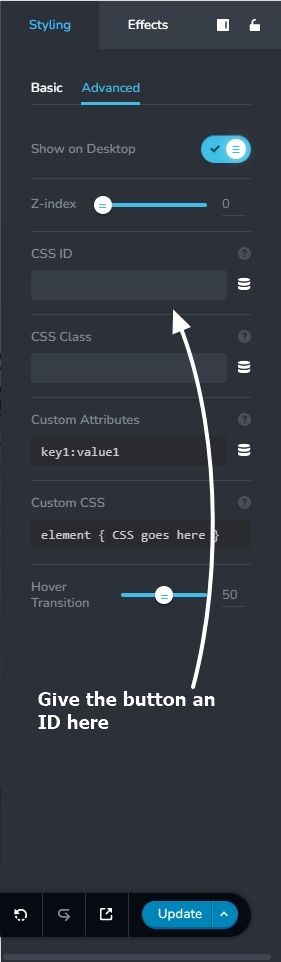
If your purpose it to get rid of the blank ID, please assign your button a CSS ID here.
 0
0
Please sign in to leave a comment.
Comments
3 comments