SSL certificate

Hello,
We do not have an SSL certificate for the www.susenconference.com domain. The page is redirected to HTTP:// We need to activate SSL certificate for this domain urgently. Aren't certificates generated automatically? Do we need to request a certificate when connecting to each domain?
Thank you for the quick response and resolution.
Regards
Michal
-

Hi Michal,
Thank you for reaching out to us.
To address this issue, I suggest following these steps to resolve it.- Start by deleting your domain from the current configuration. This will remove any existing settings associated with the domain - https://imgur.com/yEJ89mP.png
- Next, add the domain again. This will initiate the process of re-establishing the SSL Certificate specifically for your domain name.
Please try this and let me know how it goes.
Best regards,
Ariel H0 -
We did exactly what you told us to do. We deleted the existing domain and then reconnected to the domain: www.susenconference.com. However, again there is HTTP and the website does not work.
Please provide urgent assistance.
0 -

Hi Michal,
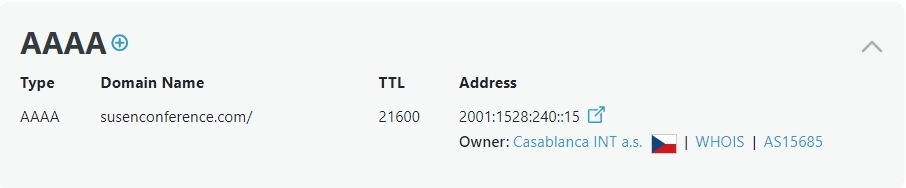
A DNS look up of your domain shows that apart from the A Record you have added to your domain, you also have a AAAA Record. Please delete the AAAA record with the IP 2001:1528:240::15 and get back to us. We will help you with the SSL certitificate.
 0
0 -
Hello George,
I deleted the AAAA record.
Michal
0 -
Hi Michal,
The SSL on your site is now working, please try it at your end to confirm.
If it doesn’t work, try clearing your browser cache, or try it in incognito mode - https://i.imgur.com/eaFxdXl.pngIf you have any further questions, please let us know.
Best regards,
Ariel H.0 -
it's already running. Thank you so much, you are great..
Michal
0


Please sign in to leave a comment.
Comments
6 comments