WP Foro with Brizy template

I just installed WP foro forum plugin
The forum shows fine with the default template (see image below) - except that the main menu not shown properly. but when I click "edit with Brizy", it breaks the link.
Is it possible to show the menu that I created using Brizy template that now shows up on all pages but not on this forum page?

-

Hi Sophia,
To the best of our knowledge, WPForo does not integrate with Brizy well. It may be better to leave the forum pages with the theme design. When a community forum is setup on a subdomain, the overall design of the forum can vary from the design of the main website. You may want to consider setting up the forum on a subdomain like in these examples.
- https://community.elfsight.com/ (https://elfsight.com/)
- https://forum.rasa.com/ (https://rasa.com/)
- https://support.brizy.io/hc/en-us/community/topics (https://www.brizy.io/)
0 -
Thanks KC
I actually manage to create the forum with Brizy header and all functions seem to work well except this small problem. The menu item shown as #3344 (no title) when the forum menu is clicked & active. All other times, where other pages are active, it is shown as how it suppose to - "forum". See below.
Any idea why this is and how to resolve it? Thanks
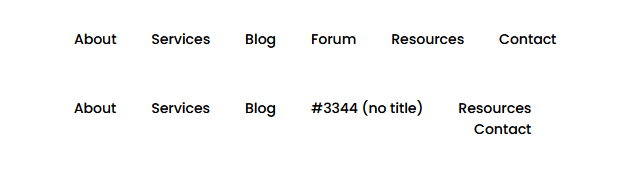 0
0 -
Hi Sophia,
In your WordPress Dashboard under Appearance - Menu, please select the appropriate menu and delete the entry #3344 (no tilte) from the menu. Then select the Forum page under the title 'Add menu items' and click on 'Add to Menu' button to add the Forum to your menu. Save your menu and check the header menu in the website frontend.
 0
0 -
Hi KC,
The menu does not show #3344 no title, it's already showing "Forum". As that is what is showing properly on all other pages. For some reason, this problem only appear Forum page is the active window.
 0
0 -
Hi Sophia,
We will need access to your project to take a closer look at the issue you are facing. Please add me as a user to your WordPress Dashboard if you need assistance with this. Send the following details to our email: communitysupport@brizy.io
- Community Post link: https://support.brizy.io/hc/en-us/community/posts/14113252826769
- WordPress Admin URL:
- Username
- Password
Please let us know here when you send us an invitation.
0 -
Thanks KC, I found a workaround now, all good. For anyone out there facing same problem, I found the answer in the wordpress thread below and it works. The menu text can not be exactly the same as the post title, so when I update this, it shows up properly.
0
Please sign in to leave a comment.
Comments
6 comments