resdesign whole site as draft before publishing

Hi
How can I redesign our whole website as draft before publishing it?.
We currently have a wordperess site with brizy Pro
-

Hi Torben,
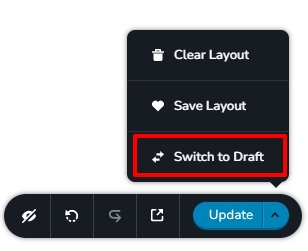
You can switch a page to draft mode in two ways
- Open the page in the Gutenberg editor and click on 'Switch To draft' https://jmp.sh/fAzHhGLi
- Open the page in the Brizy Editor and at the right bottom corner select "Switch to Draft"
 0
0 -
Thanks :)
But I was more thinking of creating a whole new site before publishing it and let the old site run until the new site was ready.
0 -
Hi Torben,
If you would like to redesign your website without disturbing your live site, you can create a staging site, redesign your website in staging and when you are happy with the redesign, migrate your staging design to your live website.
Several hosting companies provide you the staging facility. Please have a look at this article https://www.wpbeginner.com/wp-tutorials/how-to-create-staging-environment-for-a-wordpress-site/
If your hosting company does not provide this feature, you can clone your website with the help of a WordPress migration plugin. Please have a look at a few WordPress Migration plugins here https://wpastra.com/plugins/wordpress-migration-plugins/
0 -
Hi KC
Thanks our hosting has the staging site option :)
Do you know if I can use my brizy pro "one site" licens on the staging site during creation of the site?
0 -
Hi Torben,
Yes; you can use the same license for the main domain and the staging domain.
0
Please sign in to leave a comment.
Comments
5 comments