Footer does not stays at the bottom.

Hi,
Can we place the footer fixed at the bottom of the page because if i put less content on any page it comes upwards. I want to be fixed at the bottom of the screen. How can i do that?
-

Hi Vikas,
If the page content is less than the screen height, please consider adding the spacer element after the content to push the footer towards the bottom of the screen. Have a look at this page: https://restaurant1.brizy.site/spacer
0 -
That i know but the thing is it works on small laptop screen but on a big 27 inch monitor the spacing falls short.
0 -
Hi Vikas,
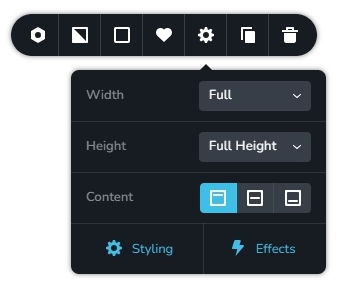
Please make the block full height and check if that helps. For example, visit this page on 27 inch monitor. https://restaurant1.brizy.site/spacer
 0
0 -
This does not solves the problem. This adds alot of space below the footer. Please suggest another alternative.
0 -
Hi Vikas,
Please share a page URL where you have attempted to implement the above idea. I would like to see the space below the footer.
If you have a specific page design you are trying to replicate, please share that URL as well. I will attempt to recreate the design for you.
0 -
http://www.vikaskanwal.design/contact-2/
Plz check the above link.
0 -
Hi Vikas,
Please have a look at my test page https://brizytest.online/footer/ and check if the footer stays at the bottom in different display screens.
Please watch this screen recording for the procedure to implement this design. https://jmp.sh/7Ji8BqaU
0 -
The problem remains the same. I think i have to put some content between the page so it does not look out of proportion.
0 -
Hi Vikas,
Have you tested my page https://brizytest.online/footer/ on different devices? I would expect the footer on this page to stay at the bottom on all devices. Please see my screen recording https://jmp.sh/yMKIrTf7
If this works well and if you give me access to your project, I can implement the same design in your project.
0 -
I tested the page but there still was some scroll coming. I have added some content inside the page now so that the footer automatically goes down to scroll. Anyway, thanks for the support.
I have few more things to ask though if you can help me.
1. Hamburger menu shows a line on the top. How to remove that?
2. How can i have smooth movement of the hamburger menu?
3. On the mobile version the written email id shows underlined. How to remove that?
Here is the link.
https://www.vikaskanwal.design/home0 -
Hi Vikas,
1. To remove the border line on top the menu texts, please click on any menu text, select the color icon and under the border tab, set the border to zero
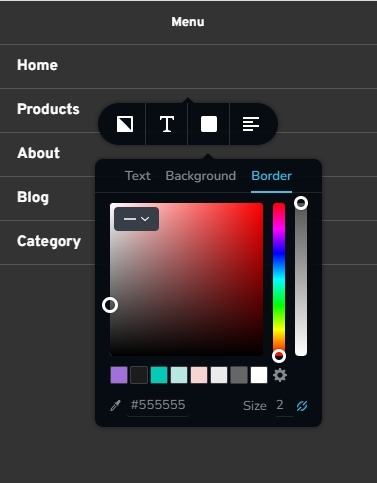
2. The hamburger menu does not allow flexibility to make opening the drawer slower. You could consider an alternate method to setup hamburger menu following the procedure in this video. 3 Ways to Use Popup Builders: Website Navigation, Back to Top Button, Deals or Cookie Notification The video is divided into 3 parts. This procedure is in the first part. You can then set an entrance animation to the popup to implement a smoother opening of the drawer. For an example of an implementation using popup, please see the hamburger menu at https://www.rishikeshwalks.in/
3. Email address does not have an underline at my end. https://jmp.sh/kGwWz4RU Which browser are you using? Can you share a screenshot?
0
Please sign in to leave a comment.
Comments
11 comments