Brizy Cloud limit

I have purchased Brizy Cloud Pro. It seems to be free only for 3 domains/projects, which I installed in former times. Now it seems, the following projects have to be bought once more, isn't it?
-

Hello Robert,
My name is Natalia, Brizy team.
Thank you for your message.
You are subscribed to our old Personal package, that allows to publish 3 projects with a custom domain.
If you want to publish more projects, you need to subscribe the one of our current PRO package. By the way, we have great discount these day, please check - https://www.brizy.io/pricing-cloud ;
Best Regards, Natalia
0 -
That means, subscribing a new PRO package I will be allowed to publish 3 new projects?
Best regards, Robert
0 -
Hello Natalia,
I now payed for a new PRO package in expectation for 3 further custom domains. It was payed by a customer of me called Eva Jacobi, mailadress eva.......eb.de (user name) last Friday. Now I thought I could publish her website (eva-jacobi.de) with my own account, since I have purchased the new package through my own account (rs@........ign.de). I thought you needed a bit of time to install everything and therefore I awaited this through the weekend. But today it still doesn’t work. When I try to publish the new site I am prompted to buy the new package again although I did so!Could you please help me what went wrong or what to to?
Regards Robert
0 -

Hi Robert,
As my colleague Natalia had mentioned, you are subscribed to our earlier Personal plan, which allowed you to publish 3 hosted websites on custom domains. This plan is no more available. Our current Personal plan allows only 1 hosted website on a custom domain. You can see our current plans here https://www.brizy.io/pricing-cloud
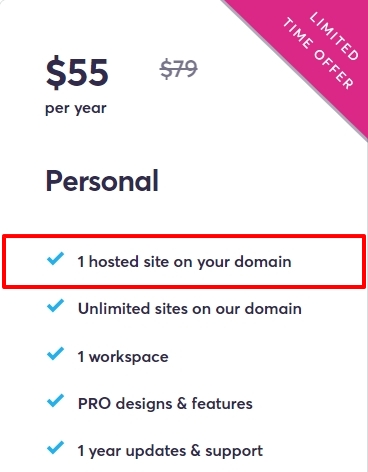
Eva Jacobi has bought the Personal plan and her account can publish 1 website on a custom domain. She can invite you as a Team Member to her Workspace. Once you accept her invitation, you can have access to her account. Please have a look at this video tutorial Team Members & Roles | Brizy Cloud 101 | Lesson 05
You will have to recreate the project in her account. These are the steps
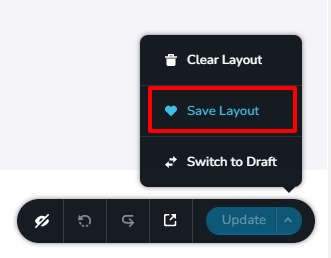
- Save each page as a layout by clicking on the Up arrow next to the Update button and then selecting 'Save Layout'
- In the project under the client workspace, add new pages and import the page layouts one by one
- Recreate the menu
- Copy paste the Global Colors and Typography from your project to the client project
- Copy paste Project Settings from your project to the client project
- Re-setup Email Notifications for any forms you have added
 0
0 -

Your description how to recreate a finished project of my account importing it into the account of my customer is very very astract for me! Point 1 is understood, but 2-6 is only a common description, not the concrete way where to click step by step.
Is there any video or could you please tell me exactly what to do?
Thx Robert
0 -
Hi Robert,
I have recorded a video for you demonstrating the steps for transferring a project from your account to the client account. https://jmp.sh/yEcoCPMJ
If you have questions after watching the video, please let me know
0 -
Hello George,
This is Robert, the designer/manager of Eva Jacobis Homepage. Thank you for the video.
Yesterday Eva invited me to her workspace. It is pending yet. Because of this today I tried another invitation, but an error occurs, see attachment.
Next: in your video you have your own account and the account of the customer signed in at the same time. This seems not possible, because I have to sign out to get access to another account.
Please take care of maintenance and give an answer to my question.
Thx Robert
 0
0 -
Hi Robert,
The invitation is pending because you have not accepted her invitation by clicking on an email you have received. Click on 'Get Started' on the invitation email.
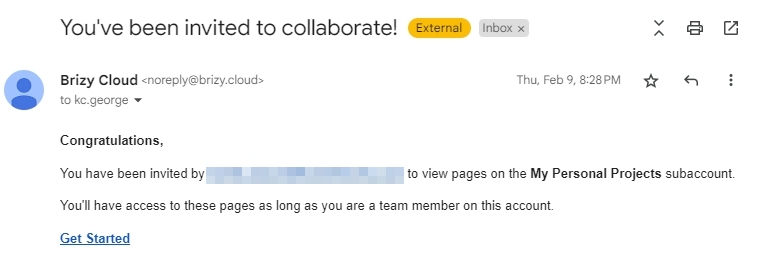
Once you accept her invitation, her workspace will appear along with yours in your account. I had a workspace with the name "Eva Jacobi" in my video. In the same way, her workspace will appear in your account. In my video, I had opened two tabs of Brizy Cloud Dashboards of my own account.
0 -
Hello,
Can you show me the way step by step, how to upload private key and SSL-certificate to brizy?
I need to make my brizy-sites secure.
Thx for help,
Robert
0 -
Hi Robert,
SSL is normally autogenerated for Brizy Cloud projects. Please let us know the domain names of the projects for which SSL needs to be generated. We will guide you on the process.
0 -
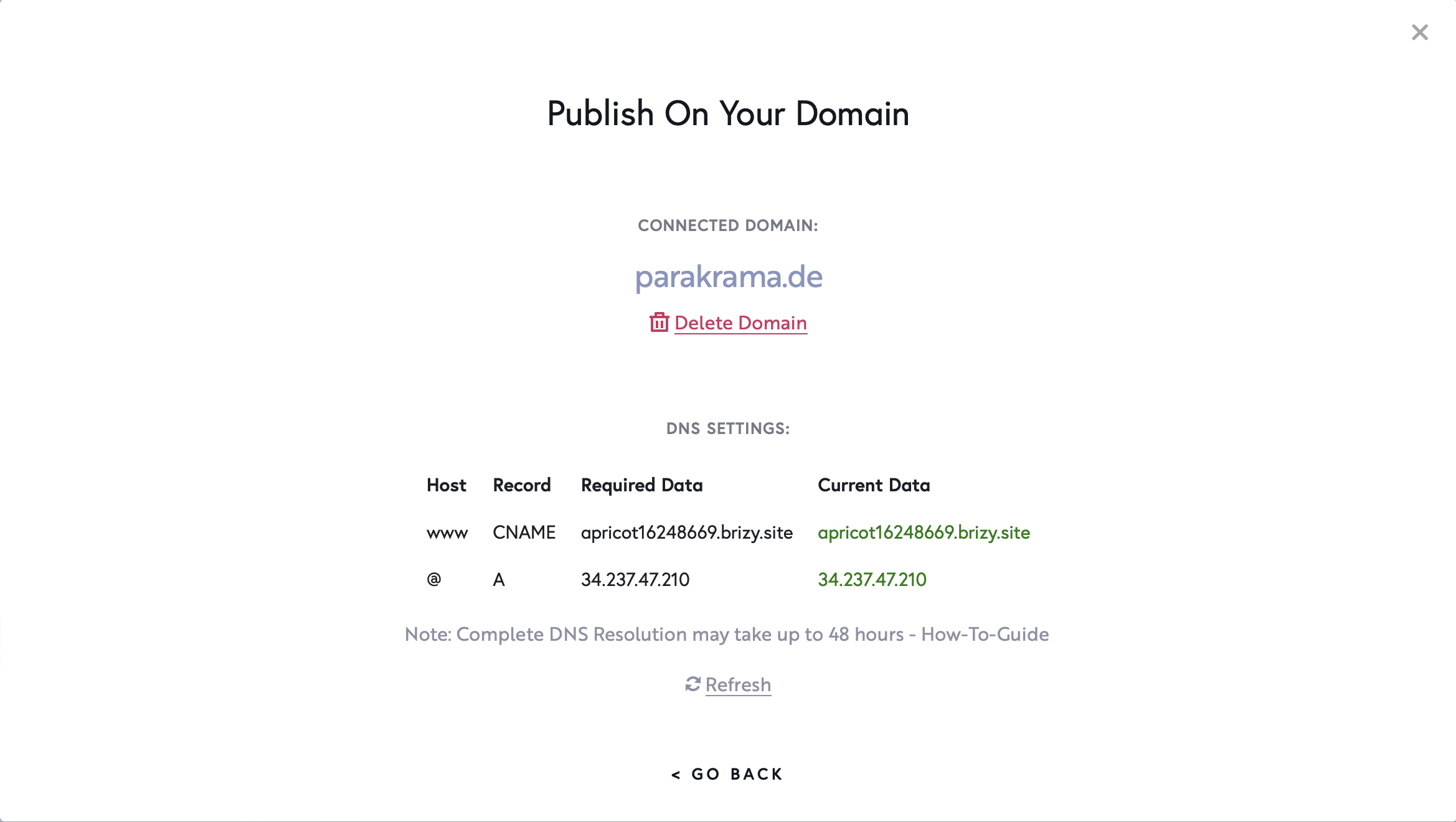
Maybe SSL is autogenerated, maybe this is NOT the problem. Fact is, that the domain www.parakrama.de does not work, message "browser cannot open this site". The domain is connected with ionos and the connection seems to be ok, see attachement.
Thx for your help, Robert
 0
0 -
Hi Robert,
Apart from the A Record you have added, your domain also has a AAAA record with the IP:
2001:8d8:100f:f000::22b. Kindly login to your Ionos.com domain account and delete this AAAA record.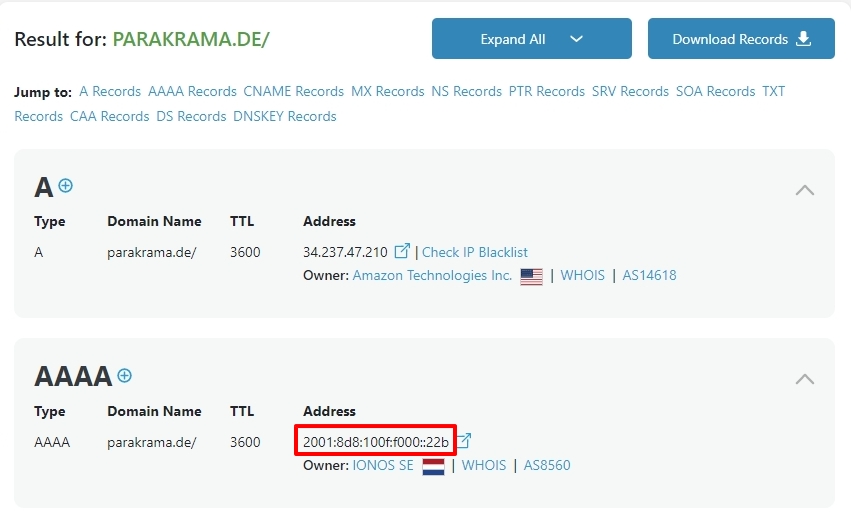
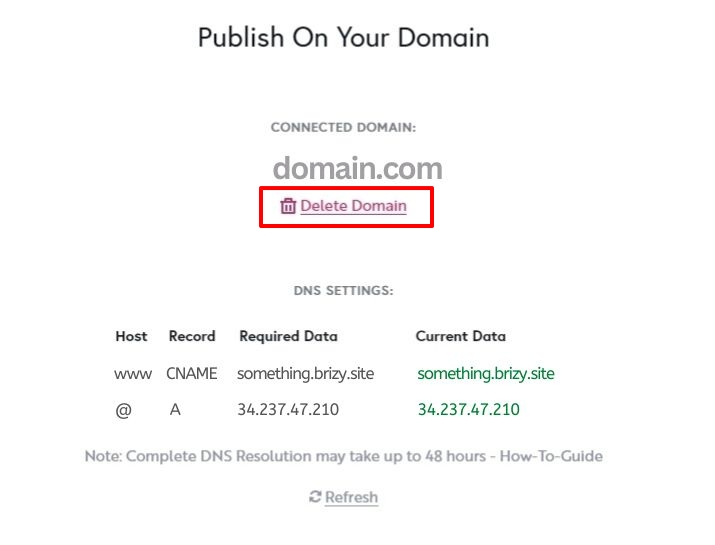
As the next step, in your Brizy Cloud Dashboard, under the 'Publish On Your Domain' screen, delete your custom domain, add it again and wait for half an hour for the SSL certificate to be auto generated.
 0
0 -
Thanks a lot for your fast support : )
Robert
0
Please sign in to leave a comment.
Comments
13 comments