How to use Brizy Pro and Astra Pro together

Hello! Can you, please, tell me how to use Brizy Pro and Astra Pro together. i have already everything installed within plugins with licences key added; however, when i choose any of the Brizy templates and try to adjust anything using Astra, nothing is working for me. i would really appreciate if you can tell me step by step what needs to be done to avoid any issues in the future. Thanks in advance!
-

Hi Eliza,
Thank you for reaching out to us.
As I understand, you are trying to adjust the templates made with Brizy with Astra. Unfortunately, this is not possible because pages made with Brizy don't work with the Astra theme's editing features.
If this does not answer your question, could you please provide us with additional information or specifics about the problem you are encountering?
If you could provide any additional details, such as error messages, screenshots, or steps to reproduce the issue, it would be greatly appreciated.
Best regards,
Ariel H.0 -
Thank you for your reply! So do you mean that Astra and Brizy cant work together? I havent created a page yet but what I want to do is to use Astra PRO theme together with Brize PRO page builder + in Brizy PRO I also see some preset page templates that i can potentially use. Can all of this work together? If not, then whats the best way to use it?
And also, can you tell me whether its worth using these both platforms together then?
Thank you!
0 -
Hi Eliza,
Thank you for the update.
They work together; however, it is not possible to use two page builders to edit the same page at the same time. Each page builder creates its own custom code and structure, which can lead to conflicts and errors when used together.
If you edit a page with Astra editing features, you can only edit that specific page with Astra. The same applies to editing pages with Brizy.
If you have any further questions, please let us know.
Best regards,
Ariel H.0 -
Hi Ariel,
Can you, please, explain to me how can I make them work together?
When I tried Astra and Elementor, they worked for me together and i was able to customize the page template with both platforms. That's why I am a bit confused with Brizy. I thought Astra is mainly a theme and Brizy is a page builder or they are both page builders then? I opened one of the Astra web articles about Brizy and they said to add starter template plugin, open its themes with Brizy (I went to WP general settings to enable Brizy for starter template), then i chose one of the non-premium themes and after that I could not edit header logo for example.
I really appreciate your help!
0 -
To make sure you understand better what issue I'm facing, here are the screenshots attached step by step:
1. As previously mentioned, I have purchased Astra PRO to get a light theme for my new website; Then I installed Start Templates plugin from where I can import Astra theme template I need using Brizy page builder (Brizy is not available anymore in Starter Templates by default anymore thats why I firstly enabled Brizy for Starter Template in the WP settings); please, see photo attached
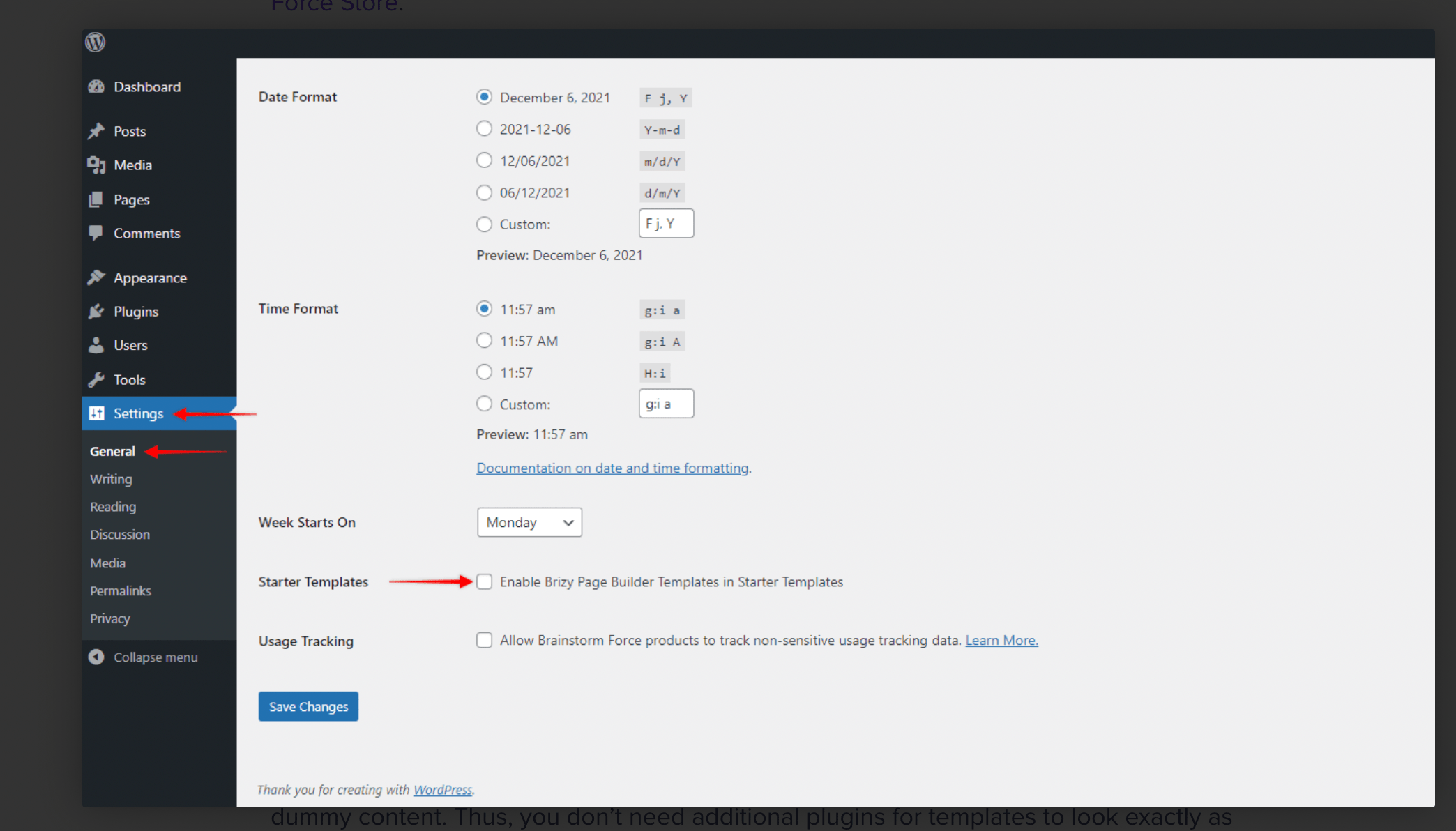
2. Then I picked the Astra template I liked from the Starter template library and chose Brizy option above as a page builder
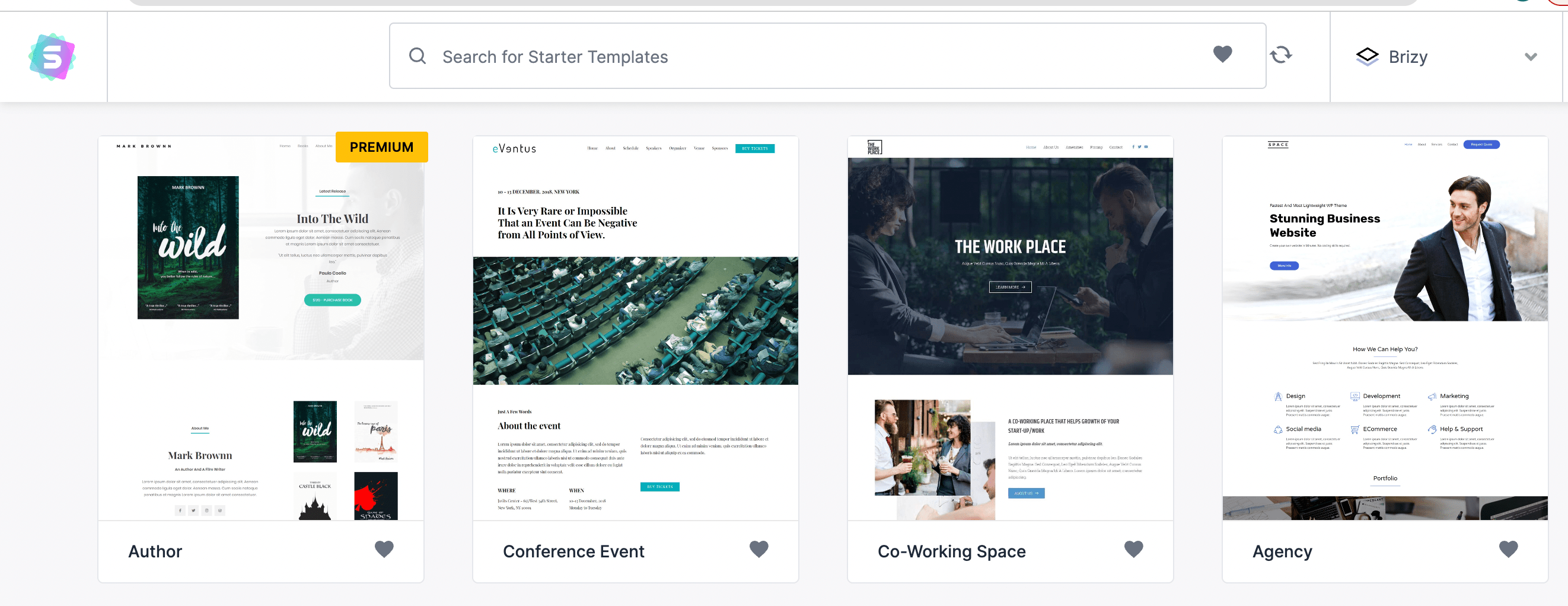
3. Then I imported the Astra PRO theme which I wanted to edit with Brizy page builder (I understood you point about inability to edit with both Astra and Brizy editing features so i want to edit with Brizy only); So once I opened Brizy PRO builder to start editing this theme, I was able to edit such basics as color, text, font etc; However, when it comes to editing navbar layout or logo within navbar, for instance, I was not able to do so (as you can see, logo is not even displayed); I just click on the navbar and nothing happens, no editing options for it.
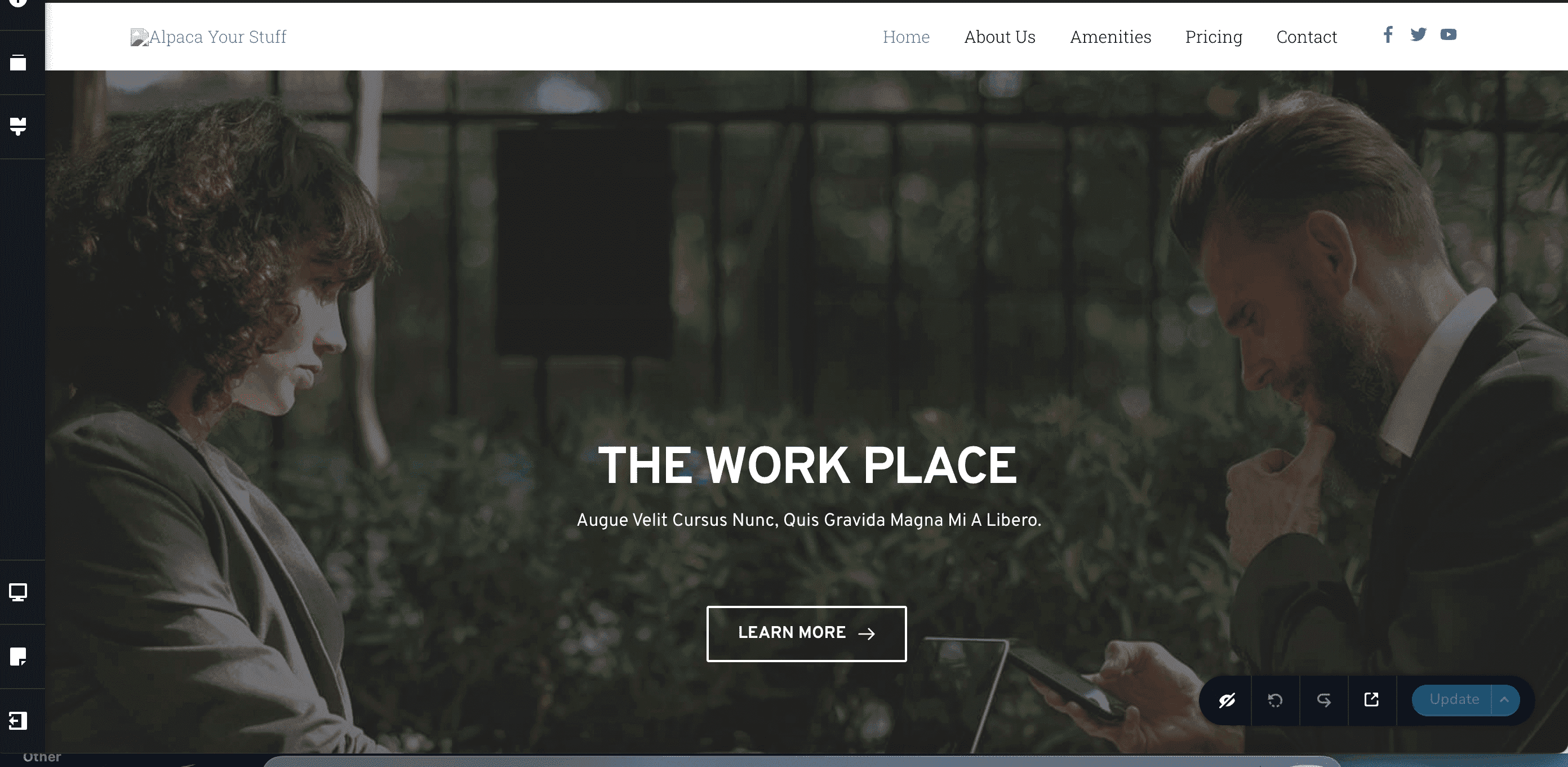
Please, let me know if you know the solution to this, thank you in advance!
0 -
Hi Eliza,
Thank you for keeping in touch.
Astra Starter Templates use the Default Page Template. This means the website header and footer are developed using Astra header footer builder (and not using Brizy).
You can edit the header/footer in the Customizer - https://prnt.sc/dFgFKMrNIeMxIf you want a fully customized header / footer made with Brizy Builder, then you need to change the default Astra Template to the Brizy Template as demonstrated on this screencast: https://youtu.be/tO3hwniwFjs
For more information about Header and Footers in Brizy, please refer to this link - https://youtu.be/Fdd4MlvuxC4
If you have any further questions, please let us know.
Best regards,
Ariel H.0 -
Hello Ariel,
Thank you for your reply! I have several questions regarding your response above;
1. Can i actually customize my header/footer using Astra and still use Brizy page builder? Will my website be working properly? You mentioned smth before about "each page builder creating its own custom code and structure, which can lead to conflicts and errors when used together". then, for example, can i still use Astra customizer to change header/footer, menu, global colors and other general settings and then edit each page separately with Brizy page builder?
2. Different scenario: If I choose a fully customized header / footer made with Brizy Builder and change the default Astra Template to the Brizy Template as you mentioned above then does it mean then by doing so I change my Astra theme to Brizy or my Astra theme is still there despite removing this default template?
3. When I user Astra Starter template with Brizy page builder, can i still access Brizy template blocks for specific web sections e.g. hero section templates etc.?
Thank you for your help!
0 -
Hi Eliza,
Thank you for the update.
1. You can modify your header and footer using Astra and still could use Brizy to build your pages. Astra theme will manage the headers and footers, including the menus, colors, etc. and then edit each page separately with Brizy page builder.
2. The Brizy Page Builder is not intended to replace your theme, but rather enhance it by allowing you to change your theme's default header and footer.
You can only customize the headers and footers if you switch to the Brizy Template, which will remove the default Astra header and footer, so you can build your own custom headers and footer with Brizy.3. You should be able to access Brizy template blocks to complement the Astra Starter Template you currently use.
I hope this helps.
Best regards,
Ariel H.0 -

Hello,
Very Informative Conversation and I want to add one more question to it. As mentionied above that Brizy Page Builder can work with the default theme header and footer.
Is it possible that we keep the header and footer of the brizy page builder across the whole site and use the Astra Theme Editor to edit the page?
If it,s not possible then my suggestion is to make only the header and footer compatible with the wordpress themes because it looks very awkward that half site uses a brizy header and footers and half uses the default theme template header and footer then it breaks the pattern of the site rather than enhancing the capabilities.
Brizy Header and Footer are much more beautiful than default theme headers and footers but the Brizy Headers and Footers bound the user to use the brizy and they can not shift to the default editor because as per my knowledge brizy headers and footers don't allow any other theme editor to work under brizy headers and footers.
Please implement this feature and people will jump to Brizy Pro due to the freedom and compatibility fo brizy headers and footers with default theme editors.
Best Regards
Zahid Naqvi
CEO PkReg.com
0 -
Hi Zahid,
Thank you for contacting us.
We regret to inform you that, currently, it is not possible to replace your theme's header and footer with the Brizy header and footer and use the Astra Theme Editor to edit the pages.
We recommend sharing your request on our website at https://www.brizy.io/ideas-and-roadmap, where other users can vote and show their support for this feature. This will help generate more awareness and possibly increase the chances of adding needed functionality in the future.
Best regards,
Ariel H.0
Please sign in to leave a comment.
Comments
10 comments