Difficulty with WP Brizy Pro creating a thin site navigation header above nav bar/header

I spent over an hour and a half, plus watching hours of youtube training videos, trying to create a simple site navigator above the existing header/nav bar...It should look something like this:
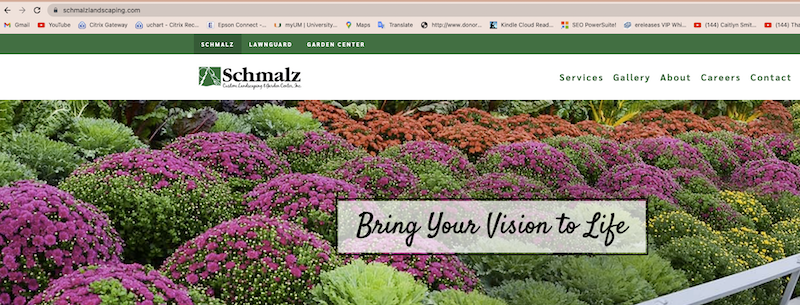
I tried various blocks including custom, but never could get the padding/container padding and other "Advanced" settings to allow a thin band like the above. I created a draft of a bar that kind of worked, but the tablet and mobile views were AWEFUL. (See below) Can you assist or point me to the training that will allow me to do this simple thing? I know how to make it global after I create it, but I just can't get it to be narrow and the text positioned where I want it.
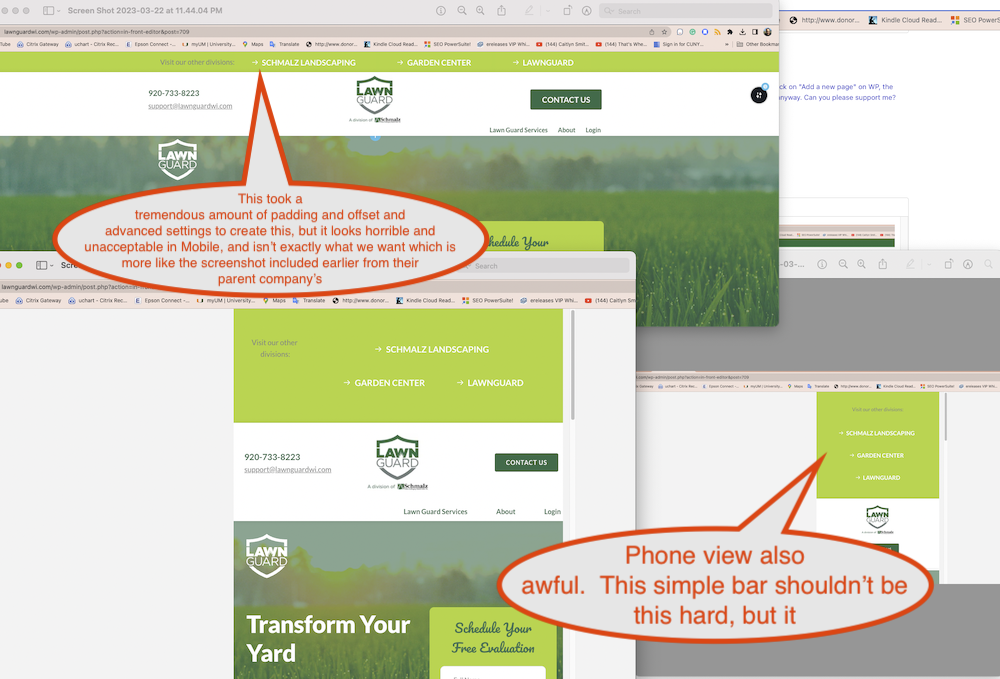
HELLLLLP!
I can send the credentials...It's the homepage post that is a draft that I was working on...Feel free to clone the home page again if you need to show me.
-

Hi Barry,
Thank you for reaching out to us.
Please add us as a user to your WordPress Dashboard and send the following details to: communitysupport@brizy.io
Community Post link: https://support.brizy.io/hc/en-us/community/posts/13961605096081
WordPress Admin URL:
Username
PasswordPlease make a full backup of your website as a precaution.
I am looking forward to your response.
Best regards,
Ariel H.0 -
Hi Barry,
Thank you for your cooperation.
Unfortunately, the credentials you provided are not working - https://prnt.sc/j8c1GIBRn8lG
Could you please update the user account, so we can inspect your website?
Best regards,
Ariel H.0 -
Oh Geeze...I see now that the new user didn't save. I recreated it with the same name and credentials and tested it myself.
We lost an entire day between support chats...I hope you an attend to this immediately before the weekend.
Thank you,
Barry
0 -
I guess you didn’t get to this yet, so we lost ge weekend. Credentials were fixed Friday a.m.
0 -

Hi Barry,
While the user brizysupport is created, the password you had sent us does not work. I attempted to reset the password; but did not get a password reset link at communitysupport@brizy.io.
Please send the latest password by email again or ensure that the email address for the user brizysupport is communitysupport@brizy.io so that we can reset the password ourselves.
0
Please sign in to leave a comment.
Comments
5 comments