WooCommerce single product page: How to render product by theme, not Brizy

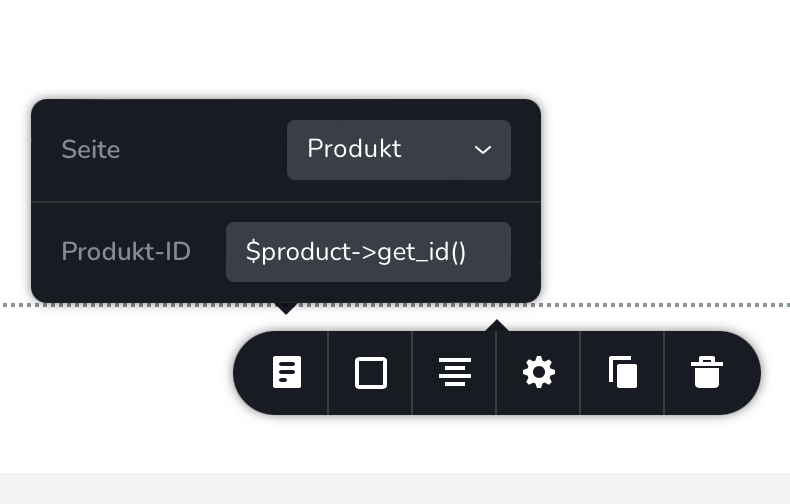
I created a Brizy template for WooCommerce single product pages. I want the product content to be rendered by the Astra Theme, not Brizy. Therefor I use the "pages" element and select "product". There is a field which requires the product id. If I put in an id like "13" it works. But I don't want to create templates for each single product. I want the template to show always the current product. I tried "$product->get_id()", but this returns always the same product. How can I specify the current product id in this field?
-

Hi Ulrich,
The product option in the Pages element is not suitable for displaying the product details in the single product page. Only when you want to highlight a certain product on the homepage or other pages this option is useful.
Have you considered the possibility of removing the Brizy template for the single product so that the Astra single product template is displayed instead? To ensure that all pages have a same appearance in this case, you will need to recreate the Astra header in Brizy or vice versa.
0 -
The product option in the Pages element is not suitable for displaying the product details in the single product page.
Why not? It works very well. This way I have the header and footer generated by Brizy and the product details generated by Astra on one page. Is looks great and I can use hundreds of WordPress Plugins which add elements to the product page, like color pickers, calendars, variations and so on.
Instead of using the page element from Brizy I also can use this shortcode:
[product_page id="99"]
I am even able to change the "99" to the current product id by using a filter hook. However, this shortcode only works on a standard WordPress page, not on the Brizy product template for reasons I don't understand yet.
You suggest to recreate the header in the Astra theme. This does not work very well, because I can not get the exact same look. The Brizy tiny cart element is very different from the Astra element, for example.
So again: My goal is to have a product template, which uses the Brizy header and footer and the single product details generated by the Theme. How can I achieve this?
Uli
0 -
Hi Ulrich,
The product option within the Pages element and the WooCommerce shortcode [product_page id="99"] are meant to be used on regular pages to display specific product details. This is not intended to be used on a single product template.
If the purpose is to use WooCommerce plugins like Variation Swatches for WooCommerce to display product variations, some of these plugins should work with Brizy Product template. Most of the WooCommerce Extensions may work with Brizy Product Template as well.
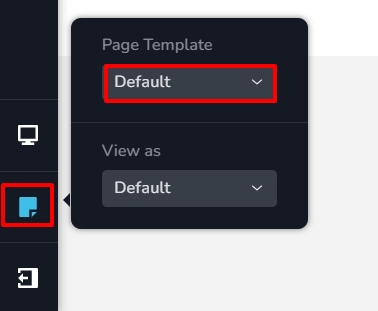
You have mentioned that you cannot get the exact same look for the Brizy and the Astra headers because . the Brizy cart element is different from the Astra element. To overcome this issue, please also consider setting up your entire website with Astra header and footer and not use Brizy header and footer. You can use the Default Page Template for this. Here is an example of a WooCommerce website developed using Default Page Template in Brizy https://echophotoph.com/
 0
0 -
To overcome this issue, please also consider setting up your entire website with Astra header and footer and not use Brizy header and footer.
This is a very good hint indeed, I haven't considered that. Thank you very much, I will try this.
Uli
0
Please sign in to leave a comment.
Comments
4 comments