Problem with external links

Hello, I bought a lifetime agency plan with brizy but I stopped using it because I lost all my hype when I realized the builder is bugged. In fact, it is not possible adding links to buttons because the result of clicking the button will be an error page.
After some months I tried to use brizy again but the problem is still there. This problem will never get solution?
Why this happens?
I use wordrpess
-

Hi Nicodemo,
We are sorry to hear about the inconvenience you have with using the Brizy builder. Normally external hyperlinks work fine with Brizy. For example, please try clicking on the buttons on this page. https://brizytest.online/links You will notice that hyperlinks work fine.
Can you please share with us a URL where you are facing issues with hyperlinks?
0 -
Hello George, thank you for your fast reply.
I want to link from wordpress to a third party funnel builder.
This is the wordpress website I'm making with brizy 👇🏻
https://corsocucinavegetariana.it/
the link where I want to redirect is this 👇🏻
https://www.corsocucinavegetariana.it/iscrizione-corso
Note that if you click the green button on the wordpress website, you will get redirected to
https://corsocucinavegetariana.it/iscrizione-corso
Up here the WWW is missing, and I think somwhow this can be the problem. There is no way to put those 3 ws in the brizy builder button.
How can I do?
Thank you again for your reply, I hope you can help me.
Nicodemo
0 -
Hi Nicodemo,
You can add www to a link in Brizy. For example, I have added the hyperlink https://www.corsocucinavegetariana.it/iscrizione-corso to the button on this page https://brizytest.online/links/
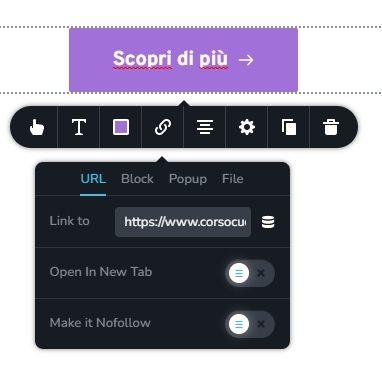
You have mentioned that "There is no way to put those www in the Brizy Builder button". When you try to add www to a URL in the Brizy link tool, what happens? Do you face any issue?
0 -
It's too strange. The button works in your example, but when i COPY and PASTE links inside buttons in brizy, I get that error.
I also tried writing the link manually and same thing happens. You can see it yourself in my home page, that link won't work. The destination link keeps being https://corsocucinavegetariana.it/iscrizione-corso
I can't understand really. Any ideas?
0 -
Hi Nicodemo,
Are you using Safari version 15.6.1 to edit the Brizy page? This specific version of Safari browser has some compatibility issue with Brizy. Can you try a different browser and check if you are able to edit the Brizy button? For example, you could try Google Chrome.
Safari 16.3 seems to work fine with Brizy. You could also try upgrading to this version.
0 -
Hello, I'm on windows.
I tried modifying the button with Google Chrome, Firefox and Edge, but nothing changes. I really have no idea what to do. I'm totally lost
0 -
Hi Nicodemo,
Can I have a look at your project to help you with this? Please add me as a user to your WordPress Dashboard if you need assistance with this. Please send the following details to my email: kc.george@brizy.io.
- Community Post link: https://support.brizy.io/hc/en-us/community/posts/13907391999633/
- WordPress Admin URL:
- Username
- Password
Please let me know here when you send me an invitation.
0 -
Thank you very much. I just sent the invitation to your email.
Hope to solve this soon
0 -
Hi Nicodemo,
I received your invitation. I could access your WordPress Dashboard for a while and now I lost access.
I also did not have access to the Appearance Menu and the Plugins menu in the WordPress Dashboard. To troubleshoot the issue, I would like access to these two areas of your WordPress Dashboard.
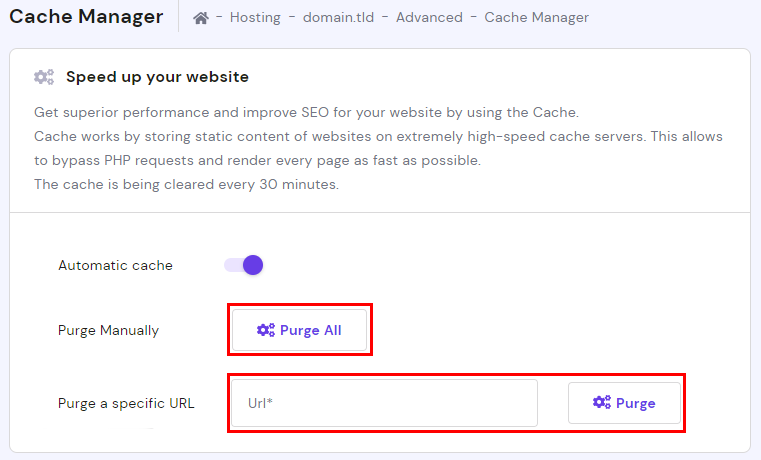
Can you also try this before restoring my access? Please login to your Hostinger account and click on 'Purge All' under Cache Manager. You can read more about the Cache Manager here https://support.hostinger.com/en/articles/6215624-how-to-use-cache-manager
 0
0 -
Hello, I purged chache on the website.
I will give you access back. Do you need editor rights or administrator rights?
Thank you
0 -
Hi Nicodemo,
Administrator rights would be useful to troubleshoot this issue.
0 -
Hello George,
I sent you another email with login details. This time I've chosen administrator rights.
Thank you again. Waiting for news
0 -
Hi Nicodemo,
Google.com and www.Google.com normally refers to the same website. Both www and non-www domains typically lead to the same website. However in your case, while corsocucinavegetariana.it is hosted with Hostinger, the same domain with www is hosted with the Funnel builder.
Brizy removes the www from the URL in preview if you hyperlink to a URL with the same domain as the website. When you add the hyperlink www.corsocucinavegetariana.it, because it uses the same domain as the website, Brizy removes the www. This happens only in preview while in the editor, you can see www. You are unable to link to the Funnel Builder page because of this reason.
To fix this issue, here are few possible work arounds.
- Change the Funnel Builder URL from www.corsocucinavegetariana.it to funnel.corsocucinavegetariana.it, dev.corsocucinavegetariana.it, page.corsocucinavegetariana.it or any other sub domain other than www. and you will be able to hyperlink link it without any problem. (The problem is only with www)
- Change the Funnel Builder domain to something other than www.corsocucinavegetariana.it. For example, if you change the funnel builder domain name to corsocucinaveg.it you can hyperlink to this domain.
- Change the domain name of your current website to something other than corsocucinavegetariana.it. If you change to your website domain to something like corsocucinaveg.it, you can hyperlink to the Funnel Builder page
0 -
Thank you for your assistance George. I will think about it, but for now I guess I'll use another page builder. I have Facebook ads running on that domain, I can't change it.
I'll figure out what to do. Thank you again for all the time you put in this investigation. It's deeply appreciated
Best regards George
0
Please sign in to leave a comment.
Comments
14 comments