Image Management - Siteground Hosting - Plugin

Hello,
I am contacting you for instructions on how to manage images with Brizy since this article of yours is old
and on my Hosting Siteground has implemented the management of images with its Plugin
I remember that Brizy creates his own folder to manage and crop the images but how are they optimized?
A few years ago when I bought Brizy, ShortPixel was directly integrated with Brizy via API.
Instead now, ShortPixel plugin must be installed separately so I ask you:
Shortpixel optimizes images that are in the standard path in wp-content/uploads/2023/03
Or also the images that are in this path?
wp-content/uploads/brizy/imgs
I ask you this, because after installing the ShortPixel plugin
The Siteground Plugin message appears:
======================================
Important message from SiteGround Optimizer plugin: We have detected that there is duplicate functionality with other plugins installed on your site: ShortPixel Image Optimizer and disabled the following features of our plugin: Images Optimization. If you want to enable them, proceed from the SiteGround Optimizer configuration page.
======================================
In the plugin settings of Siteground=> Media=> I have the option to
-Image compression currently set to Low (25%)
- Use WebP images is currently disabled but I intend to enable it
======================================
So I would like to ask this:
since before ShortPixel API was included in the Brizy settings and instead now I have to install the ShortPixel plugin which duplicates the functions that my Hosting plugin has,
Can I use SiteGround Optimizer?
Will Brizy work the same or not?
I am waiting for your instructions
Thank you
MariaVittoria
-

Hi Maria,
You have mentioned this message.
Important message from SiteGround Optimizer plugin: We have detected that there is duplicate functionality with other plugins installed on your site: ShortPixel Image Optimizer and disabled the following features of our plugin: Images Optimization. If you want to enable them, proceed from the SiteGround Optimizer configuration page.
This message implies that you must either choose Shortpixel or SG Optimizer to optimize your images. If you go with Shortpixel, you must disable image optimization option within the SG Optimizer and if you choose this option within SG Optimizer, then you must deactivate Shortpixel.
When uploading images using Brizy, you have broadly two options
1. Let Brizy handle image optimizations
If you select the Custom option for your images, Brizy will optimize your images and the images will be saved in the wp-content/uploads/brizy/imgs folder. In your project, if you have selected this option for your images, Brizy will take care of your Image Optimization and you don't need Shortpixel or SG Optimizer to optimize your images.
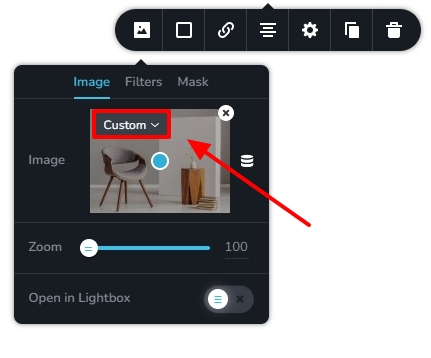
2. Let an Image Optimization plugin handle it
If you would like to use a plugin to optimize your images, you must select the 'Original' or any option other than 'Custom' here. The image will be saved in the regular WordPress medial folder wp-content/uploads/ In your project, if you have selected the 'Original' or any option other than Custom, you can use either Shortpixel or SG Optimizer to optimize your images.
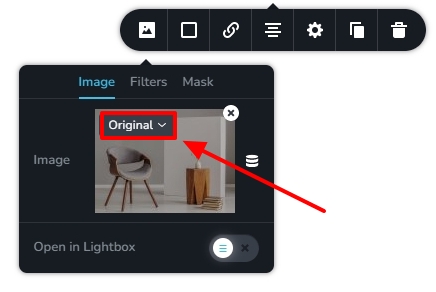
Please let us know if you have more questions.
0 -
Hi Giorgio
thanks a lot for the info
Now I understand that when I set to "Original" I can use Shortpixel plugin or SG Optimizer to optimize the images.
While if I set it to "Custom" Brizy manages the optimization of the images.
However after doing some tests I always have a doubt.
When I create a page with Brizy and add an image, the image is loaded via the Wordpress library.
Just as I upload the image to the library, whether I set it to "Original" or "Custom", Brizy creates a copy of the image in its wp-content/uploads/brizy/imgs directory.This creates copies of the images in the wp-content/uploads/brizy/imgs folder that I won't use because I'll choose to use "Original".
1. So I wonder since wordpress by default already creates three versions of my image, what's the point of having copies that I won't use?
2. If I delete the page where I uploaded my image, the folders that are always in this directory
wp-content/uploads/brizy/
and are recognizable by the number that wordpress by default assigns to a page or a post, they are not deleted but remain on the server.Therefore if I want better space management on my hosting,
Every time I delete an image from the library that I used in a page with Brizi editor, or I delete a page I created with Brizy, I have to manually remember to go and delete the images and folders via FTP or directly from my control panel who created Brizy.There should be a function that when I delete an image or page it automatically deletes everything Brizy created for that page.
I hope I was clear
Thanks0 -
Hi Maria.
You are right; some additional images are created when switching between the Custom and the Original options. If you use the 'Original' option in the Brizy image element, you will have some unused images in the /wp-content/uploads/brizy/ folder.
However the /wp-content/uploads/ folder including the /wp-content/uploads/brizy/ folder may occupy only 5-20% of the total WordPress installation size. For example, please have a look at this screenshot from my test website. While the total installation size of my website is 202 MB, /wp-content/uploads/ folder is only 12MB which is around 6% of the total size.
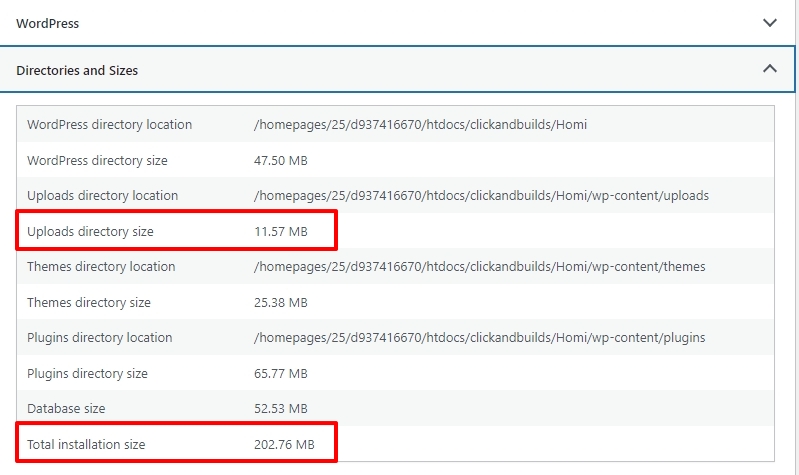
Let's say by deleting unused images, you can bring down the /wp-content/uploads/ folder size by 4MB, in my example, it will help me save 2% of the total disk space.
If you have signed up with a hosting plan which gives you 1GB space, deleting unused images may not give you significant reduction in disk space usage
0 -
Thanks a lot for the info.
However I remain of my opinion
If I create a page with Brizy, and then permanently delete it, all that Brizy editor created, Folders and images must be deleted automatically and not manually.
Thank you for your time and assistance.
0
Please sign in to leave a comment.
Comments
4 comments