Some elements won't show in the LIVE, only in the builder

This is the first time this ever happens:
I added animation to some elements and I can see them in the builder but they won't display LIVE, same thing with sliders, please help!
7crosses.com/test
-

Hi Luis,
Can you please try this and see if it makes a difference? In your WordPress Dashboard under SG Optimizer - Frontend, please disable the option "Minify JavaScript Files" as in this screenshot https://jmp.sh/zCgTD3jw
If this does not help, please get back to us.
0 -
Thanks for the response, I tried it and still didn't work, other ideas?
0 -
Hi Luis,
Due to a code conflict with a software in your WordPress environment, a Brizy JavaScript file returns a Syntax error. This could be the reason why the animations are not working. https://jmp.sh/SXpfdNJg
To see the error, visit https://7crosses.com/test/ using Google Chrome browser, right click using the mouse and select "Inspect'
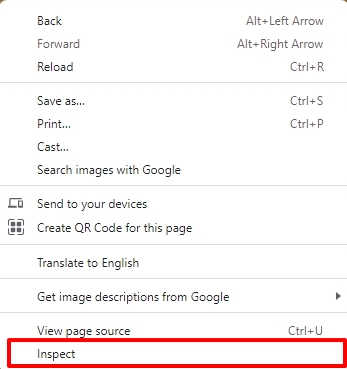
On the right pane, at the top, select the 'Console' tab and you will see the error.
To identify the conflicting software, please consider this. Please deactivate one plugin at a time and check if this error disappears. Once the error disappears, please check if the animations on your page work well.
0
Please sign in to leave a comment.
Comments
3 comments